Module 02: Identity and Access Management (IAM) and Security
Learning Objectives
By the end of this module, you will be able to:
- Define authentication and authorization, and explain how AWS Identity and Access Management (IAM) handles both
- Identify the core IAM identities: users, user groups, and roles
- Distinguish between AWS managed policies, customer managed policies, and inline policies
- Describe the structure of an IAM JSON policy document, including the Effect, Action, Resource, and Condition elements
- Explain when and why to use IAM roles instead of long-term credentials, including service roles and cross-account roles
- Summarize the purpose of AWS Organizations and Service Control Policies (SCPs) for multi-account governance
- List IAM security best practices, including Multi-Factor Authentication (MFA), password policies, access key management, and the principle of least privilege
Prerequisites
- Completion of Module 01: Cloud Fundamentals
- An AWS account with console access (free tier is sufficient)
Concepts
IAM Overview: Authentication vs. Authorization
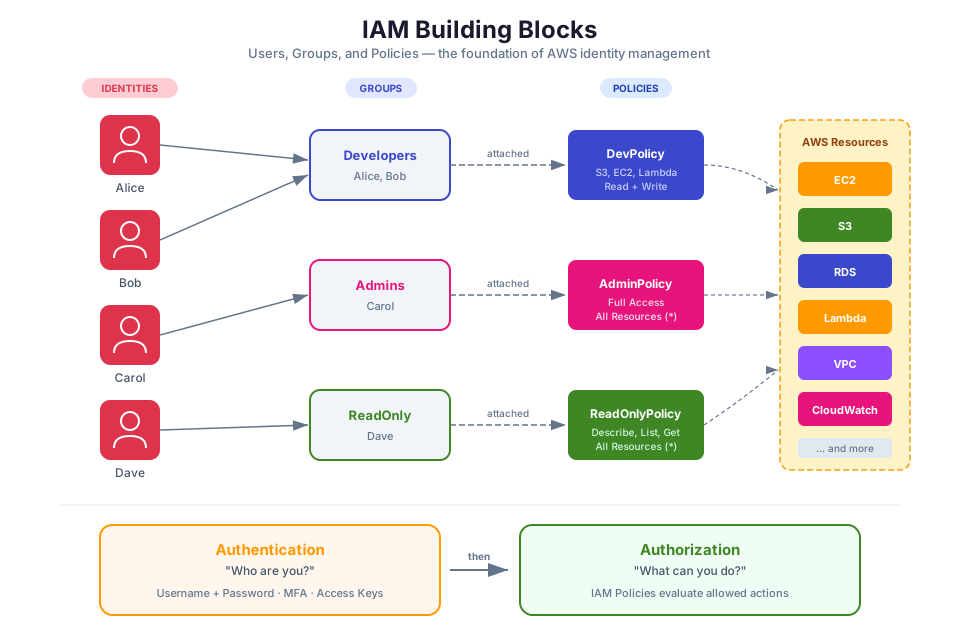
AWS Identity and Access Management (IAM) is the service you use to control who can sign in to your AWS account and what actions they can perform once authenticated. IAM answers two fundamental security questions:
-
Authentication: Who are you? Authentication is the process of verifying identity. When you sign in to the AWS Management Console with a username and password, or when an application presents an access key to the AWS API, IAM authenticates the request by confirming the credentials are valid.
-
Authorization: What are you allowed to do? After IAM confirms your identity, it evaluates the policies attached to your identity to determine which actions you can perform on which resources. If no policy explicitly allows an action, IAM denies it by default.
This distinction matters because a user can be authenticated (successfully signed in) but not authorized to perform a specific action. For example, a developer might sign in to the console but lack permission to delete a production database.
In Module 01, you learned about the Shared Responsibility Model. IAM is the primary tool for fulfilling your side of that model. AWS secures the cloud infrastructure; you use IAM to secure access to your resources within the cloud.
Tip: Think of authentication as showing your ID at the door, and authorization as the list of rooms you are allowed to enter once inside.
IAM Users, User Groups, and Policies
IAM provides three identity types for organizing access: users, user groups, and roles (covered in the next section). Each identity can have policies attached that define its permissions.
IAM Users
An IAM user is an identity that represents a person or application that interacts with AWS. Each user has a unique name within the AWS account and can have two types of credentials:
- Console password: Used to sign in to the AWS Management Console.
- Access keys: A pair of values (access key ID and secret access key) used for programmatic access through the AWS CLI, SDKs, or API calls.
When you first create an AWS account, you start with a single identity called the root user. The root user has unrestricted access to every resource in the account. Because of this, you should never use the root user for daily tasks. Instead, create individual IAM users for each person who needs access.
IAM User Groups
An IAM user group is a collection of IAM users. Groups simplify permissions management by letting you attach policies to the group rather than to each user individually. When you add a user to a group, that user automatically inherits all the permissions assigned to the group.
For example, you might create a "Developers" group with permissions to access Amazon EC2 and Amazon S3, and a "DatabaseAdmins" group with permissions to manage Amazon RDS. When a new developer joins the team, you add them to the Developers group instead of attaching individual policies.
Key characteristics of user groups:
- A user can belong to multiple groups.
- Groups cannot be nested (a group cannot contain another group).
- Groups are not identities that can be referenced in a policy's Principal element. They exist only as a way to attach policies to multiple users at once.
Managed Policies vs. Inline Policies
A policy is a JSON document that defines permissions. IAM supports two categories of identity-based policies: managed policies and inline policies.
Managed policies are standalone policy objects that you can attach to multiple users, groups, or roles. There are two types:
- AWS managed policies: Created and maintained by AWS. These cover common use cases (for example,
AmazonS3ReadOnlyAccessgrants read-only access to all S3 buckets). AWS updates these policies when new services or API actions are released. - Customer managed policies: Created and maintained by you. These give you precise control over permissions tailored to your organization's needs. You can version customer managed policies and roll back to a previous version if needed.
Inline policies are embedded directly in a single user, group, or role. An inline policy has a strict one-to-one relationship with the identity it is attached to. When you delete the identity, the inline policy is also deleted.
| Feature | AWS Managed Policy | Customer Managed Policy | Inline Policy |
|---|---|---|---|
| Created by | AWS | You | You |
| Reusable across identities | Yes | Yes | No (one identity only) |
| Versioning | Managed by AWS | Up to 5 versions | No versioning |
| Automatic updates | Yes (AWS updates) | No (you update) | No |
| Use case | Common permissions | Organization-specific | Strict 1:1 binding |
Tip: AWS recommends starting with AWS managed policies and then creating customer managed policies as your needs become more specific. Use inline policies only when you need to ensure a policy is never accidentally attached to the wrong identity.
IAM Roles: When and Why to Use Them
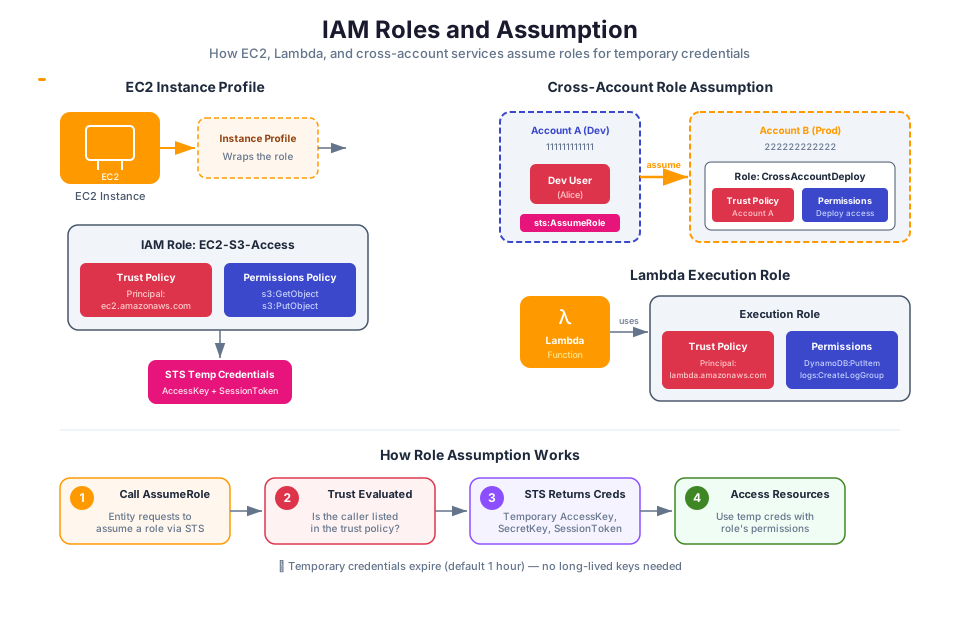
An IAM role is an identity with specific permissions that does not carry permanent credentials (no password, no access keys). When an entity assumes a role, AWS Security Token Service (STS) issues temporary security credentials that expire after a configurable duration.
Roles solve a critical security problem: they eliminate long-lived secrets. Instead of embedding access keys in an application or sharing credentials between accounts, you grant short-lived access through role assumption.
Service Roles
A service role allows an AWS service to act on your behalf. For example, if an Amazon EC2 instance needs to read objects from an Amazon S3 bucket, you create a role with S3 read permissions and attach it to the instance as an instance profile. The instance then receives temporary credentials automatically, with no access keys stored on disk.
Common service role scenarios:
- An EC2 instance that reads from S3 or writes to DynamoDB
- A Lambda function that accesses other AWS services
- An Elastic Container Service (ECS) task that pulls images from Amazon Elastic Container Registry (ECR)
Cross-Account Roles
A cross-account role allows an identity in one AWS account to access resources in another account. You create a role in the target account with a trust policy that specifies which external account (or specific users/roles in that account) can assume the role. The entity in the source account then calls sts:AssumeRole to obtain temporary credentials for the target account.
This pattern is common in organizations that use multiple AWS accounts (for example, separate accounts for development, staging, and production).
| Identity Type | Has Permanent Credentials | Use Case |
|---|---|---|
| IAM user | Yes (password, access keys) | Individual person or legacy application |
| IAM role | No (temporary credentials only) | AWS services, cross-account access, federated users |
Warning: Avoid embedding access keys in application code or configuration files. Use IAM roles to provide temporary credentials to AWS services and applica
 tions.
IAM Policy Structure: The JSON Policy Document
Every IAM policy is a JSON document that follows a specific structure. Understanding this structure is essential for writing and reading policies.
A policy document contains one or more statements. Each statement grants or denies permissions for specific actions on specific resources, optionally under specific conditions.
Here is an example policy that allows reading objects from a specific S3 bucket:
{
    "Version": "2012-10-17",
    "Statement": [
        {
            "Effect": "Allow",
            "Action": [
                "s3:GetObject",
                "s3:ListBucket"
            ],
            "Resource": [
                "arn:aws:s3:::my-example-bucket",
                "arn:aws:s3:::my-example-bucket/*"
            ],
            "Condition": {
                "IpAddress": {
                    "aws:SourceIp": "203.0.113.0/24"
                }
            }
        }
    ]
}
Policy Elements
Each statement in a policy document uses these key elements:
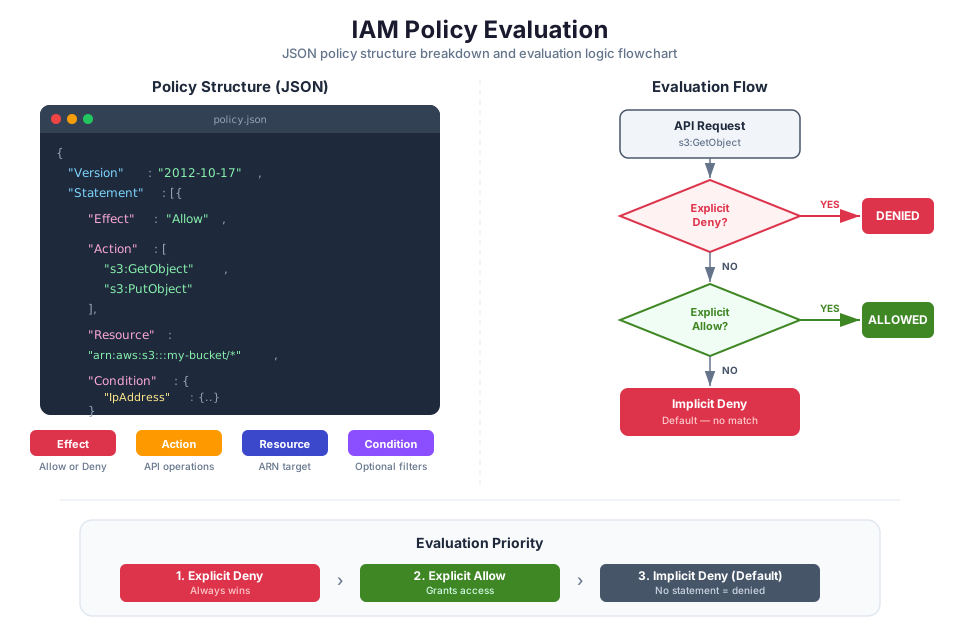
Effect: Specifies whether the statement allows or denies access. The only valid values are "Allow" and "Deny". If a request matches a statement with "Deny", the request is denied regardless of any other statements that might allow it. This is called an explicit deny, and it always takes precedence.
Action: Specifies the AWS service actions the statement applies to. Actions follow the format service:ActionName (for example, s3:GetObject, ec2:RunInstances). You can use wildcards: s3:* matches all S3 actions, and * matches all actions across all services.
Resource: Specifies the AWS resources the statement applies to, using Amazon Resource Names (ARNs). An ARN uniquely identifies an AWS resource. For example, arn:aws:s3:::my-bucket identifies a specific S3 bucket. Use "*" to match all resources (use with caution).
Condition: An optional element that specifies circumstances under which the statement is in effect. Conditions test values in the request context, such as the source IP address, the current time, or whether MFA was used. Conditions use operators such as StringEquals, IpAddress, DateGreaterThan, and Bool.
How Policy Evaluation Works
When a principal makes a request, IAM follows a policy evaluation logic to determine whether to allow or deny the request:
- By default, all requests are denied (implicit deny).
- An explicit allow in a policy overrides the implicit deny.
- An explicit deny in any policy always overrides any allow.
This means that if you have one policy that allows s3:GetObject and another that denies s3:*, the deny wins. The order in which policies are evaluated does not matter; the result is the same.
Tip: When troubleshooting access issues, check for explicit deny statements first. A single deny anywhere in the policy chain will block access, even if other policies allow it.
AWS Organizations and Service Control Policies
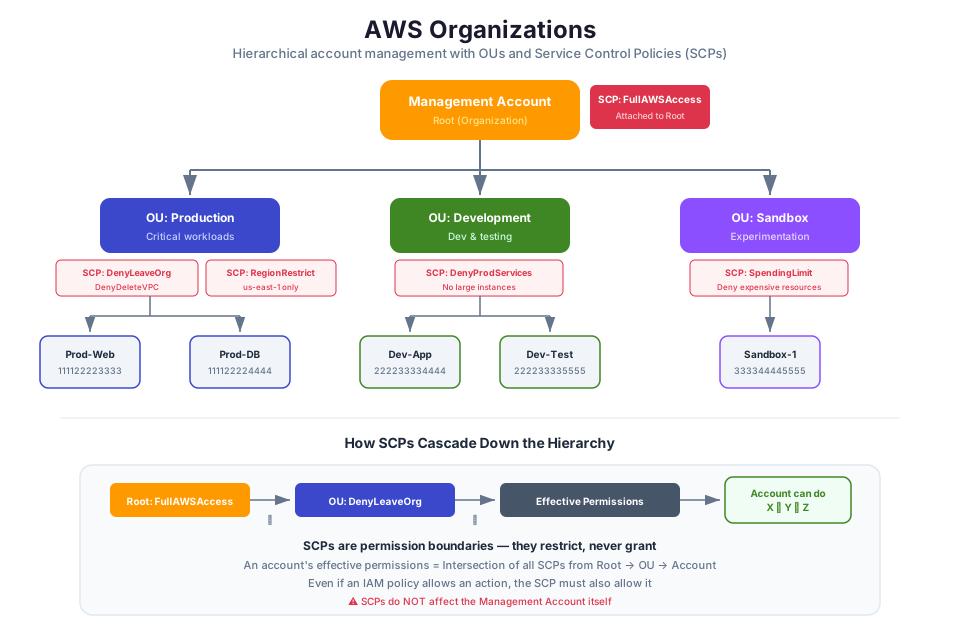
As your cloud usage grows, you may need multiple AWS accounts to separate workloads, teams, or environments. AWS Organizations lets you centrally manage and govern multiple AWS accounts from a single place. Think of it as the control plane for your entire cloud estate.
Key Concepts
- Organization: A collection of AWS accounts that you manage together. One account is the management account (formerly called the master account), and the rest are member accounts.
- Organizational Unit (OU): A logical grouping of accounts within an organization. You can nest OUs to create a hierarchy (for example, a "Production" OU and a "Development" OU under a "Workloads" OU).
- Service Control Policy (SCP): A policy that defines the maximum permissions available to accounts in an organization or OU.
Service Control Policies (SCPs)
Service Control Policies act as guardrails for your organization. An SCP does not grant permissions; it sets the ceiling on what permissions are possible. Even if an IAM policy in a member account explicitly allows an action, the action is blocked if the SCP does not also permit it.
For example, you might attach an SCP to your "Production" OU that prevents anyone from deleting Amazon S3 buckets or disabling AWS CloudTrail logging, regardless of their IAM permissions within the account.
SCPs follow the same JSON policy syntax as IAM policies:
{
    "Version": "2012-10-17",
    "Statement": [
        {
            "Effect": "Deny",
            "Action": [
                "s3:DeleteBucket",
                "cloudtrail:StopLogging"
            ],
            "Resource": "*"
        }
    ]
}
Key points about SCPs:
- SCPs affect all users and roles in member accounts, including the account's root user.
- SCPs do not affect the management account.
- SCPs do not grant permissions. They only restrict what is allowed by IAM policies.
- SCPs and IAM policies work together: an action must be allowed by both the SCP and the IAM policy for the request to succeed.
Tip: Think of SCPs as a fence around a property. IAM policies determine which doors inside the building you can open, but the SCP fence determines which buildings you can enter in the first place.
IAM Security Best Practices
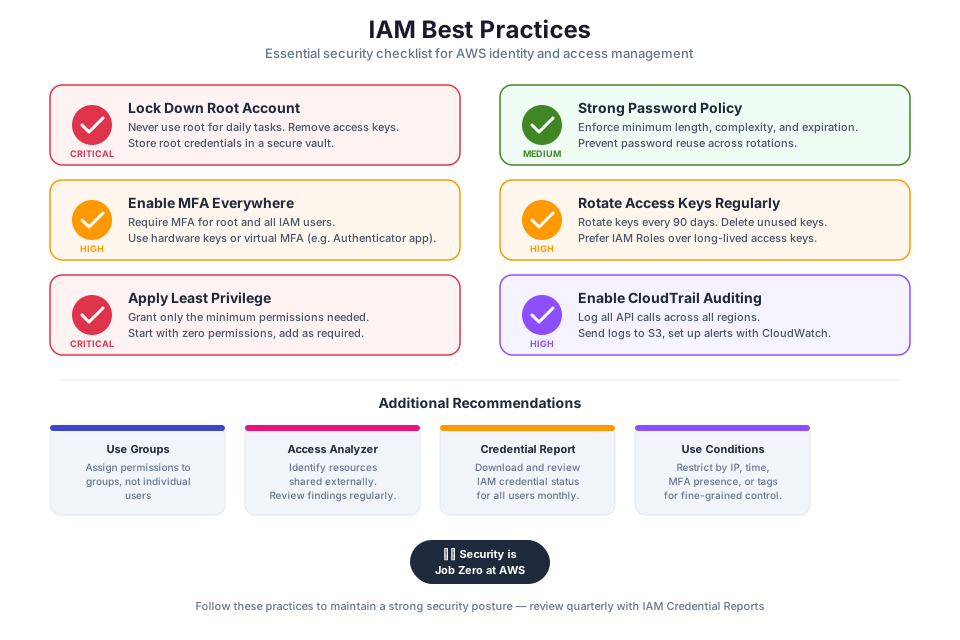
AWS publishes a comprehensive list of security best practices in IAM. The following practices are the most critical for securing your AWS environment.
Protect the Root User
The root user has unrestricted access to everything in your AWS account. Follow these rules:
- Enable MFA on the root user immediately after creating the account.
- Do not create access keys for the root user.
- Do not use the root user for daily tasks. Create IAM users or use IAM Identity Center instead.
- Use the root user only for tasks that specifically require it (for example, changing the account's support plan or closing the account).
Enable Multi-Factor Authentication (MFA)
Multi-Factor Authentication (MFA) adds a second verification step beyond a password. With MFA enabled, a user must present both their password and a time-based code from a registered device before gaining access.
AWS supports several MFA device types:
- Passkeys and security keys: Phishing-resistant FIDO2 devices (for example, YubiKey).
- Virtual MFA applications: Software-based authenticators such as Google Authenticator or Authy that generate time-based one-time passwords (TOTP).
- Hardware TOTP tokens: Physical devices that generate one-time passwords.
Warning: Always enable MFA on the root user and on all IAM users who have console access. A compromised password without MFA can give an attacker full access to your account.
Configure Password Policies
An account password policy defines requirements for IAM user passwords. You can enforce:
- Minimum password length
- Required character types (uppercase, lowercase, numbers, symbols)
- Password expiration period
- Prevention of password reuse
- Whether users can change their own passwords
Manage Access Keys Securely
Access keys are long-term credentials used for programmatic access. They pose a security risk if exposed or mismanaged. Follow these guidelines:
- Prefer IAM roles over access keys whenever possible. Roles provide temporary credentials that expire automatically.
- Never embed access keys in application source code or commit them to version control.
- Rotate access keys regularly.
- Remove access keys that are no longer in use.
- Use AWS CloudTrail to monitor access key usage.
You can check the age of your access keys using the AWS CLI:
aws iam list-access-keys --user-name your-username
Expected output:
{
    "AccessKeyMetadata": [
        {
            "UserName": "your-username",
            "AccessKeyId": "AKIAEXAMPLE123456",
            "Status": "Active",
            "CreateDate": "2024-01-15T10:30:00+00:00"
        }
    ]
}
Apply the Principle of Least Privilege
Least privilege means granting only the minimum permissions required to perform a task. Start with zero permissions and add only what is needed. This limits the potential damage from compromised credentials or accidental misuse.
Practical steps for applying least privilege:
- Start with AWS managed policies for common use cases, then refine with customer managed policies.
- Use IAM Access Analyzer to generate least-privilege policies based on actual access activity.
- Review and remove unused users, roles, and permissions regularly.
- Use conditions in policies to further restrict access (for example, restrict actions to a specific IP range or require MFA).
Instructor Notes
Estimated lecture time: 75 minutes
Common student questions:
-
Q: What is the difference between an IAM user and an IAM role? A: An IAM user has permanent credentials (password and/or access keys) and represents a specific person or application. An IAM role has no permanent credentials; instead, it provides temporary security credentials when an entity assumes it. Use roles for AWS services, cross-account access, and federated users. Use IAM users only when permanent credentials are specifically required. See the IAM identities documentation for details.
-
Q: If I attach a policy to a group and also attach a different policy directly to a user in that group, which one wins? A: Both apply. IAM evaluates all policies attached to the user, whether directly or through group membership. The policy evaluation logic combines all applicable policies. If any policy explicitly denies an action, the deny wins. Otherwise, if any policy allows the action, it is allowed.
-
Q: Can an SCP override an IAM administrator policy? A: Yes. An SCP sets the maximum permissions boundary for all users and roles in a member account, including administrators. Even if an IAM policy grants
AdministratorAccess, the action is denied if the SCP does not allow it. SCPs do not affect the management account. See the SCP documentation for details. -
Q: Why should I avoid using the root user? A: The root user has unrestricted access to every resource and billing setting in the account. If the root user credentials are compromised, the attacker has complete control. By using IAM users or roles with limited permissions for daily work, you reduce the blast radius of a credential compromise. AWS best practices recommend enabling MFA on the root user and locking it away for emergency use only.
Teaching tips:
- Start by connecting to Module 01's Shared Responsibility Model. Remind students that IAM is the primary tool for fulfilling the "Security in the Cloud" side of the model. Draw the responsibility boundary on the whiteboard and show where IAM fits.
- Walk through the JSON policy example element by element. Have students predict what the policy allows before you explain it. This builds intuition for reading policies.
- Use the analogy of a building security system: authentication is the badge reader at the front door (proving who you are), authorization is the access list that determines which floors and rooms your badge opens.
- When explaining managed vs. inline policies, compare them to shared templates vs. handwritten notes. Managed policies are reusable templates; inline policies are sticky notes attached to one person.
Pause points:
- After authentication vs. authorization: ask students to give an example of being authenticated but not authorized (for example, logging in to a system but not having permission to delete records).
- After the policy JSON walkthrough: display a policy on screen and ask students to identify the Effect, Action, Resource, and Condition. Then ask what would happen if the Effect were changed to "Deny."
- After IAM roles: ask students why storing access keys on an EC2 instance is a security risk, and how roles solve that problem.
- After SCPs: ask students what happens if an SCP denies
s3:DeleteBucketbut an IAM policy in the member account allows it (answer: the request is denied).
Key Takeaways
- IAM controls both authentication (verifying identity) and authorization (granting permissions) for your AWS account, and it is your primary tool for fulfilling the customer side of the Shared Responsibility Model.
- Use IAM user groups to manage permissions for multiple users efficiently, and prefer managed policies over inline policies for reusability and easier maintenance.
- Use IAM roles instead of long-term access keys whenever possible; roles provide temporary credentials that reduce the risk of credential exposure.
- Every IAM policy follows a JSON structure with Effect, Action, Resource, and (optionally) Condition elements; an explicit deny always overrides any allow.
- Apply the principle of least privilege, enable MFA for all human users, and never use the root user for daily tasks.
AWS Bootcamp: From Novice to Architect Author: Samuel Ogunti License: CC BY-NC 4.0