Module 16: Reliability and Disaster Recovery
Learning Objectives
By the end of this module, you will be able to:
- Analyze availability requirements by calculating target uptime percentages (nines) and evaluating the cost and complexity trade-offs of achieving higher availability levels
- Assess Recovery Time Objective (RTO) and Recovery Point Objective (RPO) requirements for a workload and recommend a disaster recovery strategy that meets those objectives
- Evaluate the four AWS disaster recovery strategies (backup and restore, pilot light, warm standby, multi-site active-active) and justify which strategy is appropriate for a given workload based on RTO, RPO, cost, and complexity
- Recommend multi-AZ and multi-Region architectures for high availability by analyzing single points of failure and designing redundancy at each layer
- Analyze resilience patterns (retry with exponential backoff, circuit breaker, bulkhead, timeout, fallback) and evaluate when to apply each pattern in a distributed application
- Assess AWS Backup configurations and recommend backup plans that meet data protection requirements for RDS, DynamoDB, EBS, and S3
- Evaluate Route 53 failover routing configurations and health checks for automated DNS-based disaster recovery
- Justify the use of chaos engineering practices to validate reliability assumptions and identify weaknesses before they cause production incidents
Prerequisites
- Completion of Module 03: Networking Basics (VPC) (multi-AZ VPC architecture, subnets across Availability Zones, and NAT gateway redundancy)
- Completion of Module 04: Compute with Amazon EC2 (Auto Scaling groups that maintain instance health across AZs)
- Completion of Module 06: Databases with Amazon RDS and DynamoDB (RDS Multi-AZ deployments, automated backups, read replicas, and DynamoDB global tables)
- Completion of Module 07: Load Balancing and DNS (ALB cross-zone load balancing, Route 53 routing policies, and health checks)
- Completion of Module 14: Monitoring and Observability (CloudWatch alarms and metrics that detect failures and trigger recovery actions)
- Familiarity with all prior modules, as this module applies reliability principles to infrastructure built throughout the bootcamp
Concepts
Availability: Uptime, SLAs, and the Cost of Nines
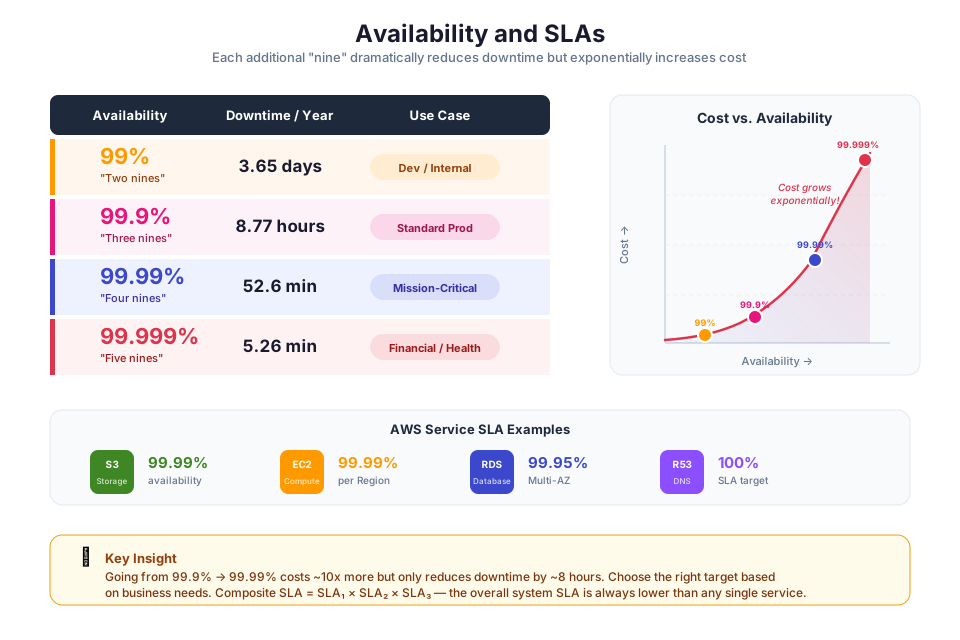
Availability measures how often your system is up and reachable. You will see it expressed as a percentage or in "nines" notation:
| Availability | Nines | Downtime per Year | Downtime per Month |
|---|---|---|---|
| 99% | Two nines | 3.65 days | 7.3 hours |
| 99.9% | Three nines | 8.77 hours | 43.8 minutes |
| 99.95% | Three and a half nines | 4.38 hours | 21.9 minutes |
| 99.99% | Four nines | 52.6 minutes | 4.38 minutes |
| 99.999% | Five nines | 5.26 minutes | 26.3 seconds |
Each additional nine roughly increases the cost and complexity by an order of magnitude. Moving from 99.9% to 99.99% requires eliminating single points of failure at every layer, implementing automated failover, and testing recovery procedures regularly. Most production web applications target 99.9% to 99.99% availability.
AWS publishes Service Level Agreements (SLAs) for its services. For example, EC2 and RDS Multi-AZ offer a 99.95% SLA, and S3 offers a 99.9% SLA for standard storage. Your application's availability is limited by the lowest-availability component in the critical path.
Tip: Availability is a business decision, not just a technical one. Higher availability costs more (redundant infrastructure, automated failover, multi-Region deployment). Work with stakeholders to define the availability target based on the business impact of downtime, then design the architecture to meet that target.
RTO and RPO: Defining Recovery Objectives
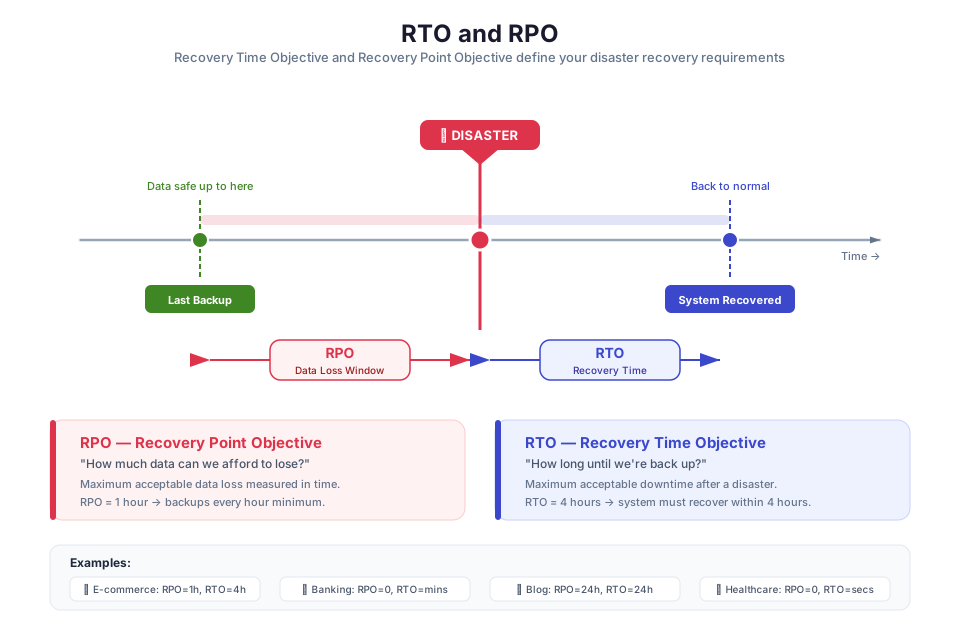
Two metrics define your disaster recovery requirements:
- Recovery Time Objective (RTO) is the maximum acceptable time between a disruption and the restoration of service. If your RTO is 1 hour, you must be able to restore service within 1 hour of a failure.
- Recovery Point Objective (RPO) is the maximum acceptable amount of data loss measured in time. If your RPO is 15 minutes, you can lose at most 15 minutes of data (meaning backups or replication must occur at least every 15 minutes).
                    RPO                    RTO
    <─────────────────|────────────────────>
    Last backup       Disaster             Service restored
    or replication    occurs               and operational
RTO and RPO are independent. A system might have an RPO of 1 hour (hourly backups are acceptable) but an RTO of 5 minutes (the service must be restored quickly). The combination of RTO and RPO determines which disaster recovery strategy is appropriate.
| RTO/RPO | Appropriate DR Strategy | Relative Cost |
|---|---|---|
| Hours/Hours | Backup and restore | Lowest |
| Minutes to hours/Minutes | Pilot light | Low to moderate |
| Minutes/Seconds to minutes | Warm standby | Moderate to high |
| Near-zero/Near-zero | Multi-site active-active | Highest |
Disaster Recovery Strategies on AWS
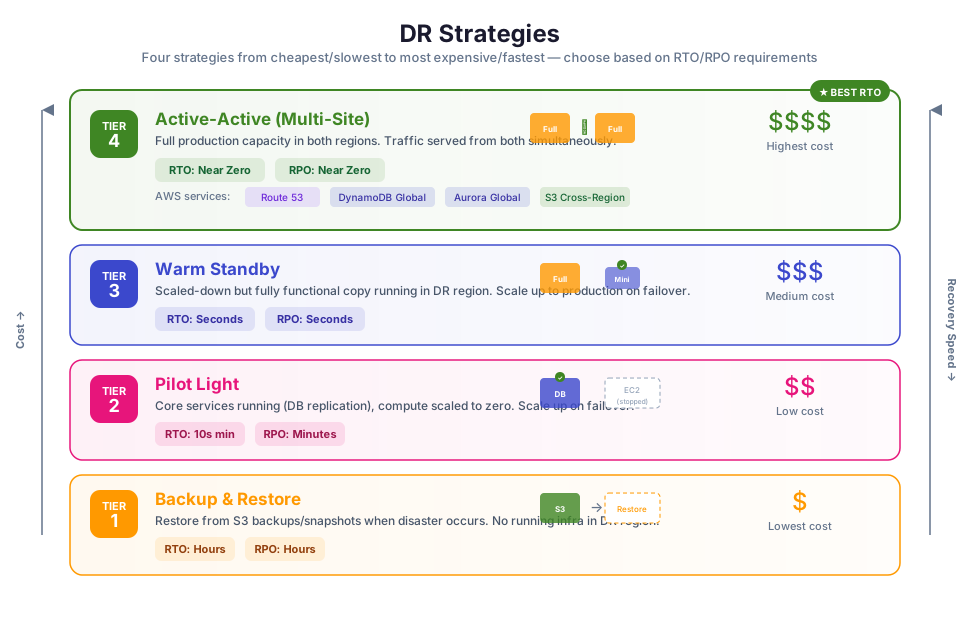
AWS supports four disaster recovery strategies, each trading cost for speed of recovery. The Disaster Recovery of Workloads on AWS whitepaper covers these in depth.
Backup and Restore
The simplest and cheapest approach. You copy data and configuration to another Region (using AWS Backup, S3 cross-Region replication, or EBS snapshots) and rebuild from those backups if disaster strikes. No infrastructure runs in the recovery Region during normal operations.
- RTO: Hours (time to provision infrastructure and restore data)
- RPO: Hours (depends on backup frequency)
- Cost: Lowest (you pay only for backup storage, not for running infrastructure)
- Best for: Non-critical workloads where hours of downtime are acceptable
Pilot Light
A minimal footprint of the production environment stays running in the recovery Region. Core components (database replicas, AMIs, network configuration) are maintained, but compute resources (EC2 instances, ECS tasks) remain off. When disaster strikes, you spin up compute and switch traffic.
- RTO: Minutes to hours (time to scale up compute and switch DNS)
- RPO: Minutes (depends on replication lag)
- Cost: Low to moderate (you pay for database replicas and minimal infrastructure)
- Best for: Workloads that need faster recovery than backup/restore but do not justify the cost of a full standby environment
Warm Standby
A scaled-down but fully running copy of production exists in the recovery Region. This standby environment can handle a fraction of traffic (or none) but is ready to scale up quickly. When disaster strikes, you increase capacity and redirect all traffic.
- RTO: Minutes (the environment is already running; you only need to scale and switch traffic)
- RPO: Seconds to minutes (continuous replication)
- Cost: Moderate to high (you pay for a running environment, though at reduced scale)
- Best for: Business-critical workloads that require recovery within minutes
Multi-Site Active-Active
Your workload runs simultaneously in two or more Regions, with each Region handling live traffic. If one Region fails, the remaining Regions absorb the load. There is no failover delay because every Region is already serving users.
- RTO: Near-zero (traffic is already distributed; failed Region is simply removed from rotation)
- RPO: Near-zero (data is replicated synchronously or near-synchronously across Regions)
- Cost: Highest (you pay for full production infrastructure in multiple Regions)
- Best for: Mission-critical workloads where any downtime is unacceptable (financial trading, healthcare, global SaaS platforms)
Strategy Comparison
| Strategy | RTO | RPO | Cost | Complexity |
|---|---|---|---|---|
| Backup and restore | Hours | Hours | $ | Low |
| Pilot light | Minutes to hours | Minutes | $$ | Moderate |
| Warm standby | Minutes | Seconds to minutes | $$$ | High |
| Multi-site active-active | Near-zero | Near-zero | $$$$ | Very high |
Multi-AZ and Multi-Region Architectures
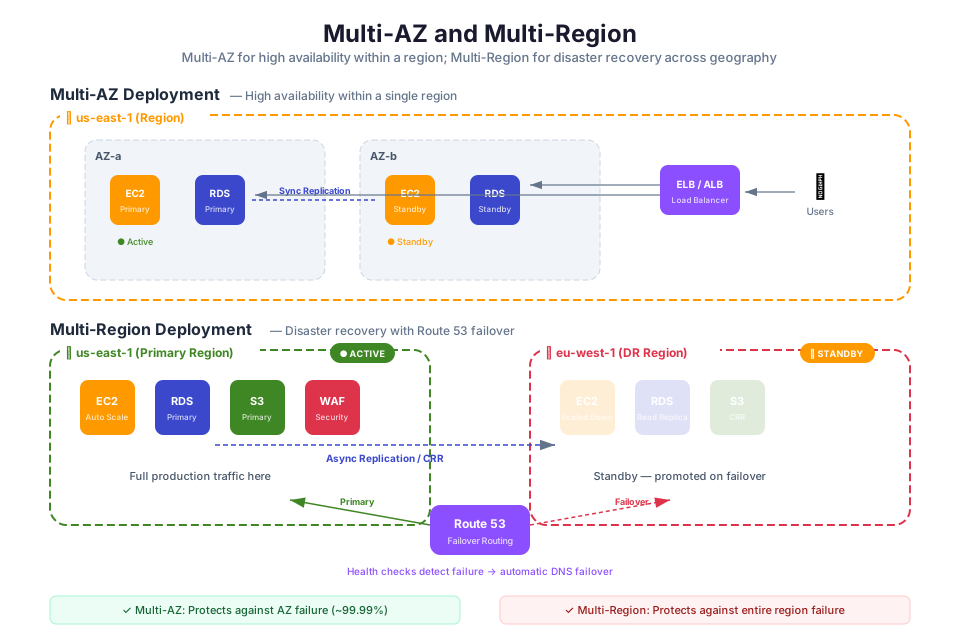
Multi-AZ: The Minimum for Production
In Module 03, you built a VPC with subnets in two Availability Zones. Multi-AZ deployment is the foundation of high availability on AWS. Each AZ is a physically separate data center (or group of data centers) with independent power, cooling, and networking. If one AZ experiences a failure, resources in the other AZ continue operating.
AWS services that support Multi-AZ deployment:
| Service | Multi-AZ Mechanism |
|---|---|
| EC2 + Auto Scaling | Auto Scaling group spans multiple AZs; unhealthy instances are replaced automatically |
| RDS Multi-AZ | Synchronous standby replica in a different AZ with automatic failover |
| ALB | Distributes traffic across targets in multiple AZs |
| ECS/Fargate | Tasks distributed across AZs by the ECS scheduler |
| ElastiCache | Multi-AZ replication with automatic failover |
| NAT Gateway | Deploy one per AZ for AZ-independent outbound internet access |
Multi-Region: For Disaster Recovery and Global Reach
Multi-Region architectures place resources in two or more AWS Regions. This guards against Region-level failures (extremely rare, but possible) and brings your application closer to globally distributed users.
Key AWS services for multi-Region architectures:
| Service | Multi-Region Capability |
|---|---|
| Route 53 | DNS-based failover routing between Regions using health checks |
| S3 Cross-Region Replication | Automatic replication of objects to a bucket in another Region |
| RDS Cross-Region Read Replicas | Asynchronous replication to a read replica in another Region (can be promoted to primary) |
| DynamoDB Global Tables | Multi-Region, multi-active replication with automatic conflict resolution |
| Aurora Global Database | Cross-Region replication with less than 1 second lag and fast failover |
| AWS Elastic Disaster Recovery | Continuous block-level replication of servers to a recovery Region |
Tip: Multi-Region adds significant complexity (data replication lag, conflict resolution, deployment coordination, cost). Start with multi-AZ for high availability. Add multi-Region only when your RTO/RPO requirements or geographic distribution needs justify the additional complexity and cost.
Resilience Patterns for Distributed Applications
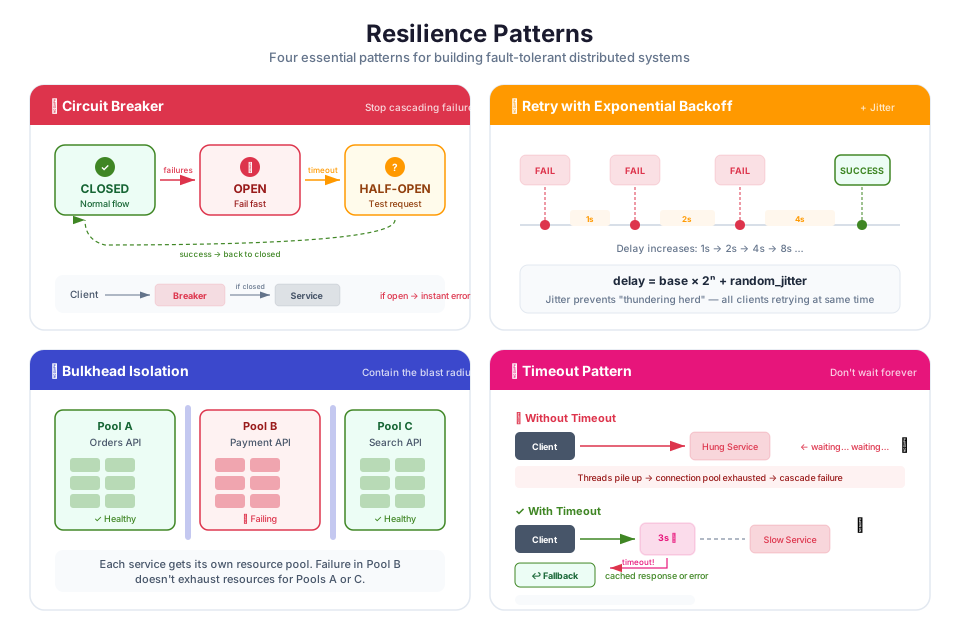
When your application is spread across multiple services (microservices, Lambda functions, containers), a failure in one component can ripple outward and take down the whole system. The patterns below, drawn from the Reliability Pillar of the Well-Architected Framework, prevent that cascade.
Retry with Exponential Backoff and Jitter
When a service call fails due to a transient error (network timeout, throttling, temporary unavailability), retry the call after a delay. Increase the delay exponentially with each retry (1s, 2s, 4s, 8s) and add random jitter to prevent all clients from retrying at the same time.
Attempt 1: immediate
Attempt 2: wait 1s + random(0-500ms)
Attempt 3: wait 2s + random(0-500ms)
Attempt 4: wait 4s + random(0-500ms)
(give up after max retries)
The AWS SDKs implement retry with exponential backoff automatically for most API calls. You can configure the maximum number of retries and the backoff strategy.
Circuit Breaker
A circuit breaker monitors the failure rate of calls to a downstream service. When the failure rate exceeds a threshold, the circuit "opens" and subsequent calls fail immediately without attempting the downstream call. After a timeout period, the circuit enters a "half-open" state and allows a limited number of test calls. If the test calls succeed, the circuit closes and normal operation resumes.
Closed (normal) --> failure rate exceeds threshold --> Open (fail fast)
Open --> timeout expires --> Half-Open (test calls)
Half-Open --> test calls succeed --> Closed
Half-Open --> test calls fail --> Open
Circuit breakers prevent a failing downstream service from consuming resources (threads, connections, time) in the calling service, which could cause the caller to fail as well (cascading failure).
Bulkhead
The bulkhead pattern isolates components so that a failure in one does not affect others. Named after the watertight compartments in a ship's hull, bulkheads in software limit the blast radius of failures.
Examples on AWS:
- Use separate SQS queues for different message types so that a backlog in one queue does not block processing of others.
- Use separate Lambda functions (with separate concurrency limits) for different API endpoints so that a traffic spike on one endpoint does not exhaust concurrency for others.
- Use separate ECS services for different microservices so that a memory leak in one service does not affect others.
Timeout
Set timeouts on all external calls (HTTP requests, database queries, API calls). A timeout ensures that a slow or unresponsive dependency does not block the calling service indefinitely. Without timeouts, a single slow dependency can consume all available threads or connections, causing the calling service to become unresponsive.
Fallback
When a service call fails (even after retries), provide a degraded but functional response instead of returning an error. For example, if a recommendation engine is unavailable, return a default set of popular items instead of showing an error page.
AWS Backup: Centralized Backup Management
AWS Backup gives you a single place to define and enforce backup policies for all your AWS resources. Rather than juggling separate snapshot schedules for RDS, EBS, and DynamoDB (which you configured individually in earlier modules), you create one backup plan that covers everything.
Key concepts:
| Concept | Description |
|---|---|
| Backup plan | A policy that defines backup frequency, retention period, and lifecycle rules |
| Backup vault | A secure container where backups are stored (encrypted with KMS) |
| Backup rule | A schedule within a backup plan (for example, daily at 2:00 AM, retain for 30 days) |
| Resource assignment | Which resources are included in the backup plan (by tag, resource type, or ARN) |
| Cross-Region copy | Automatically copy backups to another Region for disaster recovery |
Supported services include EC2 (AMIs), EBS (snapshots), RDS (snapshots), DynamoDB (backups), EFS (backups), S3 (backups), and Aurora (snapshots).
Tip: Use tag-based resource assignment in your backup plans. For example, assign all resources tagged
Backup=dailyto a daily backup plan. This ensures that new resources are automatically included in the backup plan when they are tagged correctly, without manual configuration.
Chaos Engineering: Testing Reliability
Chaos engineering means deliberately breaking things on purpose, in a controlled way, to find out how your system responds before a real outage does it for you. Think of it like a fire drill for your infrastructure.
AWS Fault Injection Service (FIS) lets you run these experiments without building custom failure-injection tooling. It ships with pre-built actions for common scenarios:
| FIS Action | What It Simulates |
|---|---|
| Stop EC2 instances | Instance failure in an Auto Scaling group |
| Throttle EBS I/O | Degraded storage performance |
| Inject Lambda errors | Function failures for testing error handling |
| Disrupt network connectivity | Network partition between services |
| Failover RDS | Database failover to the standby instance |
A chaos engineering experiment follows this process:
- Define a hypothesis. "If one EC2 instance in the Auto Scaling group fails, the ALB will route traffic to the remaining healthy instances, and the Auto Scaling group will launch a replacement within 5 minutes."
- Design the experiment. Use FIS to stop one EC2 instance.
- Run the experiment. Execute the FIS experiment in a staging environment first, then in production during low-traffic periods.
- Observe the results. Monitor CloudWatch metrics, ALB health checks, and Auto Scaling activity.
- Improve. If the system did not recover as expected, fix the issue and re-run the experiment.
Tip: Start chaos engineering in non-production environments. Run experiments during business hours when the team is available to respond. Gradually increase the scope and severity of experiments as your confidence in the system's resilience grows.
Instructor Notes
Estimated lecture time: 90 to 105 minutes
Common student questions:
-
Q: What is the difference between high availability and disaster recovery? A: High availability (HA) is about minimizing downtime during normal operations by eliminating single points of failure (multi-AZ deployment, Auto Scaling, health checks). Disaster recovery (DR) is about recovering from a major disruption that affects an entire AZ or Region. HA keeps the system running during small failures; DR restores the system after large failures. A well-designed architecture includes both.
-
Q: Do I always need multi-Region deployment? A: No. Multi-Region adds significant complexity and cost. Most applications achieve sufficient availability with multi-AZ deployment within a single Region. Consider multi-Region only when your RTO/RPO requirements demand near-zero downtime, when you need to serve users in multiple geographic locations with low latency, or when regulatory requirements mandate data residency in specific Regions.
-
Q: How do I choose between the four DR strategies? A: Start with your RTO and RPO requirements. If hours of downtime and data loss are acceptable, use backup and restore (cheapest). If you need recovery in minutes with minimal data loss, use pilot light or warm standby. If you need near-zero downtime and data loss, use multi-site active-active (most expensive). The choice is a trade-off between cost and recovery speed.
-
Q: What is the difference between a retry and a circuit breaker? A: A retry attempts the same operation again after a failure, hoping the transient issue has resolved. A circuit breaker stops attempting the operation entirely after repeated failures, preventing the calling service from wasting resources on a dependency that is clearly down. Use retries for transient failures (network blips, throttling). Use circuit breakers when a dependency is consistently failing and retries would only add load to an already struggling service.
Teaching tips:
- Start the lecture by asking students: "Your production database goes down at 3 AM. What happens next?" Walk through the scenario to motivate the need for defined RTO/RPO, automated recovery, and tested DR procedures.
- When explaining the four DR strategies, draw them on a whiteboard as a spectrum from low cost/high RTO to high cost/low RTO. Use a concrete example (an e-commerce site) and ask students which strategy they would choose for different components (product catalog vs. payment processing vs. marketing blog).
- Pause after the resilience patterns section for a group exercise. Present a microservices architecture diagram and ask each team to identify where they would apply retry, circuit breaker, bulkhead, and timeout patterns.
- The chaos engineering section is a good opportunity for a live demo. If time permits, show the AWS FIS console and walk through creating a simple experiment (stopping an EC2 instance in an Auto Scaling group).
- Connect this module to previous modules: multi-AZ VPC (Module 03), Auto Scaling (Module 04), RDS Multi-AZ (Module 06), ALB health checks (Module 07), and CloudWatch alarms (Module 14) are all building blocks of the reliability architecture discussed here.
Key Takeaways
- Define RTO and RPO for every critical workload before designing the architecture; these objectives determine which disaster recovery strategy is appropriate and how much to invest in redundancy.
- Multi-AZ deployment is the minimum for production workloads; it protects against single-AZ failures with automatic failover for most AWS services (RDS, ALB, Auto Scaling, ECS).
- The four DR strategies (backup/restore, pilot light, warm standby, multi-site active-active) represent a spectrum of cost vs. recovery speed; choose based on your workload's business criticality and budget.
- Apply resilience patterns (retry with backoff, circuit breaker, bulkhead, timeout) in distributed applications to prevent cascading failures when individual components fail.
- Test your reliability assumptions through chaos engineering; a disaster recovery plan that has never been tested is a plan that may not work when you need it.
AWS Bootcamp: From Novice to Architect Author: Samuel Ogunti License: CC BY-NC 4.0