Module 03: Networking Basics (VPC)
Learning Objectives
By the end of this module, you will be able to:
- Define a Virtual Private Cloud (VPC) and explain its role as the networking foundation for AWS resources
- Describe the difference between the default VPC and a custom VPC, including when to use each
- Explain Classless Inter-Domain Routing (CIDR) notation and how it determines the size of a VPC and its subnets
- Distinguish between public subnets and private subnets, and identify which workloads belong in each
- Describe how internet gateways and Network Address Translation (NAT) gateways provide internet access to resources in public and private subnets
- Explain how route tables control the flow of network traffic within a VPC
- Distinguish between security groups (stateful) and network access control lists (NACLs, stateless), and summarize the default behavior of each
- Identify common VPC design patterns, including two-tier and three-tier architectures
Prerequisites
- Completion of Module 01: Cloud Fundamentals
- Completion of Module 02: Identity and Access Management (IAM) and Security
- An AWS account with console access (free tier is sufficient)
Concepts
VPC Fundamentals
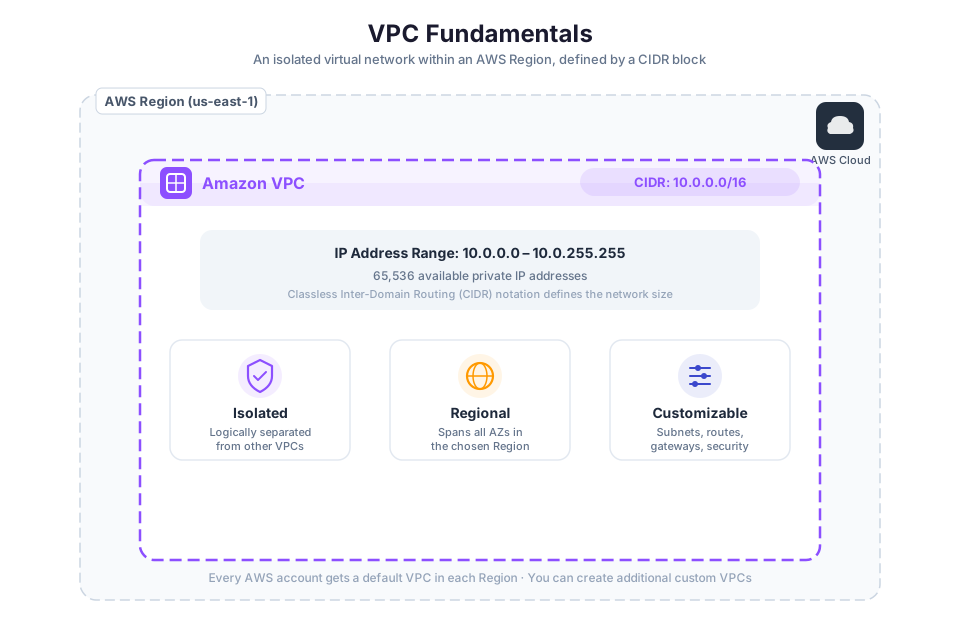
A Virtual Private Cloud (VPC) is your own logically isolated network inside AWS. Every resource that needs networking (EC2 instances, RDS databases, load balancers) lives inside a VPC. You define the IP address range, carve out subnets, configure route tables, and attach gateways.
Think of a VPC as a private data center floor plan that you design, except AWS provides the physical building. In Module 01, you learned that AWS organizes infrastructure into Regions and Availability Zones. A VPC exists within a single Region but can span multiple Availability Zones in that Region.
Default VPC vs. Custom VPC
When you create an AWS account, AWS automatically creates a default VPC in each Region. The default VPC comes preconfigured with:
- A
/16IPv4 CIDR block (172.31.0.0/16), providing 65,536 private IP addresses - A default subnet in each Availability Zone, each with a
/20CIDR block - An internet gateway already attached
- A default route table with a route to the internet gateway
- A default security group and a default network ACL
The default VPC is designed for convenience. You can launch instances into it immediately without any networking setup. However, for production workloads, you should create a custom VPC where you control the IP address range, subnet layout, and security configuration.
| Feature | Default VPC | Custom VPC |
|---|---|---|
| Created automatically | Yes (one per Region) | No (you create it) |
| CIDR block | 172.31.0.0/16 (fixed) | You choose (e.g., 10.0.0.0/16) |
| Internet gateway | Attached by default | You attach one if needed |
| Subnets | Public by default (auto-assign public IP) | You configure public or private |
| Use case | Quick testing, learning | Production workloads, controlled environments |
Tip: Use the default VPC for experimentation and labs. For any workload that handles real data or serves real users, create a custom VPC with a deliberate network design.
CIDR Blocks and IP Addressing
Every VPC requires a CIDR block that defines its range of private IP addresses. CIDR notation combines an IP address with a prefix length that indicates how many bits are fixed. The remaining bits are available for host addresses.
For example, 10.0.0.0/16 means the first 16 bits are fixed (10.0), and the remaining 16 bits can vary. This gives you 65,536 IP addresses (2^16). A smaller prefix number means a larger network:
| CIDR Block | Prefix Length | Available IPs | Typical Use |
|---|---|---|---|
10.0.0.0/16 | /16 | 65,536 | Large VPC for production |
10.0.0.0/20 | /20 | 4,096 | Medium subnet |
10.0.0.0/24 | /24 | 256 | Small subnet |
10.0.0.0/28 | /28 | 16 | Minimum subnet size in AWS |
AWS allows VPC CIDR blocks between /16 (65,536 addresses) and /28 (16 addresses). The most common choice for a VPC is /16, which provides enough addresses to create many subnets.
When choosing a CIDR block, use private IP address ranges defined by RFC 1918:
10.0.0.0/8(10.0.0.0 to 10.255.255.255)172.16.0.0/12(172.16.0.0 to 172.31.255.255)192.168.0.0/16(192.168.0.0 to 192.168.255.255)
Warning: Choose your VPC CIDR block carefully. If you later need to connect your VPC to another VPC or to an on-premises network, overlapping CIDR blocks will cause routing conflicts. Plan your IP address space before creating the VPC.
Subnets: Public vs. Private
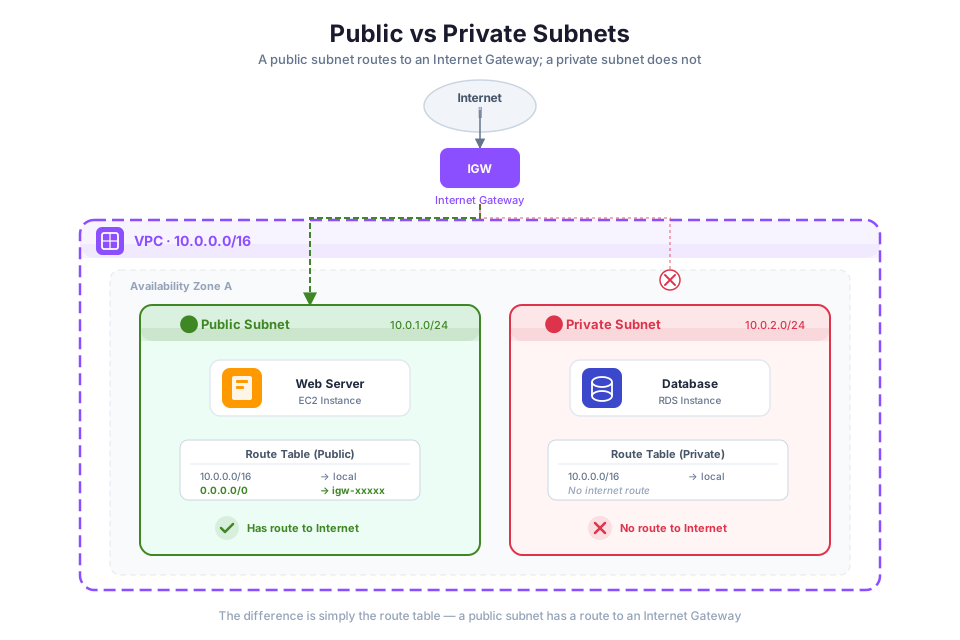
A subnet is a range of IP addresses within your VPC. You divide your VPC's CIDR block into subnets, and each subnet resides in a single Availability Zone. Subnets cannot span multiple AZs.
There are two types of subnets based on their routing configuration:
- Public subnet: A subnet whose route table includes a route to an internet gateway. Resources in a public subnet can communicate directly with the internet if they have a public IP address.
- Private subnet: A subnet with no route to an internet gateway. Resources in a private subnet cannot receive inbound traffic from the internet and cannot send outbound traffic to the internet directly.
| Characteristic | Public Subnet | Private Subnet |
|---|---|---|
| Route to internet gateway | Yes | No |
| Public IP addresses | Auto-assigned or Elastic IP | Not needed |
| Inbound internet traffic | Allowed (filtered by security groups) | Blocked |
| Outbound internet access | Direct through internet gateway | Through NAT gateway only |
| Typical workloads | Web servers, load balancers, bastion hosts | Databases, application servers, internal services |
Availability Zone Placement
In Module 01, you learned that each AWS Region contains multiple Availability Zones for fault tolerance. When designing a VPC, you should create subnets in at least two AZs. This allows you to deploy resources across AZs for high availability. If one AZ experiences an outage, resources in the other AZ continue to operate.
A common pattern is to create one public subnet and one private subnet in each AZ:
VPC: 10.0.0.0/16
├── AZ-a
│   ├── Public Subnet:  10.0.1.0/24  (256 IPs)
│   └── Private Subnet: 10.0.2.0/24  (256 IPs)
└── AZ-b
    ├── Public Subnet:  10.0.3.0/24  (256 IPs)
    └── Private Subnet: 10.0.4.0/24  (256 IPs)
Subnet Sizing
Each subnet CIDR block must be a subset of the VPC's CIDR block. AWS reserves five IP addresses in every subnet:
- First address: network address
- Second address: reserved by AWS for the VPC router
- Third address: reserved by AWS for DNS
- Fourth address: reserved by AWS for future use
- Last address: network broadcast address
For example, in a /24 subnet with 256 addresses, only 251 are available for your resources. In a /28 subnet (the minimum size), only 11 addresses are usable.
Tip: When planning subnet sizes, account for the five reserved addresses. For small subnets, this overhead is significant. A
/28subnet provides only 11 usable IPs out of 16 total.
Internet Gateway and NAT Gateway
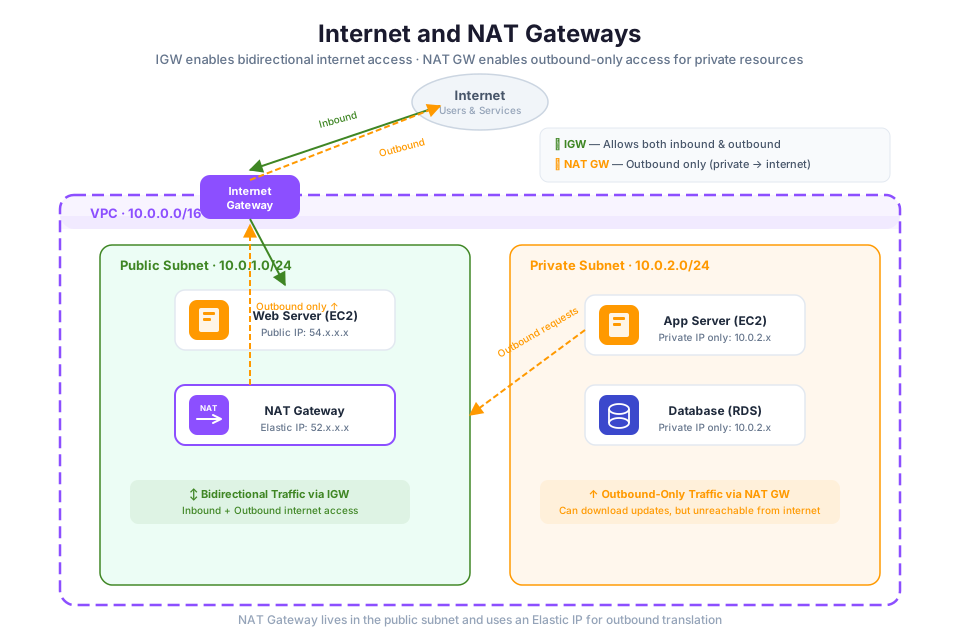
Resources in your VPC need a path to the internet for software updates, API calls to external services, or serving web traffic. AWS provides two gateway types for this purpose.
Internet Gateway
An internet gateway connects your VPC to the public internet. It is horizontally scaled, redundant, and highly available by design, so you never need to worry about its capacity. It serves two purposes:
- It acts as a target in your route table for internet-bound traffic.
- It performs network address translation (NAT) for instances that have a public IPv4 address.
To enable internet access for a subnet, you must:
- Attach an internet gateway to your VPC.
- Add a route in the subnet's route table that directs internet-bound traffic (
0.0.0.0/0) to the internet gateway. - Ensure instances in the subnet have a public IPv4 address or an Elastic IP address.
- Ensure the subnet's security groups and network ACLs allow the desired traffic.
A subnet with a route to an internet gateway is what makes it a "public" subnet.
NAT Gateway
A NAT gateway gives private subnet instances a path to the internet for outbound traffic (downloading patches, calling external APIs) while blocking any inbound connections from the internet. It acts as a one-way door.
The NAT gateway sits in a public subnet and has an Elastic IP address. Private subnet instances send their outbound traffic to the NAT gateway, which forwards it to the internet gateway using its own public IP. Return traffic is routed back through the NAT gateway to the originating instance.
Private Instance --> Private Subnet Route Table --> NAT Gateway (in public subnet) --> Internet Gateway --> Internet
Key characteristics of NAT gateways:
- You create a NAT gateway in a public subnet and assign it an Elastic IP address.
- You add a route in the private subnet's route table pointing
0.0.0.0/0to the NAT gateway. - NAT gateways are managed by AWS. You do not need to patch or maintain them.
- For high availability, create a NAT gateway in each AZ and configure each private subnet to use the NAT gateway in its own AZ.
Warning: NAT gateways incur hourly charges and data processing charges. If your private subnet instances do not need internet access, do not create a NAT gateway. Review the NAT gateway pricing before deploying one.
| Gateway Type | Direction | Location | Use Case |
|---|---|---|---|
| Internet gateway | Inbound and outbound | Attached to VPC | Public subnet resources communicating with the internet |
| NAT gateway | Outbound only | Placed in a public subnet | Private subnet resources initiating outbound internet connections |
Route Tables: How Traffic Flows
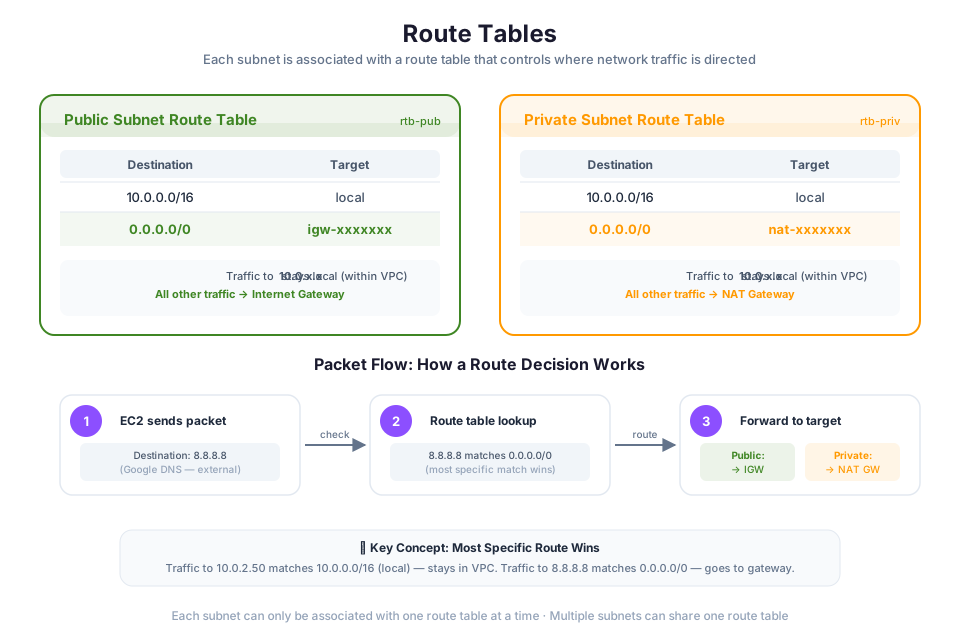
A route table contains rules (called routes) that tell the VPC router where to send network traffic. Every subnet must be associated with exactly one route table, and that table controls routing for the subnet.
Main Route Table vs. Custom Route Tables
When you create a VPC, AWS automatically creates a main route table. The main route table has a single route called the local route, which enables communication between all resources within the VPC:
| Destination | Target | Purpose |
|---|---|---|
10.0.0.0/16 | local | Traffic within the VPC stays local |
Any subnet that is not explicitly associated with a custom route table uses the main route table by default. For production environments, create custom route tables for each subnet type rather than modifying the main route table.
A public subnet's route table includes a route to the internet gateway:
| Destination | Target | Purpose |
|---|---|---|
10.0.0.0/16 | local | VPC internal traffic |
0.0.0.0/0 | igw-xxxxxxxx | All other traffic goes to the internet gateway |
A private subnet's route table routes internet-bound traffic to a NAT gateway:
| Destination | Target | Purpose |
|---|---|---|
10.0.0.0/16 | local | VPC internal traffic |
0.0.0.0/0 | nat-xxxxxxxx | All other traffic goes to the NAT gateway |
How Route Evaluation Works
When a resource sends traffic, the VPC router examines the destination IP address and matches it against the routes in the associated route table. The most specific route (longest prefix match) wins. For example, if a route table has both 10.0.0.0/16 -> local and 0.0.0.0/0 -> igw, traffic destined for 10.0.2.5 matches the /16 route (more specific) and stays within the VPC. Traffic destined for 8.8.8.8 matches only the /0 route and goes to the internet gateway.
You can view your VPC's route tables using the AWS CLI:
aws ec2 describe-route-tables --filters "Name=vpc-id,Values=vpc-xxxxxxxx"
Expected output (abbreviated):
{
    "RouteTables": [
        {
            "RouteTableId": "rtb-xxxxxxxx",
            "Routes": [
                {
                    "DestinationCidrBlock": "10.0.0.0/16",
                    "GatewayId": "local",
                    "State": "active"
                },
                {
                    "DestinationCidrBlock": "0.0.0.0/0",
                    "GatewayId": "igw-xxxxxxxx",
                    "State": "active"
                }
            ]
        }
    ]
}
Tip: Keep your route tables simple and well-documented. Each subnet should have a clear purpose (public or private), and its route table should reflect that purpose. Avoid adding unnecessary routes to the main route table.
Security Groups and Network ACLs
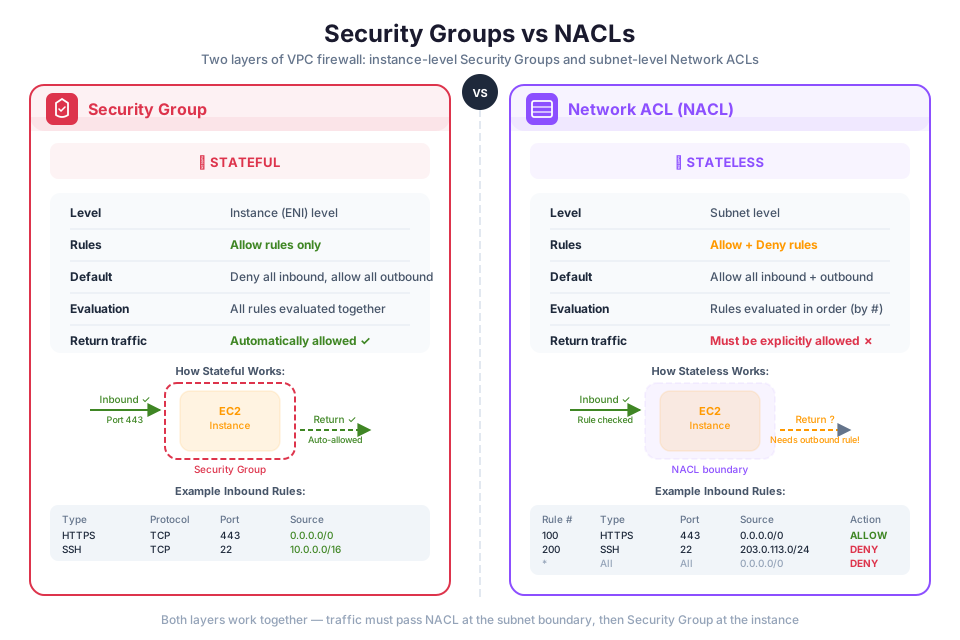
AWS provides two layers of network security for your VPC: security groups and network access control lists (NACLs). Both filter traffic, but they operate differently and at different levels.
In Module 02, you learned about IAM policies that control who can perform API actions on AWS resources. Security groups and NACLs complement IAM by controlling the network traffic that can reach your resources.
Security Groups (Stateful)
A security group acts as a virtual firewall for individual AWS resources (EC2 instances, RDS databases, Lambda functions in a VPC). It controls inbound and outbound traffic at the resource level.
Key characteristics of security groups:
- Stateful: If you allow an inbound request, the response is automatically allowed regardless of outbound rules. Similarly, if you allow an outbound request, the response is automatically allowed regardless of inbound rules.
- Allow rules only: You can specify allow rules but not deny rules. Any traffic that does not match an allow rule is denied by default.
- Resource-level: Security groups are attached to individual resources (such as an EC2 instance or an Elastic Network Interface), not to subnets.
- Rule evaluation: All rules are evaluated before deciding whether to allow traffic. There is no rule ordering.
The default security group for a VPC allows all inbound traffic from other resources associated with the same security group and allows all outbound traffic. When you create a custom security group, it starts with no inbound rules (all inbound traffic denied) and one outbound rule that allows all outbound traffic.
Example security group rules for a web server:
| Direction | Protocol | Port Range | Source/Destination | Purpose |
|---|---|---|---|---|
| Inbound | TCP | 80 | 0.0.0.0/0 | Allow HTTP from anywhere |
| Inbound | TCP | 443 | 0.0.0.0/0 | Allow HTTPS from anywhere |
| Inbound | TCP | 22 | 203.0.113.0/24 | Allow SSH from your IP range |
| Outbound | All | All | 0.0.0.0/0 | Allow all outbound traffic |
Network Access Control Lists (Stateless)
A network ACL is an optional security layer that filters traffic at the subnet boundary. Unlike security groups, NACLs are stateless and support both allow and deny rules.
Key characteristics of NACLs:
- Stateless: Inbound and outbound traffic are evaluated independently. If you allow inbound traffic on port 80, you must also explicitly allow the outbound response traffic (typically on ephemeral ports 1024-65535).
- Allow and deny rules: You can create both allow and deny rules, which is useful for explicitly blocking specific IP addresses.
- Subnet-level: A NACL is associated with a subnet. All resources in that subnet are subject to the NACL's rules.
- Rule ordering: Rules are evaluated in order, starting with the lowest numbered rule. As soon as a rule matches, it is applied and no further rules are evaluated.
The default NACL allows all inbound and outbound traffic. When you create a custom NACL, it denies all inbound and outbound traffic until you add rules.
Security Groups vs. Network ACLs: Comparison
| Feature | Security Group | Network ACL |
|---|---|---|
| Operates at | Resource level (instance, ENI) | Subnet level |
| Statefulness | Stateful (return traffic auto-allowed) | Stateless (must explicitly allow return traffic) |
| Rule types | Allow rules only | Allow and deny rules |
| Rule evaluation | All rules evaluated together | Rules evaluated in number order; first match wins |
| Default behavior | Denies all inbound; allows all outbound | Default NACL allows all; custom NACL denies all |
| Applies to | Only resources explicitly associated | All resources in the associated subnet |
| Use case | Primary firewall for individual resources | Additional subnet-level defense; blocking specific IPs |
Tip: Use security groups as your primary network firewall. They are easier to manage because they are stateful and apply at the resource level. Use NACLs as a secondary defense layer when you need to explicitly deny traffic from specific IP addresses or CIDR ranges at the subnet boundary.
VPC Design Patterns
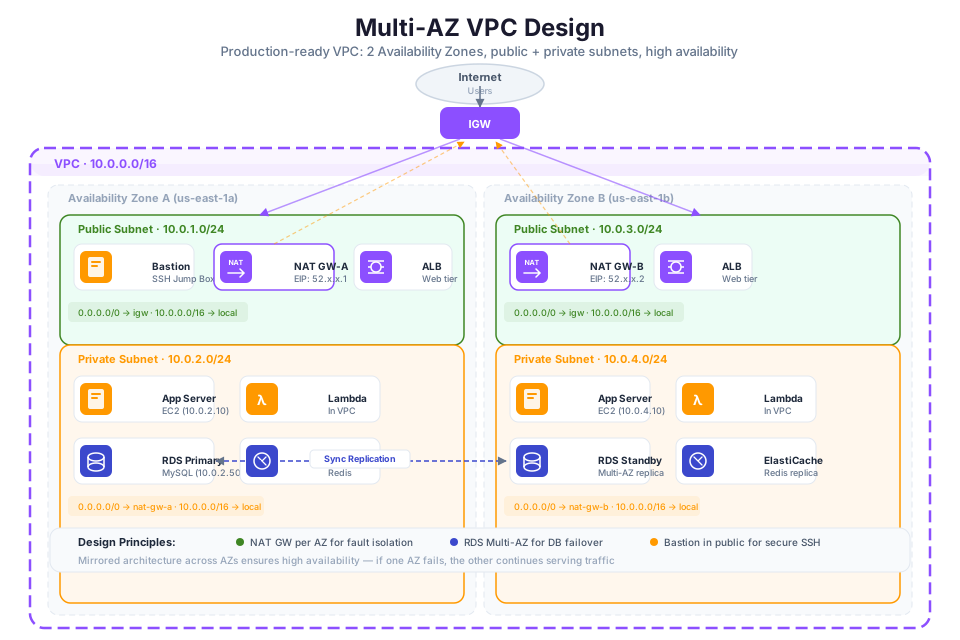
Now that you understand the individual VPC components, you can combine them into common architecture patterns. These patterns reflect how organizations structure their VPCs for different workload types.
Two-Tier Architecture
A two-tier architecture separates your application into a public-facing tier and a data tier:
- Public tier: Web servers or load balancers in public subnets. These resources have public IP addresses and accept traffic from the internet through the internet gateway.
- Data tier: Databases and caches in private subnets. These resources have no public IP addresses and are accessible only from the public tier through security group rules.
Internet
   |
Internet Gateway
   |
Public Subnets (AZ-a, AZ-b)
   ├── Web Server (AZ-a)
   └── Web Server (AZ-b)
   |
Private Subnets (AZ-a, AZ-b)
   ├── Database Primary (AZ-a)
   └── Database Standby (AZ-b)
The web servers' security group allows inbound HTTP/HTTPS from the internet. The database security group allows inbound traffic only from the web servers' security group. This is an example of security group referencing: instead of specifying IP addresses, you reference another security group as the source. This approach is more maintainable because it automatically adapts as instances are added or removed.
Three-Tier Architecture
A three-tier architecture adds an application tier between the public and data tiers:
- Presentation tier (public subnets): Load balancers that distribute incoming traffic.
- Application tier (private subnets): Application servers that process business logic. These servers receive traffic only from the load balancers and communicate with the data tier.
- Data tier (private subnets): Databases and caches that store persistent data. These resources accept connections only from the application tier.
Internet
   |
Internet Gateway
   |
Public Subnets
   └── Application Load Balancer
   |
Private Subnets (Application Tier)
   ├── App Server (AZ-a)
   └── App Server (AZ-b)
   |
Private Subnets (Data Tier)
   ├── RDS Primary (AZ-a)
   └── RDS Standby (AZ-b)
Each tier has its own security group with rules that allow traffic only from the tier above it. This creates a layered defense where a compromise in one tier does not automatically grant access to the others.
| Tier | Subnet Type | Security Group Allows Inbound From | Example Resources |
|---|---|---|---|
| Presentation | Public | Internet (HTTP/HTTPS) | Application Load Balancer |
| Application | Private | Presentation tier security group | EC2 instances, ECS tasks |
| Data | Private | Application tier security group | RDS, ElastiCache, DynamoDB |
In Module 02, you learned about the principle of least privilege for IAM policies. The same principle applies to network security: each tier should accept traffic only from the tier that needs to communicate with it, and nothing else.
Tip: The three-tier architecture is the most common VPC design pattern for web applications on AWS. It provides clear separation of concerns, layered security, and the ability to scale each tier independently.
You can view your VPC and its components using the AWS CLI:
aws ec2 describe-vpcs --filters "Name=is-default,Values=false"
Expected output (abbreviated):
{
    "Vpcs": [
        {
            "VpcId": "vpc-xxxxxxxx",
            "CidrBlock": "10.0.0.0/16",
            "State": "available",
            "IsDefault": false
        }
    ]
}
To list subnets in a specific VPC:
aws ec2 describe-subnets --filters "Name=vpc-id,Values=vpc-xxxxxxxx"
Instructor Notes
Estimated lecture time: 90 minutes
Common student questions:
-
Q: What is the difference between a security group and a network ACL? A: Security groups are stateful and operate at the resource level (such as an EC2 instance). If you allow inbound traffic, the response is automatically allowed. NACLs are stateless and operate at the subnet level. You must explicitly allow both inbound and outbound traffic, including return traffic on ephemeral ports. Security groups support only allow rules, while NACLs support both allow and deny rules. See the security groups documentation and network ACLs documentation for details.
-
Q: Why do I need a NAT gateway if my private instances need internet access? Why not just put them in a public subnet? A: Placing resources in a public subnet exposes them to inbound internet traffic, which increases the attack surface. A NAT gateway allows private instances to initiate outbound connections (for example, downloading patches) without being reachable from the internet. This follows the principle of least privilege applied to network access. See the NAT gateway use cases for common scenarios.
-
Q: Can I change my VPC's CIDR block after creating it? A: You cannot change the primary CIDR block, but you can add secondary CIDR blocks to expand the address space. This is why planning your CIDR block before creating the VPC is important. If you need a completely different address range, you must create a new VPC.
-
Q: How many subnets can I create in a VPC? A: The default quota is 200 subnets per VPC. You can request an increase through the AWS Service Quotas console. See the Amazon VPC quotas page for current limits.
Teaching tips:
- Start by connecting to Module 01's Regions and Availability Zones concept. Draw a Region on the whiteboard with two AZs, then draw a VPC spanning both AZs. This establishes the spatial relationship between infrastructure components students already know and the new networking concepts.
- Use the analogy of a building floor plan: the VPC is the building, subnets are rooms, route tables are hallways and signs, the internet gateway is the front door, and security groups are locks on individual room doors. NACLs are security checkpoints at the hallway entrances.
- When explaining CIDR notation, write out the binary representation of a
/24and a/16on the whiteboard. Show students how the prefix length determines which bits are "locked" and which bits are available for host addresses. Use a simple calculation: 2^(32 - prefix) = number of addresses. - Connect security groups back to Module 02's IAM concepts. Remind students that IAM controls who can call AWS APIs (for example, who can create an EC2 instance), while security groups control what network traffic can reach that instance after it is running. Both are necessary for a secure architecture.
Pause points:
- After VPC fundamentals and CIDR: ask students to calculate how many IP addresses are in a
/24subnet (256) and how many are usable after AWS reservations (251). Then ask them to calculate a/28(16 total, 11 usable). - After public vs. private subnets: ask students which subnet type they would use for a database (private) and why (no direct internet access reduces attack surface).
- After the security groups vs. NACLs comparison table: present a scenario where an EC2 instance in a public subnet can receive HTTP traffic but cannot respond. Ask students to identify the likely cause (NACL is stateless and the outbound rule for ephemeral ports is missing).
- After VPC design patterns: draw a three-tier architecture on the whiteboard and ask students to define the security group rules for each tier. This reinforces both the architecture pattern and the security group concepts.
Key Takeaways
- A VPC is your isolated virtual network in AWS, spanning a single Region across multiple Availability Zones. You control the IP address range (CIDR block), subnets, routing, and security.
- Public subnets route traffic through an internet gateway for direct internet access; private subnets use a NAT gateway for outbound-only internet access. Place databases and internal services in private subnets.
- Route tables determine where traffic flows. Each subnet is associated with a route table, and the most specific route (longest prefix match) wins.
- Security groups (stateful, resource-level, allow-only) are your primary firewall. Network ACLs (stateless, subnet-level, allow and deny) provide an additional defense layer.
- The three-tier architecture (presentation, application, data) is the most common VPC design pattern, using layered security groups to restrict traffic between tiers following the principle of least privilege.
AWS Bootcamp: From Novice to Architect Author: Samuel Ogunti License: CC BY-NC 4.0