Module 09: Serverless Computing with AWS Lambda
Learning Objectives
By the end of this module, you will be able to:
- Build an AWS Lambda function with a Python handler that processes event data and returns a structured response
- Construct a serverless REST API by integrating Amazon API Gateway with Lambda and Amazon DynamoDB
- Integrate Lambda with multiple event sources including Amazon Simple Storage Service (Amazon S3), Amazon Simple Queue Service (Amazon SQS), Amazon Simple Notification Service (Amazon SNS), and Amazon DynamoDB Streams
- Troubleshoot cold start latency in Lambda functions and apply mitigation strategies such as provisioned concurrency and reduced package size
- Compare Lambda event source types (push-based triggers vs. poll-based event source mappings) and differentiate when to use each
- Differentiate between Lambda deployment packaging options (.zip archives vs. container images) and select the appropriate method for a given use case
- Build reusable function components using Lambda Layers to share code and dependencies across multiple functions
Prerequisites
- Completion of Module 02: Identity and Access Management (IAM) and Security (IAM roles, policies, and the principle of least privilege for creating Lambda execution roles)
- Completion of Module 05: Storage with Amazon S3 (S3 event notifications for triggering Lambda functions on object uploads)
- Completion of Module 06: Databases with Amazon RDS and DynamoDB (DynamoDB tables, primary keys, and DynamoDB Streams for event-driven data processing)
- Completion of Module 08: Messaging and Integration Services (SQS queues, SNS topics, and EventBridge for triggering Lambda functions from messaging services)
- An AWS account with console access (free tier includes 1 million Lambda requests and 400,000 GB-seconds of compute per month)
Concepts
What Is Serverless Computing?
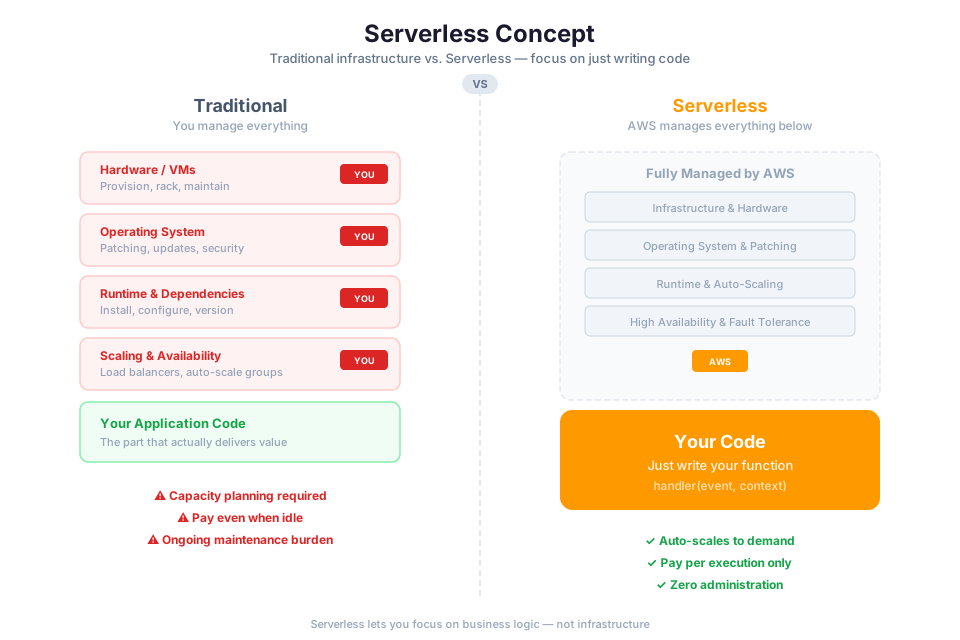
Serverless computing is a cloud execution model where the cloud provider manages the infrastructure entirely. You write code, deploy it, and the provider handles provisioning, scaling, patching, and capacity planning. The term "serverless" is a bit misleading: servers still exist, but they are invisible to you. You never SSH into them, patch them, or worry about their capacity.
AWS Lambda is the core serverless compute service on AWS. You upload your code, and Lambda handles everything else: provisioning, scaling, patching, and capacity planning. Your function runs only when triggered by an event, and you pay only for the milliseconds of compute time consumed. When nothing is happening, you pay nothing.
Key characteristics of serverless computing:
- No server management. You never provision, patch, or maintain servers. AWS handles the compute infrastructure behind the scenes.
- Pay-per-invocation pricing. Charges are based on request count and execution duration. Idle time costs nothing, which is a significant shift from the always-on EC2 model you learned in Module 04.
- Automatic scaling. Lambda spins up additional instances of your function as events arrive. Each instance handles one request at a time (by default), and Lambda can run thousands concurrently.
- Event-driven execution. Functions run only when triggered. They are not long-running daemons waiting for work.
Serverless is well suited for workloads that are event-driven, have variable traffic, or run for short durations. Examples include processing file uploads, handling API requests, transforming data streams, and running scheduled tasks.
Tip: Serverless does not replace all compute workloads. Long-running processes (over 15 minutes), workloads requiring persistent connections, or applications needing full operating system control are better suited for Amazon EC2 (Module 04) or containers (Module 10).
Lambda Fundamentals: Handler, Event, and Context
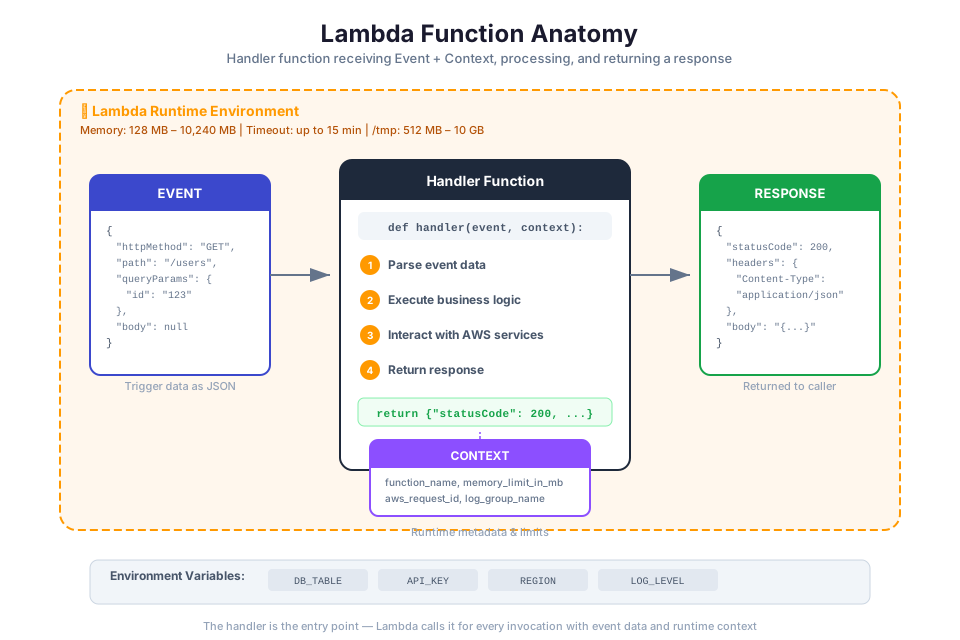
Every Lambda function has three core components: the handler function, the event object, and the context object. Understanding these components is essential for building Lambda functions.
The Handler Function
The handler is the entry point for your Lambda function. When Lambda invokes your function, it calls the handler method. The handler receives two arguments: the event object and the context object. It processes the event and returns a response.
Here is a minimal Python Lambda handler:
def lambda_handler(event, context):
    name = event.get("name", "World")
    return {
        "statusCode": 200,
        "body": f"Hello, {name}"
    }
The handler name follows the format file_name.function_name. If your code is in a file called lambda_function.py and the handler function is lambda_handler, the handler setting is lambda_function.lambda_handler.
The Event Object
The event object is a JSON document that contains the data your function processes. The structure of the event depends on the service that invokes the function. An API Gateway request produces a different event structure than an S3 notification or an SQS message.
For example, when S3 triggers a Lambda function on an object upload, the event contains the bucket name, object key, and event type:
def lambda_handler(event, context):
    bucket = event["Records"][0]["s3"]["bucket"]["name"]
    key = event["Records"][0]["s3"]["object"]["key"]
    print(f"New object uploaded: s3://{bucket}/{key}")
    return {"status": "processed"}
The Context Object
The context object provides runtime information about the current invocation. Useful properties include:
| Property | Description |
|---|---|
function_name | The name of the Lambda function |
function_version | The version of the function being executed |
memory_limit_in_mb | The amount of memory allocated to the function |
aws_request_id | A unique identifier for the current invocation |
get_remaining_time_in_millis() | Returns the number of milliseconds remaining before the function times out |
The aws_request_id is particularly useful for correlating log entries across CloudWatch Logs. Include it in your log messages to trace a single invocation through your logs.
The Execution Environment
Lambda runs your code inside an execution environment, which is an isolated container that provides the runtime, memory, and temporary disk space your function needs. The execution environment lifecycle has three phases:
- Init phase. Lambda creates the execution environment, downloads your code, initializes extensions, and runs any code outside the handler function (such as importing libraries or establishing database connections). This phase happens once per execution environment.
- Invoke phase. Lambda calls your handler function with the event and context. This phase repeats for each invocation that reuses the same execution environment.
- Shutdown phase. Lambda shuts down the execution environment after a period of inactivity. Any resources initialized during the Init phase are released.
Because the Init phase runs only once per execution environment, you can optimize performance by placing initialization code (such as database connections or SDK client creation) outside the handler:
import boto3

# Runs once during Init phase, reused across invocations
dynamodb = boto3.resource("dynamodb")
table = dynamodb.Table("Orders")

def lambda_handler(event, context):
    # Runs on every invocation
    response = table.get_item(Key={"OrderId": event["order_id"]})
    return response.get("Item")
This pattern is called connection reuse. It reduces latency on subsequent invocations because the SDK client and database connection are already initialized.
Tip: In Module 02, you learned about IAM roles. The DynamoDB client in the example above uses the Lambda function's execution role to authenticate. You do not embed credentials in the code.
Supported Runtimes
Lambda provides managed runtimes for several programming languages. A runtime is the language-specific environment that executes your handler code. AWS maintains these runtimes and applies security patches automatically, so you do not need to track CVEs for the underlying platform.
Managed Runtime Options
| Runtime | Languages | Identifier | Notes |
|---|---|---|---|
| Node.js | JavaScript, TypeScript | nodejs22.x, nodejs20.x | Includes AWS SDK for JavaScript v3 |
| Python | Python | python3.13, python3.12 | Includes boto3 (AWS SDK for Python) |
| Java | Java, Kotlin, Scala | java21, java17 | Supports SnapStart for reduced cold starts |
| .NET | C#, F#, PowerShell | dotnet8 | Runs on .NET 8 managed runtime |
| Ruby | Ruby | ruby3.4, ruby3.3 | Includes AWS SDK for Ruby |
Tip: Python and Node.js are the most common choices for Lambda functions due to their fast startup times and lightweight runtimes. Java and .NET functions tend to have longer cold start times but offer strong type systems and mature ecosystems.
Custom Runtimes
If your preferred language is not in the managed runtime list, you can build a custom runtime using the provided.al2023 runtime identifier. Custom runtimes run on Amazon Linux 2023 and implement the Lambda Runtime API. Languages such as Go, Rust, and C++ use this approach.
You can also package your function as a container image (up to 10 GB), which gives you full control over the runtime, operating system libraries, and dependencies. Container images must implement the Lambda Runtime Interface Client to communicate with the Lambda service.
Event Sources and Triggers
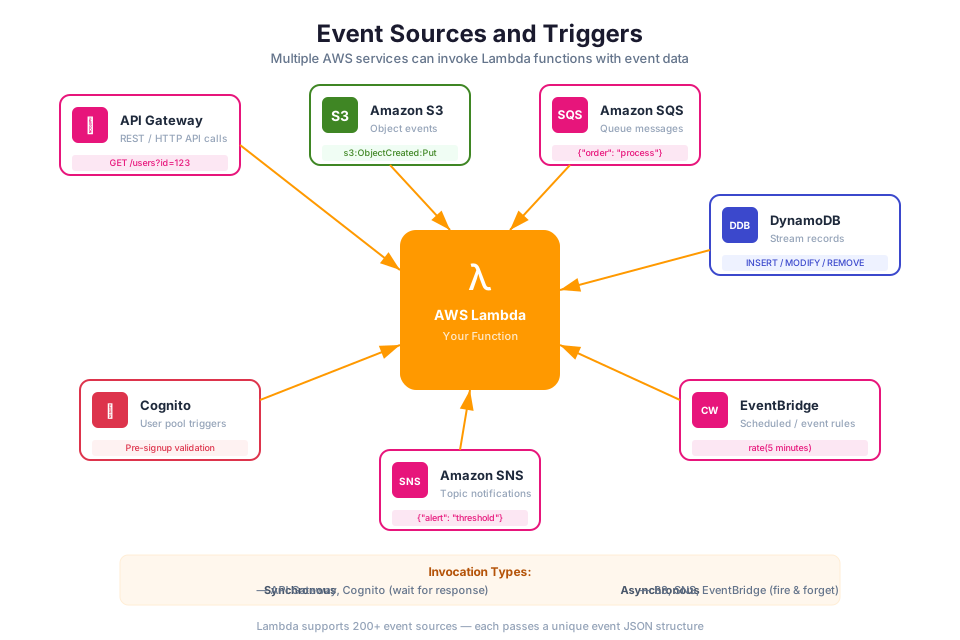
Lambda functions do not run continuously. They execute in response to events from other AWS services or external sources. The service or resource that generates the event is called an event source. Lambda supports two invocation patterns for connecting event sources to functions.
Push-Based Triggers (Direct Invocation)
With push-based triggers, the event source invokes the Lambda function directly. The source service calls the Lambda API and passes the event to your function. You configure the trigger on the source service, and you grant the source service permission to invoke your function using a resource-based policy.
Common push-based event sources:
- Amazon API Gateway: invokes Lambda on HTTP requests
- Amazon S3: invokes Lambda on object creation, deletion, or modification events (you configured S3 event notifications in Module 05)
- Amazon SNS: invokes Lambda when a message is published to a topic (you created SNS topics in Module 08)
- Amazon EventBridge: invokes Lambda when an event matches a rule pattern
- Amazon CloudWatch Events: invokes Lambda on a schedule (cron or rate expression) or in response to AWS service state changes
Poll-Based Event Source Mappings
With poll-based triggers, Lambda polls the event source for new records and invokes your function with a batch of records. You create an event source mapping that configures Lambda to poll the source at regular intervals.
Common poll-based event sources:
- Amazon SQS: Lambda polls the queue for messages (you created SQS queues in Module 08)
- Amazon DynamoDB Streams: Lambda polls the stream for new records when items in a DynamoDB table change (you created DynamoDB tables in Module 06)
- Amazon Kinesis Data Streams: Lambda polls the stream for new data records
Push vs. Poll Comparison
| Feature | Push-Based Triggers | Poll-Based (Event Source Mapping) |
|---|---|---|
| Who invokes Lambda | The source service | Lambda polls the source |
| Permission model | Resource-based policy on the function | Execution role needs read access to the source |
| Batching | Typically single event | Configurable batch size |
| Error handling | Depends on invocation type (sync/async) | Automatic retries, configurable failure destinations |
| Examples | API Gateway, S3, SNS, EventBridge | SQS, DynamoDB Streams, Kinesis |
Tip: The permission model differs between push and poll triggers. For push-based triggers, the source service needs permission to invoke your function (resource-based policy). For poll-based triggers, your function's execution role needs permission to read from the source (IAM policy on the role). Both patterns use the IAM concepts you learned in Module 02.
IAM Execution Roles for Lambda
Every Lambda function requires an execution role, which is an IAM role that grants the function permission to access AWS services and resources. When your function runs, it assumes this role and receives temporary credentials from AWS Security Token Service (STS). This is the same role assumption mechanism you learned about in Module 02.
How Lambda Assumes the Execution Role
When you create a Lambda function, you specify an IAM role with a trust policy that allows the Lambda service (lambda.amazonaws.com) to assume it. Lambda automatically assumes this role before invoking your function. Your function code uses the temporary credentials provided by the role to make AWS API calls (for example, reading from S3 or writing to DynamoDB).
Here is an example trust policy for a Lambda execution role:
{
    "Version": "2012-10-17",
    "Statement": [
        {
            "Effect": "Allow",
            "Principal": {
                "Service": "lambda.amazonaws.com"
            },
            "Action": "sts:AssumeRole"
        }
    ]
}
Applying Least Privilege
Follow the principle of least privilege when defining the permissions policy for your execution role. Grant only the specific actions your function needs on the specific resources it accesses. Avoid using wildcard permissions (*) for actions or resources.
For example, if your function reads items from a single DynamoDB table and writes logs to CloudWatch, the permissions policy should look like this:
{
    "Version": "2012-10-17",
    "Statement": [
        {
            "Effect": "Allow",
            "Action": [
                "dynamodb:GetItem",
                "dynamodb:Query"
            ],
            "Resource": "arn:aws:dynamodb:us-east-1:123456789012:table/Orders"
        },
        {
            "Effect": "Allow",
            "Action": [
                "logs:CreateLogGroup",
                "logs:CreateLogStream",
                "logs:PutLogEvents"
            ],
            "Resource": "arn:aws:logs:us-east-1:123456789012:*"
        }
    ]
}
AWS Managed Policies for Lambda
AWS provides several managed policies for common Lambda use cases:
| Managed Policy | Permissions Granted |
|---|---|
AWSLambdaBasicExecutionRole | Write logs to CloudWatch Logs |
AWSLambdaDynamoDBExecutionRole | Read from DynamoDB Streams and write logs |
AWSLambdaSQSQueueExecutionRole | Read from SQS queues and write logs |
AWSLambdaVPCAccessExecutionRole | Manage elastic network interfaces for VPC access |
Start with the appropriate managed policy for your event source, then add a custom inline policy for any additional permissions your function needs. This approach balances convenience with least privilege.
Warning: The
AWSLambdaBasicExecutionRolepolicy only grants CloudWatch Logs permissions. If your function accesses any other AWS service (S3, DynamoDB, SQS), you must add those permissions separately. A function without the correct permissions will fail with anAccessDeniedException.
Environment Variables and Configuration
Lambda provides several configuration options that control how your function executes. Understanding these settings helps you optimize performance and cost.
Environment Variables
Environment variables let you pass configuration settings to your function without modifying code. Common uses include database table names, API endpoints, feature flags, and non-sensitive configuration values.
import os

TABLE_NAME = os.environ["TABLE_NAME"]
REGION = os.environ.get("AWS_REGION", "us-east-1")

def lambda_handler(event, context):
    # Use TABLE_NAME to reference the DynamoDB table
    table = dynamodb.Table(TABLE_NAME)
    return table.get_item(Key={"id": event["id"]})
You set environment variables in the function configuration. Lambda encrypts environment variables at rest using AWS Key Management Service (AWS KMS). For sensitive values such as database passwords or API keys, use AWS Secrets Manager or AWS Systems Manager Parameter Store instead of environment variables.
Memory Configuration
Lambda memory ranges from 128 MB to 10,240 MB (10 GB), in 1 MB increments. CPU power scales proportionally with memory. A function configured with 1,769 MB receives the equivalent of one full vCPU. Increasing memory also increases CPU, which can reduce execution time for compute-bound functions.
Timeout Configuration
The timeout setting defines the maximum time your function can run before Lambda terminates it. The default timeout is 3 seconds, and the maximum is 900 seconds (15 minutes). Set the timeout based on your function's expected execution time, with a buffer for variability.
Reserved Concurrency
Reserved concurrency guarantees a set number of concurrent execution environments for your function. It also acts as a maximum concurrency limit, preventing the function from scaling beyond the reserved amount. Use reserved concurrency to protect downstream resources (such as a database) from being overwhelmed by too many concurrent Lambda invocations.
Configuration Summary
| Setting | Range | Default | Impact |
|---|---|---|---|
| Memory | 128 MB to 10,240 MB | 128 MB | More memory = more CPU = faster execution (and higher cost per ms) |
| Timeout | 1 s to 900 s | 3 s | Maximum execution time before forced termination |
| Reserved concurrency | 0 to account limit | Unreserved (shared pool) | Guarantees and caps concurrent executions |
| Ephemeral storage | 512 MB to 10,240 MB | 512 MB | Temporary disk space in /tmp |
Tip: Use the AWS Lambda Power Tuning tool to find the optimal memory setting for your function. Increasing memory often reduces execution time enough to lower overall cost, even though the per-millisecond rate is higher.
Cold Starts: Causes and Mitigation
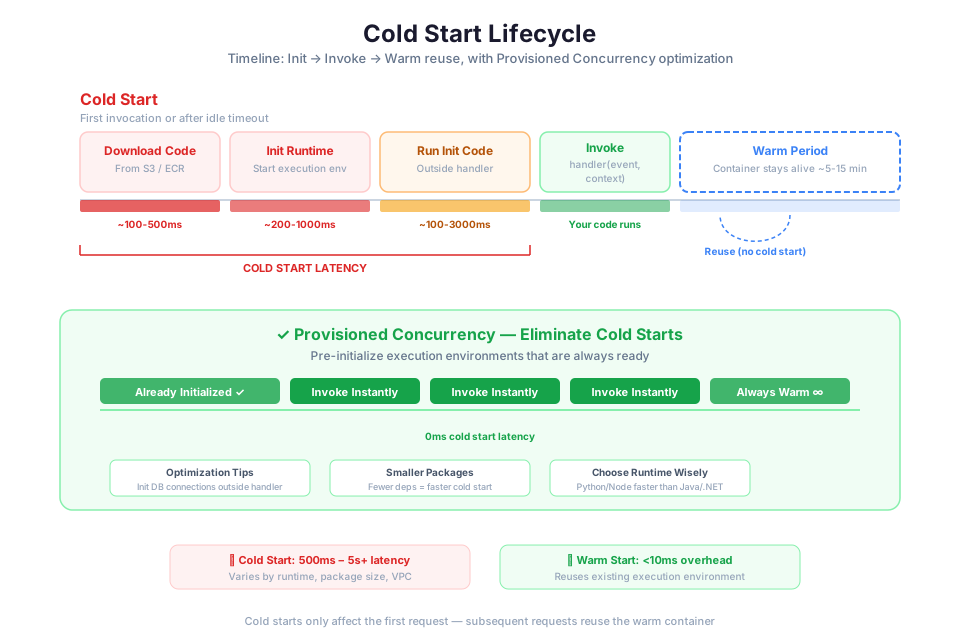
A cold start occurs when Lambda creates a new execution environment to handle an invocation. During a cold start, Lambda must download your code, initialize the runtime, and run your initialization code (the Init phase) before it can process the event. This adds latency to the first invocation in a new execution environment.
What Causes Cold Starts
Cold starts happen in several situations:
- First invocation. When a function is invoked for the first time or after a period of inactivity, no execution environment exists, so Lambda must create one.
- Scaling up. When concurrent invocations exceed the number of available execution environments, Lambda creates new environments to handle the additional load.
- Code or configuration changes. When you update your function code or configuration, Lambda creates new execution environments with the updated code.
After the initial cold start, Lambda reuses the execution environment for subsequent invocations (warm starts). Warm invocations skip the Init phase entirely, resulting in significantly lower latency.
Cold Start Duration Factors
The duration of a cold start depends on several factors:
| Factor | Impact on Cold Start |
|---|---|
| Runtime language | Interpreted languages (Python, Node.js) start faster than compiled languages (Java, .NET) |
| Deployment package size | Larger packages take longer to download and extract |
| Initialization code | More imports, SDK clients, and database connections increase Init phase duration |
| VPC configuration | Functions in a VPC require elastic network interface (ENI) attachment, adding latency |
| Memory allocation | Higher memory allocations provide more CPU, which can speed up initialization |
Mitigation Strategies
| Strategy | How It Helps | Trade-off |
|---|---|---|
| Provisioned concurrency | Pre-initializes a specified number of execution environments so they are always warm | You pay for provisioned environments even when they are idle |
| Minimize package size | Smaller packages download faster; include only the dependencies your function needs | Requires careful dependency management |
| SnapStart (Java only) | Takes a snapshot of the initialized execution environment and restores it on cold start, reducing Init phase to milliseconds | Available only for Java runtimes; requires handling uniqueness in restored state |
| Move initialization outside the handler | SDK clients and connections initialized once per execution environment, reused across invocations | No trade-off; this is a best practice for all functions |
| Choose a lightweight runtime | Python and Node.js have faster cold starts than Java and .NET | Language choice depends on team skills and ecosystem requirements |
| Reduce VPC cold starts | Use VPC endpoints instead of NAT gateways where possible; Lambda has improved VPC networking to reduce ENI attachment time | Some workloads require VPC access for security |
Tip: For most workloads, cold starts add 100 to 500 milliseconds for Python and Node.js functions, and 1 to 10 seconds for Java functions. If your use case is latency-sensitive (such as a synchronous API), consider provisioned concurrency or SnapStart. For asynchronous workloads (such as processing SQS messages), cold starts are usually acceptable.
Lambda Layers: Sharing Code and Dependencies
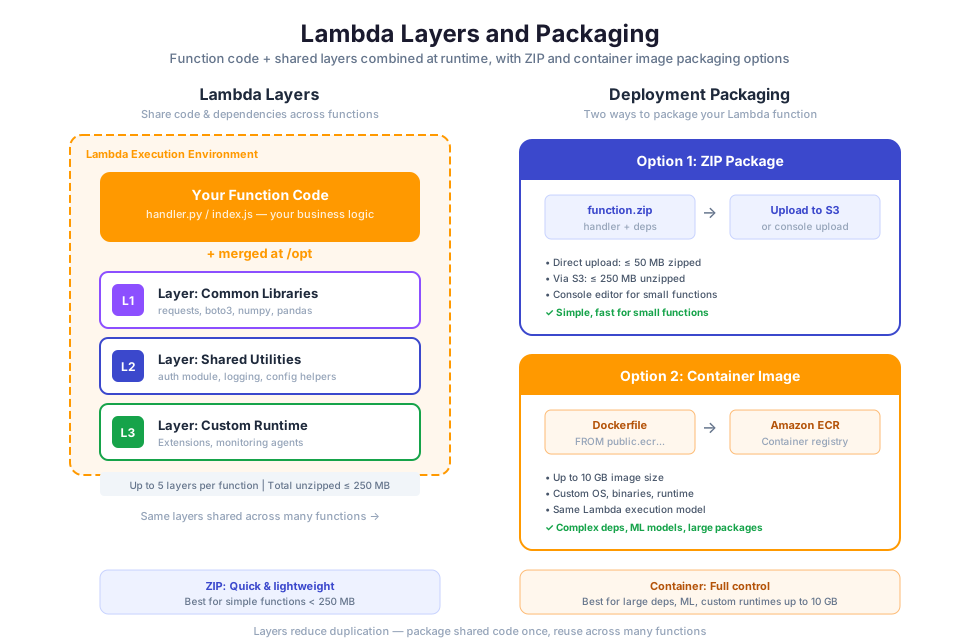
Lambda Layers provide a way to package libraries, custom runtimes, and other dependencies separately from your function code. A layer is a .zip archive that Lambda extracts into the /opt directory of the execution environment. Your function code can then import libraries from the layer as if they were installed locally.
Why Use Layers
Layers solve several common problems:
- Code sharing. If multiple functions use the same library or utility code, you package it once in a layer and attach the layer to each function. This avoids duplicating dependencies across deployment packages.
- Smaller deployment packages. By moving large dependencies into a layer, your function's deployment package contains only your application code. This speeds up deployments and reduces cold start times.
- Separation of concerns. Application code and dependencies have different update cycles. Layers let you update dependencies independently of your function code.
How Layers Work
Each layer version is an immutable snapshot identified by an Amazon Resource Name (ARN). When you attach a layer to a function, you specify the layer version ARN. A function can use up to five layers. Lambda extracts layers in order, and the contents are available in the /opt directory.
For Python, place your libraries in the python/ directory within the layer .zip file. Lambda adds /opt/python to the Python import path automatically:
my-layer.zip
└── python/
    └── requests/
        ├── __init__.py
        └── ...
aws lambda publish-layer-version \
    --layer-name my-shared-libs \
    --zip-file fileb://my-layer.zip \
    --compatible-runtimes python3.12 python3.13
You can then attach the layer to any function:
aws lambda update-function-configuration \
    --function-name my-function \
    --layers arn:aws:lambda:us-east-1:123456789012:layer:my-shared-libs:1
Tip: AWS and third-party organizations publish public layers for common libraries (such as the AWS SDK, pandas, and NumPy). Check the AWS Serverless Application Repository for pre-built layers before creating your own.
Lambda Packaging: Deployment Packages and Container Images
Lambda supports two packaging formats for deploying your function code: .zip file archives and container images. The choice depends on your dependency size, build process, and team workflow.
.zip File Archives
A .zip deployment package contains your function code and any dependencies. For Python, you install dependencies into a directory and zip everything together:
pip install requests -t package/
cp lambda_function.py package/
cd package && zip -r ../deployment.zip .
You then upload the .zip file to Lambda directly (up to 50 MB) or through Amazon S3 (up to 250 MB unzipped):
aws lambda create-function \
    --function-name my-function \
    --runtime python3.12 \
    --role arn:aws:iam::123456789012:role/my-lambda-role \
    --handler lambda_function.lambda_handler \
    --zip-file fileb://deployment.zip
Container Images
For functions with large dependencies or complex build requirements, you can package your function as a container image up to 10 GB in size. You build the image using a Dockerfile, push it to Amazon Elastic Container Registry (Amazon ECR), and configure Lambda to use the image.
AWS provides base images for each supported runtime. Here is an example Dockerfile for a Python Lambda function:
FROM public.ecr.aws/lambda/python:3.12

COPY requirements.txt .
RUN pip install -r requirements.txt

COPY lambda_function.py .

CMD ["lambda_function.lambda_handler"]
Packaging Comparison
| Feature | .zip Archive | Container Image |
|---|---|---|
| Maximum size | 250 MB (unzipped) | 10 GB |
| Build tool | zip, pip, npm | Docker |
| Registry | Lambda service or S3 | Amazon ECR |
| Custom OS libraries | Limited | Full control |
| Local testing | AWS SAM CLI (sam local invoke) | Docker (docker run) |
| Best for | Small to medium functions with standard dependencies | Large dependencies, custom binaries, existing container workflows |
Tip: Start with .zip archives for simplicity. Move to container images only when your dependencies exceed the .zip size limit or when your team already uses container-based build pipelines.
API Gateway and Lambda: Building REST APIs
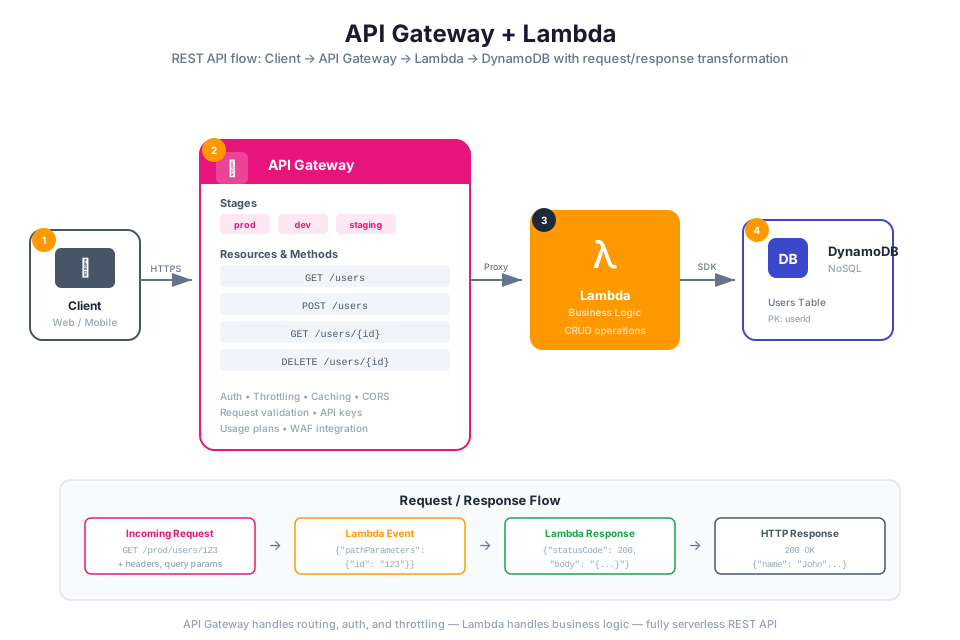
Amazon API Gateway handles the plumbing of building, deploying, and operating APIs. It manages request routing, authentication, throttling, and response formatting so your Lambda functions can focus purely on business logic. Together, API Gateway and Lambda let you run a production API without provisioning a single server.
API Types
API Gateway offers three API types:
| API Type | Protocol | Use Case |
|---|---|---|
| REST API | HTTP | Full-featured REST APIs with request validation, caching, API keys, usage plans |
| HTTP API | HTTP | Simpler, lower-cost APIs with basic routing and JWT authorization |
| WebSocket API | WebSocket | Real-time, two-way communication (chat, notifications, streaming) |
For this module, you will focus on REST APIs, which provide the most comprehensive feature set.
Lambda Proxy Integration
The most common way to connect API Gateway to Lambda is through Lambda proxy integration. With proxy integration, API Gateway passes the entire HTTP request (headers, query parameters, path parameters, body) to your Lambda function as the event object. Your function processes the request and returns a response in a specific format that API Gateway converts back to an HTTP response.
The response format for Lambda proxy integration:
def lambda_handler(event, context):
    # Extract data from the API Gateway event
    http_method = event["httpMethod"]
    path = event["path"]
    body = event.get("body")

    # Process the request
    result = {"message": f"Received {http_method} request to {path}"}

    # Return response in the required format
    return {
        "statusCode": 200,
        "headers": {
            "Content-Type": "application/json"
        },
        "body": json.dumps(result)
    }
The response must include statusCode (integer), and optionally headers (object) and body (string). If the body is JSON, you must serialize it to a string using json.dumps().
Stages and Deployments
API Gateway uses stages to manage different versions of your API. A stage is a named reference to a deployment of your API. Common stage names include dev, staging, and prod. Each stage has its own invoke URL:
https://{api-id}.execute-api.{region}.amazonaws.com/{stage}/
For example:
https://abc123.execute-api.us-east-1.amazonaws.com/prod/orders
When you make changes to your API (adding routes, modifying integrations), you create a new deployment and associate it with a stage. This allows you to test changes in a dev stage before promoting them to prod.
Building a Serverless API: The Full Picture
A typical serverless API combines API Gateway, Lambda, and DynamoDB (which you learned about in Module 06):
Client --> API Gateway --> Lambda Function --> DynamoDB Table
                                          --> CloudWatch Logs
- A client sends an HTTP request to the API Gateway endpoint.
- API Gateway routes the request to the appropriate Lambda function based on the HTTP method and path.
- The Lambda function processes the request, reads from or writes to DynamoDB, and returns a response.
- API Gateway converts the Lambda response to an HTTP response and sends it back to the client.
- Lambda automatically sends function logs to Amazon CloudWatch Logs.
The Lambda function's execution role (from Module 02) must include permissions for both DynamoDB operations and CloudWatch Logs. API Gateway needs a resource-based policy on the Lambda function to invoke it.
Warning: API Gateway has a default timeout of 29 seconds for Lambda integrations. If your Lambda function takes longer than 29 seconds, API Gateway returns a 504 Gateway Timeout error to the client, even if the function is still running. Design your API-backed functions to complete within this limit.
Instructor Notes
Estimated lecture time: 90 minutes
Common student questions:
-
Q: When should I use Lambda instead of EC2? A: Use Lambda for event-driven, short-duration workloads (under 15 minutes) with variable traffic. Lambda is ideal when you want zero infrastructure management and pay-per-invocation pricing. Use EC2 when you need long-running processes, persistent connections, full OS control, or workloads that run continuously at steady state. See the Lambda overview for use case guidance.
-
Q: How do I handle secrets like database passwords in Lambda? A: Do not store secrets in environment variables as plaintext. Use AWS Secrets Manager or AWS Systems Manager Parameter Store to store secrets, and grant your Lambda execution role permission to retrieve them. Your function fetches the secret at runtime (ideally during the Init phase for connection reuse). Environment variables are appropriate for non-sensitive configuration such as table names and feature flags. See the environment variables documentation for details.
-
Q: Why does my Lambda function time out when accessing resources in my VPC? A: Lambda functions configured for VPC access need a route to the internet (through a NAT gateway) or to AWS services (through VPC endpoints) to reach services like DynamoDB or S3. If your function is in a private subnet without a NAT gateway or VPC endpoint, API calls to AWS services will time out. Create a VPC endpoint for the service or place a NAT gateway in a public subnet. You configured VPC networking in Module 03.
-
Q: Can a Lambda function call another Lambda function? A: Yes, but avoid synchronous Lambda-to-Lambda calls when possible. Chaining synchronous invocations increases latency, cost, and error handling complexity. Instead, use asynchronous patterns: publish to an SNS topic or SQS queue (Module 08) and let the second function process the message independently. For complex multi-step workflows, use AWS Step Functions to orchestrate the sequence.
Teaching tips:
- Start by connecting serverless to the services students already know. Remind them that in Module 04 they provisioned EC2 instances and managed scaling manually. Lambda removes that operational burden entirely. Draw a comparison: EC2 is like owning a car (you maintain it), Lambda is like a taxi (you pay per ride).
- Walk through the handler, event, and context using a live demo in the AWS Console. Create a simple "Hello World" function, test it with a sample event, and show the CloudWatch Logs output. This gives students a concrete mental model before diving into event sources.
- When covering event sources, draw a diagram on the whiteboard showing push-based triggers on one side and poll-based event source mappings on the other. Have students categorize each service (S3, SQS, SNS, DynamoDB Streams) into the correct category before revealing the answer.
- For the cold start section, run a live demo: invoke a function after a period of inactivity (cold start), then invoke it again immediately (warm start). Show the difference in duration from the CloudWatch Logs. This makes the concept tangible.
Pause points:
- After the handler/event/context section: ask students to predict what the event object looks like for an S3 trigger versus an API Gateway request. Show both event structures side by side.
- After event sources: ask students which invocation pattern (push or poll) they would use for a given scenario (for example, "process uploaded images" vs. "drain a message queue").
- After IAM execution roles: ask students what happens if the execution role does not include DynamoDB permissions but the function tries to read from a table (answer:
AccessDeniedException). - After cold starts: ask students to rank the mitigation strategies by cost-effectiveness for a low-traffic API endpoint versus a high-traffic data pipeline.
Key Takeaways
- Lambda runs your code in response to events with no servers to manage, scaling automatically from zero to thousands of concurrent executions, and charging only for actual compute time consumed.
- Every Lambda function needs an IAM execution role that follows the principle of least privilege; the role grants the function permission to access specific AWS services and resources using temporary credentials.
- Cold starts add latency to the first invocation in a new execution environment; mitigate them by minimizing package size, initializing SDK clients outside the handler, and using provisioned concurrency or SnapStart for latency-sensitive workloads.
- Lambda integrates with dozens of AWS services through two patterns: push-based triggers (where the source service invokes Lambda directly) and poll-based event source mappings (where Lambda polls the source for new records).
- Combining API Gateway, Lambda, and DynamoDB creates a fully serverless REST API with no infrastructure to provision, automatic scaling, and pay-per-request pricing across all three services.
AWS Bootcamp: From Novice to Architect Author: Samuel Ogunti License: CC BY-NC 4.0