Module 19: Advanced Topics
Learning Objectives
By the end of this module, you will be able to:
- Design a multi-account strategy using AWS Organizations and AWS Control Tower, and defend the organizational unit (OU) structure based on security, compliance, and operational requirements
- Architect a content delivery solution using Amazon CloudFront with S3 and ALB origins, and evaluate caching behaviors, Origin Access Control (OAC), and invalidation strategies
- Propose caching strategies using Amazon ElastiCache (Redis) for different access patterns (cache-aside, write-through, read-through) and justify the strategy selection based on data consistency and latency requirements
- Design multi-step workflows using AWS Step Functions, and critique when to use Step Functions versus direct Lambda-to-Lambda invocation or SQS-based orchestration
- Architect a serverless analytics solution using Amazon Athena to query data in S3, and evaluate partitioning and file format strategies (Parquet, ORC) for query performance and cost optimization
- Critique emerging AWS services and capabilities (Amazon Bedrock for generative AI, AWS App Runner for simplified container deployment) and evaluate their applicability to specific workload requirements
- Create an architecture decision record (ADR) that documents a technology choice, the alternatives considered, the trade-offs evaluated, and the rationale for the decision
Prerequisites
- Completion of all modules from Phase 1 through Phase 4 (Modules 01 through 16)
- Completion of Module 17: The AWS Well-Architected Framework (the six pillars used to evaluate advanced architecture decisions)
- Completion of Module 18: Architecture Patterns on AWS (architecture patterns that these advanced services extend and enhance)
- Particular emphasis on:
- Module 05: Storage with Amazon S3 (S3 as an origin for CloudFront and a data lake for Athena)
- Module 09: Serverless Computing with AWS Lambda (Lambda functions orchestrated by Step Functions)
- Module 13: Security in Depth (Organizations SCPs and multi-account security)
Concepts
Multi-Account Strategy with AWS Organizations and Control Tower
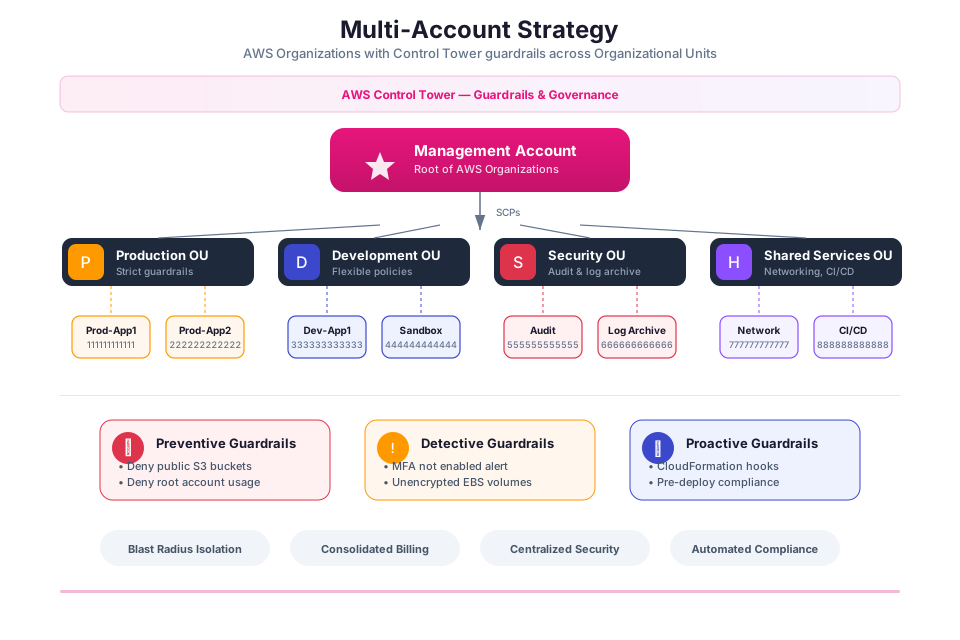
In a production environment, running everything in one AWS account is like putting all your eggs in one basket. A compromised credential in one workload could affect all others. Cost attribution becomes guesswork. Service quotas are shared across unrelated projects. AWS Organizations solves these problems by letting you create and govern multiple accounts under a single management account.
Organizational Units and Account Structure
AWS Organizations groups accounts into organizational units (OUs). A recommended OU structure for most organizations:
| OU | Purpose | Example Accounts |
|---|---|---|
| Security | Centralized security services (GuardDuty, Security Hub, CloudTrail) | Security tooling account, log archive account |
| Infrastructure | Shared networking, DNS, and CI/CD pipelines | Network account, shared services account |
| Workloads | Production and non-production application accounts | Prod-app-A, staging-app-A, dev-app-A |
| Sandbox | Experimentation accounts with limited budgets | Developer sandbox accounts |
| Suspended | Accounts pending closure | Decommissioned project accounts |
Service Control Policies (SCPs)
Service Control Policies act as permission boundaries for entire OUs. They do not grant access; they cap the maximum permissions available. Even if an IAM policy in a member account grants AdministratorAccess, an SCP on the parent OU can block specific actions.
Common SCP use cases:
| SCP | What It Prevents |
|---|---|
| Deny Region restriction | Prevents creating resources outside approved Regions |
| Deny root user actions | Prevents the root user in member accounts from performing any actions |
| Deny leaving the organization | Prevents member accounts from removing themselves from the organization |
| Require encryption | Denies creating unencrypted S3 buckets or EBS volumes |
AWS Control Tower
AWS Control Tower automates the setup of a multi-account landing zone that follows AWS best practices. It creates the organizational structure, configures centralized logging, applies guardrails (preventive and detective controls), and provides a compliance dashboard across all accounts.
If you are setting up a multi-account environment from scratch, Control Tower is the recommended starting point. It automates what would otherwise require manual configuration of Organizations, CloudTrail, Config, IAM Identity Center, and SCPs.
Tip: Even if you start with a single AWS account for learning, plan for multi-account from the beginning. Design your IaC templates (Module 11) to be account-agnostic using parameters for account IDs and Region names. This makes the transition to multi-account smoother when the time comes.
Amazon CloudFront: Global Content Delivery
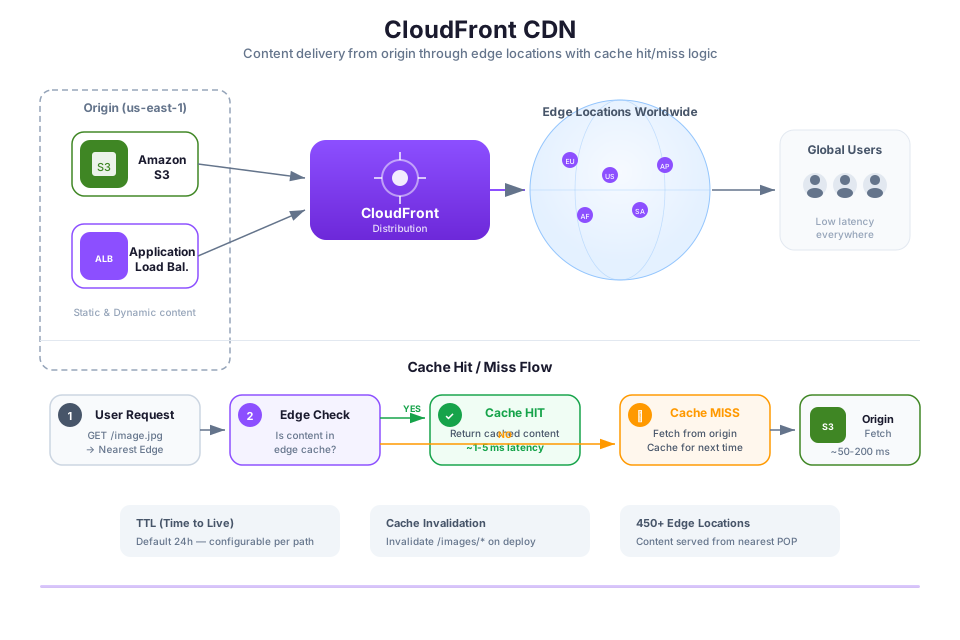
Amazon CloudFront is a CDN (Content Delivery Network) that caches your content at edge locations around the world. Instead of every user request traveling all the way to your origin server in a single Region, CloudFront serves cached copies from the nearest edge location, cutting latency dramatically for global audiences.
Request Flow
Here is what happens when a user in Tokyo requests an image from your site hosted in us-east-1:
User (Tokyo) --> CloudFront Edge (Tokyo) --> Cache hit? --> Return cached content
                                          --> Cache miss? --> Fetch from origin (us-east-1)
                                                          --> Cache at edge
                                                          --> Return to user
On the first request, CloudFront fetches from the origin and caches the response at the Tokyo edge location. Every subsequent request for that same content from nearby users is served directly from the cache, avoiding the round trip to us-east-1.
Origins and Behaviors
A CloudFront distribution defines one or more origins (where content comes from) and cache behaviors (rules for how content is cached and served).
| Origin Type | Use Case |
|---|---|
| S3 bucket | Static assets (HTML, CSS, JS, images, videos) |
| ALB | Dynamic API responses from EC2 or ECS |
| API Gateway | Serverless API responses |
| Custom HTTP server | Any HTTP/HTTPS endpoint |
Cache behaviors let you route different URL paths to different origins. For example, /static/* routes to an S3 bucket, and /api/* routes to an ALB. This is the foundation of the static website + dynamic API pattern from Module 18.
Origin Access Control (OAC)
Origin Access Control ensures that users can only reach your S3 content through CloudFront, not by hitting the bucket URL directly. OAC replaces the older Origin Access Identity (OAI) mechanism and adds support for SSE-KMS encryption.
Tip: Always use OAC when serving S3 content through CloudFront. This ensures that your S3 bucket remains private (Block Public Access enabled) while CloudFront serves the content globally. Without OAC, you would need to make the bucket public, which is a security risk.
Amazon ElastiCache: In-Memory Caching
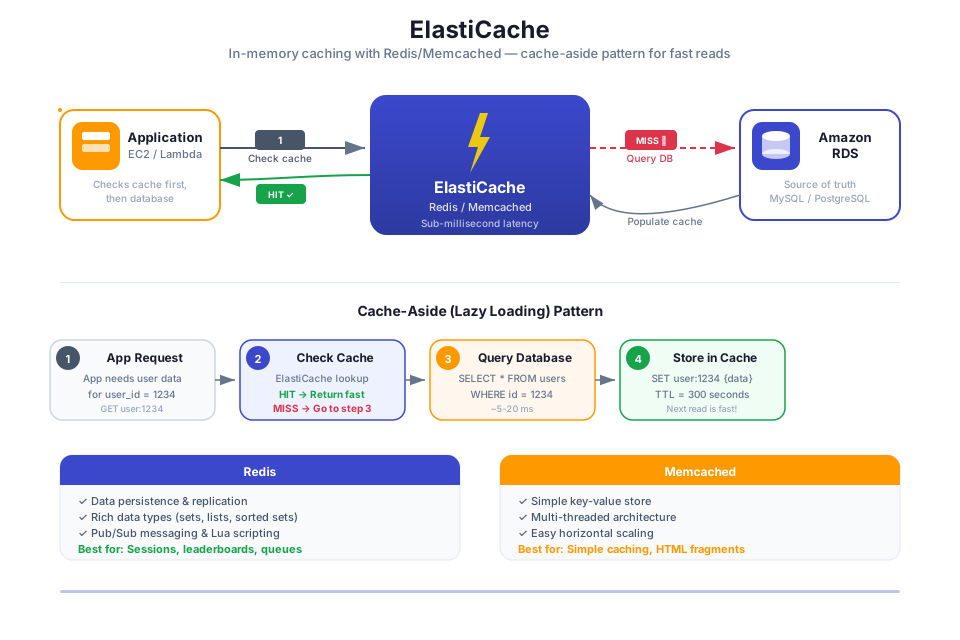
Amazon ElastiCache runs Redis or Memcached as a managed service, giving you an in-memory data store that sits between your application and your database. By caching frequently accessed data in memory (where reads take microseconds), you reduce load on your database and speed up response times significantly.
Caching Strategies
The caching strategy you choose depends on your data access patterns and consistency requirements:
| Strategy | How It Works | Best For |
|---|---|---|
| Cache-aside (lazy loading) | Application checks cache first. On miss, reads from database, writes to cache, returns data. | Read-heavy workloads where stale data is acceptable for short periods |
| Write-through | Application writes to cache and database simultaneously. Reads always hit the cache. | Workloads that require the cache to always have the latest data |
| Write-behind (write-back) | Application writes to cache only. Cache asynchronously writes to database. | Write-heavy workloads where slight data loss risk is acceptable |
| Read-through | Cache automatically fetches from database on miss (requires cache-aware data layer). | Simplified application code where the cache manages its own population |
Redis vs. Memcached
| Feature | Redis | Memcached |
|---|---|---|
| Data structures | Strings, lists, sets, sorted sets, hashes, streams | Strings only |
| Persistence | Optional (snapshots, AOF) | None |
| Replication | Multi-AZ with automatic failover | None |
| Pub/sub | Supported | Not supported |
| Use case | Session stores, leaderboards, real-time analytics, message queues | Simple key-value caching with multi-threaded performance |
Tip: Choose Redis for most use cases. It provides richer data structures, persistence, replication, and pub/sub messaging. Choose Memcached only when you need simple key-value caching with multi-threaded performance and do not need persistence or replication.
AWS Step Functions: Workflow Orchestration
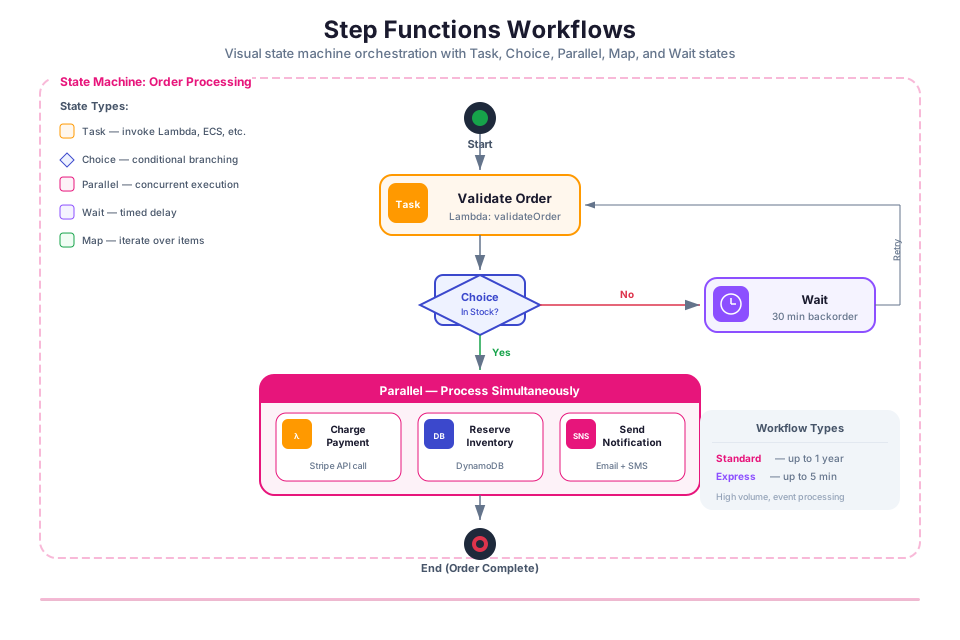
AWS Step Functions lets you define multi-step workflows as state machines, then handles execution, error recovery, and state tracking for you. Instead of writing tangled orchestration code inside Lambda functions (calling one function from another, managing retries, tracking progress), you declare the workflow visually and let Step Functions run it.
When to Use Step Functions
| Scenario | Use Step Functions | Use Direct Invocation or SQS |
|---|---|---|
| Multi-step process with branching logic | Yes (Choice states, Parallel states) | No (complex to implement in code) |
| Long-running workflow (minutes to months) | Yes (Standard Workflows, up to 1 year) | No (Lambda timeout is 15 minutes) |
| Human approval step in a workflow | Yes (Wait for Callback pattern) | Difficult to implement |
| Retry with configurable backoff per step | Yes (built-in Retry and Catch) | Must implement in each Lambda |
| Simple event-driven processing | No (overhead not justified) | Yes (SQS + Lambda is simpler) |
| High-throughput, low-latency processing | No (Standard Workflows have per-transition charges) | Yes (SQS + Lambda scales more cost-effectively) |
Workflow Types
Step Functions offers two workflow types:
| Type | Duration | Pricing | Use Case |
|---|---|---|---|
| Standard | Up to 1 year | Per state transition | Long-running, auditable workflows (order processing, ETL pipelines) |
| Express | Up to 5 minutes | Per execution + duration | High-volume, short-duration workflows (data transformation, IoT event processing) |
Tip: Use Step Functions when your workflow has branching logic, parallel execution, error handling with retries, or human approval steps. For simple "event triggers function" patterns, SQS + Lambda is simpler and cheaper.
Amazon Athena: Serverless SQL Analytics
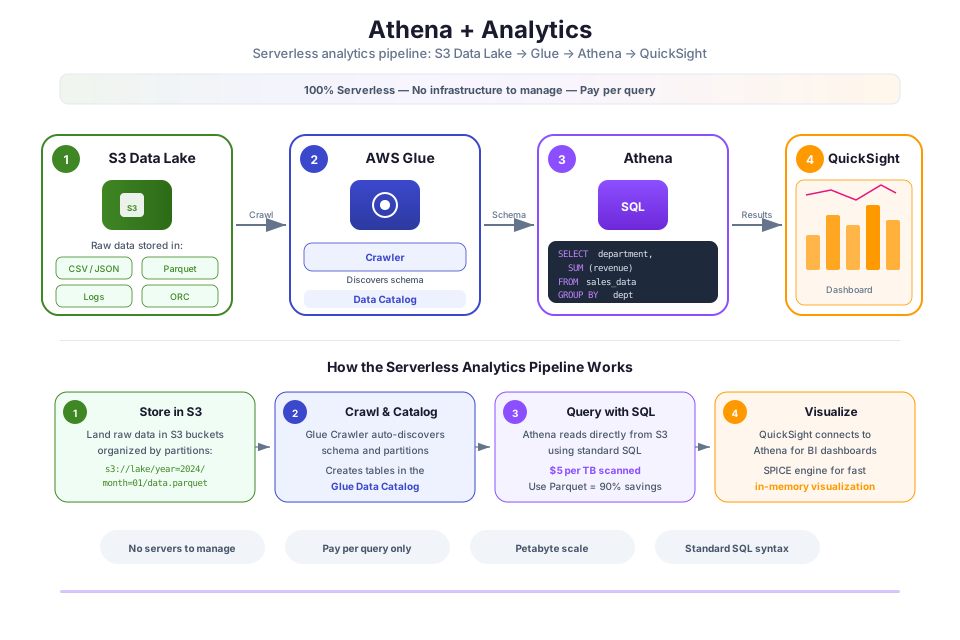
Amazon Athena lets you run standard SQL queries directly against data sitting in S3, with no database to provision or manage. You point Athena at your S3 data, define a schema in the Glue Data Catalog, and start querying. There is no infrastructure to set up or maintain.
Schema-on-Read Approach
Athena does not require you to load data into a separate database. Your data stays in S3 in its original format (CSV, JSON, Parquet, ORC, Avro). You define a table in the AWS Glue Data Catalog that maps column names and data types to the S3 location. When you run a query, Athena reads the relevant files from S3, applies the schema, and returns results.
-- Example: Query CloudTrail logs stored in S3
SELECT eventName, userIdentity.arn, sourceIPAddress, eventTime
FROM cloudtrail_logs
WHERE eventName = 'DeleteBucket'
  AND eventTime > '2026-01-01'
ORDER BY eventTime DESC
LIMIT 20;
Performance and Cost Optimization
Athena charges per query based on the amount of data scanned. Optimizing data format and partitioning reduces both cost and query time:
| Optimization | Impact |
|---|---|
| Use columnar formats (Parquet, ORC) instead of CSV/JSON | Reduces data scanned by 30% to 90% (Athena reads only the columns needed) |
| Partition data by date, Region, or other common filter keys | Athena skips partitions that do not match the query filter |
| Compress data (Snappy, GZIP, ZSTD) | Reduces data scanned and S3 storage costs |
| Use AWS Glue Data Catalog for schema management | Centralized schema registry shared across Athena, Glue, and Redshift Spectrum |
Tip: Convert your S3 data from CSV or JSON to Parquet format before querying with Athena. A simple AWS Glue ETL job or Lambda function can handle the conversion. The cost savings from reduced data scanning typically pay for the conversion within days.
Emerging Services and Capabilities
AWS continuously launches new services and features. As an architect, you should evaluate emerging services for potential applicability to your workloads. Two notable services that extend the capabilities covered in this bootcamp:
Amazon Bedrock (Generative AI)
Amazon Bedrock gives you access to foundation models (from Amazon, Anthropic, Meta, and others) through a single API, without managing any ML infrastructure. You can add text generation, summarization, image generation, and conversational AI to your applications by calling the Bedrock API from Lambda, just like you would call DynamoDB.
Bedrock integrates with the serverless patterns you learned in this bootcamp: API Gateway receives a user request, Lambda calls the Bedrock API with the prompt, and the response is returned to the user. The architecture is the same serverless API pattern from Module 18, with Bedrock as the backend service instead of DynamoDB.
AWS App Runner
AWS App Runner deploys containerized web applications without requiring you to configure a VPC, ALB, ECS cluster, or task definition. You provide a container image or source code repository, and App Runner handles building, deploying, scaling, and load balancing automatically.
App Runner sits between Lambda (fully serverless, per-invocation pricing, 15-minute timeout) and ECS Fargate (full container orchestration, VPC configuration, ALB setup). It is a good fit for teams that want container-based deployment without the operational complexity of ECS.
Tip: Evaluate new services against your existing architecture using the Well-Architected Framework pillars. Ask: does this service improve our security posture, reduce operational overhead, improve reliability, increase performance, reduce cost, or improve sustainability? If it does not clearly improve at least one pillar without degrading others, the existing approach may be sufficient.
Architecture Decision Records (ADRs)
An Architecture Decision Record (ADR) is a document that captures a significant architectural decision, the context that led to it, the alternatives considered, and the rationale for the choice. ADRs create a historical record of why the architecture looks the way it does, which is invaluable for new team members and for future reviews.
A simple ADR template:
# ADR-001: Use DynamoDB for Session Storage

## Status
Accepted

## Context
The application needs to store user session data with sub-10ms read latency.
Sessions are accessed by session ID (key-value pattern) and expire after 30 minutes.
The application runs on Lambda, which cannot maintain in-memory session state.

## Decision
Use Amazon DynamoDB with a TTL attribute for automatic session expiration.

## Alternatives Considered
- ElastiCache Redis: Provides sub-millisecond latency but requires VPC configuration
  for Lambda, adding cold start latency and operational complexity.
- RDS: Provides relational queries but is over-engineered for a simple key-value
  access pattern and adds connection management complexity for Lambda.

## Consequences
- DynamoDB provides single-digit millisecond latency for key-value reads, meeting
  the latency requirement.
- TTL handles session expiration automatically with no application code.
- DynamoDB on-demand pricing means no capacity planning for variable session load.
- Trade-off: DynamoDB does not support complex queries across sessions. If future
  requirements include session analytics, a separate analytics pipeline will be needed.
Tip: Write ADRs for decisions that are difficult to reverse, that involve significant trade-offs, or that future team members are likely to question. You do not need an ADR for every minor configuration choice.
Instructor Notes
Estimated lecture time: 90 to 105 minutes
Common student questions:
-
Q: When should I move from a single AWS account to multiple accounts? A: Move to multiple accounts when you need to isolate production from development (to prevent accidental changes), when you need separate billing for different teams or projects, when you need different security controls for different workloads, or when you are approaching service quotas in a single account. For most organizations, the answer is "as soon as you have a production workload."
-
Q: What is the difference between CloudFront and an ALB? A: An ALB distributes traffic across targets within a single Region. CloudFront caches and delivers content from edge locations worldwide. They serve different purposes and are often used together: CloudFront at the edge for caching and global delivery, ALB in the Region for load balancing across compute targets. In the static website + API pattern, CloudFront serves cached static content and forwards API requests to the ALB.
-
Q: When should I use Step Functions instead of just calling Lambda functions from other Lambda functions? A: Use Step Functions when your workflow has branching logic (if/else), parallel execution, error handling with different retry strategies per step, human approval steps, or when the total workflow duration exceeds Lambda's 15-minute timeout. For simple "function A calls function B" patterns, direct invocation or SQS is simpler. Step Functions adds value when the orchestration logic is complex enough that implementing it in Lambda code would be error-prone and hard to maintain.
-
Q: Is Athena a replacement for a data warehouse like Redshift? A: No. Athena is best for ad-hoc queries on data in S3 (log analysis, one-time reports, exploratory analytics). Redshift is better for complex, recurring analytical queries on large datasets with many joins and aggregations. Athena charges per query (based on data scanned), so frequent complex queries can become expensive. Redshift charges per cluster hour, so it is more cost-effective for heavy, continuous analytical workloads.
Teaching tips:
- Start the lecture by asking students: "If you were starting a company today, how many AWS accounts would you create?" This leads to a discussion of multi-account strategy and why a single account is insufficient for production.
- When explaining CloudFront, use a real-world analogy: CloudFront edge locations are like local warehouses for an online retailer. Instead of shipping every order from a central warehouse (the origin), the retailer stocks popular items at local warehouses (edge locations) for faster delivery.
- The Step Functions section is a good candidate for a live demo. Show the Workflow Studio visual editor, create a simple state machine with a Lambda task and a Choice state, and execute it. The visual execution history makes the concept concrete.
- For the Athena section, prepare a sample dataset in S3 (CloudTrail logs work well) and run a few queries live. Show the difference in cost and performance between querying CSV data and querying the same data in Parquet format.
- Emphasize that this module introduces services at a conceptual level. Students are not expected to master every service covered here. The goal is to know these services exist, understand their primary use cases, and be able to evaluate whether they are appropriate for a given workload.
Key Takeaways
- Multi-account strategy (AWS Organizations + Control Tower) is the standard for production environments; it provides security isolation, cost attribution, and service quota separation that a single account cannot.
- CloudFront accelerates content delivery globally by caching at edge locations; use it with OAC for secure S3 origins and with ALB origins for dynamic API content.
- ElastiCache (Redis) reduces database load and improves latency for frequently accessed data; choose the caching strategy (cache-aside, write-through) based on your consistency and latency requirements.
- Step Functions orchestrate multi-step workflows with built-in error handling, retries, and branching; use them when orchestration logic is too complex for direct Lambda invocation or SQS.
- Athena provides serverless SQL analytics on S3 data; optimize cost and performance by using columnar formats (Parquet) and partitioning data by common query filters.
AWS Bootcamp: From Novice to Architect Author: Samuel Ogunti License: CC BY-NC 4.0