Module 17: The AWS Well-Architected Framework
Learning Objectives
By the end of this module, you will be able to:
- Critique an existing AWS architecture against each of the six Well-Architected Framework pillars and identify gaps in operational excellence, security, reliability, performance efficiency, cost optimization, and sustainability
- Design improvement plans that address high-risk issues identified during a Well-Architected review, prioritizing changes by business impact and implementation effort
- Evaluate trade-offs between pillars (for example, cost vs. reliability, security vs. agility, performance vs. sustainability) and defend architectural decisions that balance competing requirements
- Propose architectural changes that satisfy multiple pillars simultaneously, demonstrating how a single design decision can improve security, reliability, and cost efficiency together
- Architect a Well-Architected review process for an organization, including review cadence, stakeholder involvement, and integration with the development lifecycle
- Critique the use of Well-Architected lenses (Serverless, SaaS, Data Analytics) to evaluate specialized workloads beyond the general framework
- Design a remediation roadmap that sequences improvements based on risk severity, dependency order, and resource availability
Prerequisites
- Completion of all modules from Phase 1 through Phase 4 (Modules 01 through 16), as this module synthesizes concepts from every prior module
- Completion of Module 13: Security in Depth (security services and practices evaluated under the Security Pillar)
- Completion of Module 14: Monitoring and Observability (monitoring practices evaluated under the Operational Excellence and Reliability Pillars)
- Completion of Module 15: Cost Optimization (cost practices evaluated under the Cost Optimization Pillar)
- Completion of Module 16: Reliability and Disaster Recovery (reliability practices evaluated under the Reliability Pillar)
Concepts
What Is the AWS Well-Architected Framework?
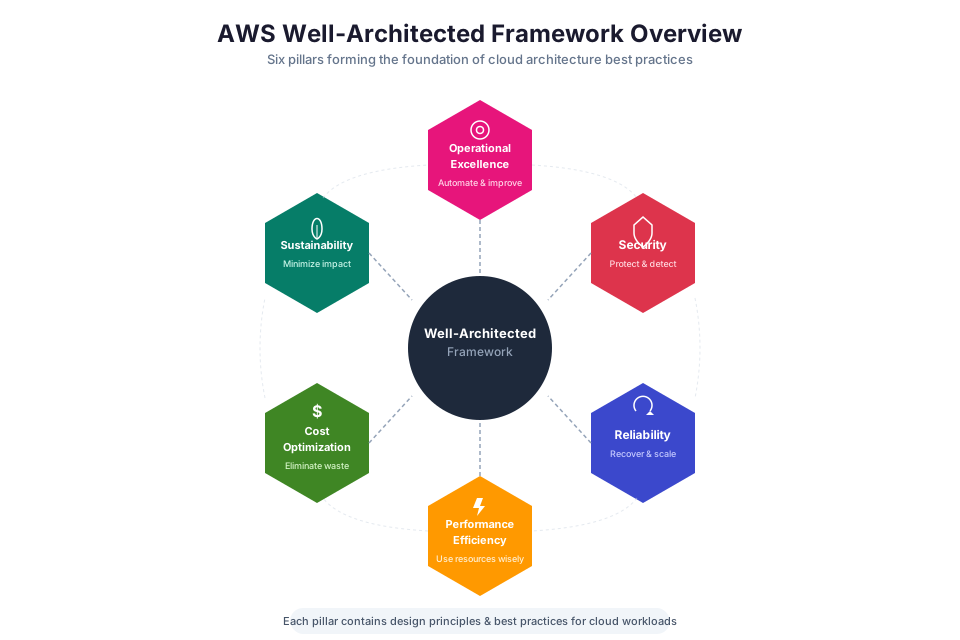
The AWS Well-Architected Framework gives you a structured way to evaluate your cloud workloads against proven design principles. Think of it as a rubric for cloud architecture: it surfaces the questions you should be asking about your system's design, and it highlights gaps you might not notice until something breaks in production.
The Framework is not a pass/fail checklist. It is a conversation tool that forces you to confront trade-offs explicitly. Every architecture involves compromises: you might spend more for better reliability, or accept slightly lower performance to cut costs significantly. The Framework ensures you make these trade-offs on purpose rather than by accident.
Six pillars organize the Framework, each covering a fundamental dimension of a well-designed workload:
| Pillar | Focus | Key Question |
|---|---|---|
| Operational Excellence | Running and monitoring systems to deliver business value | "How do you evolve your operations over time?" |
| Security | Protecting information, systems, and assets | "How do you protect your data and systems?" |
| Reliability | Recovering from failures and meeting demand | "How do you ensure your workload performs its intended function?" |
| Performance Efficiency | Using resources efficiently as demand changes | "How do you select and use the right resources?" |
| Cost Optimization | Avoiding unnecessary costs | "How do you manage and optimize costs?" |
| Sustainability | Minimizing environmental impact | "How do you reduce the environmental impact of your workloads?" |
Tip: The Framework is most valuable when used as a regular practice, not a one-time assessment. Review your architectures at key milestones: before launch, after significant changes, and on a quarterly or semi-annual schedule. Each review surfaces new improvement opportunities as your workload and AWS services evolve.
Pillar 1: Operational Excellence
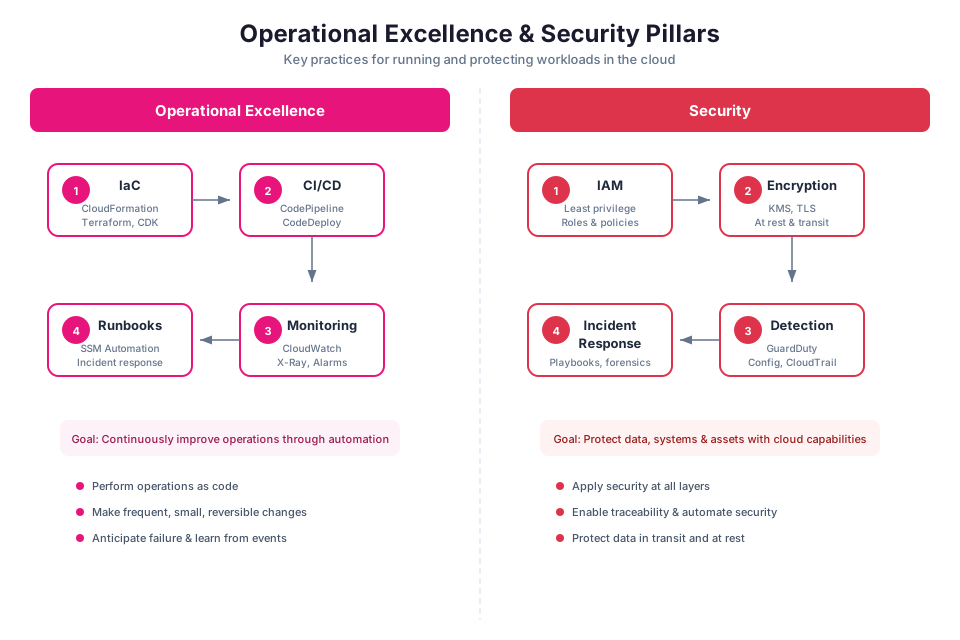
The Operational Excellence Pillar asks: "Can your team run this system effectively day after day, and improve it over time?" It covers how you deploy, monitor, and evolve your workloads.
Design principles:
- Perform operations as code. Define your infrastructure, deployment procedures, and operational tasks as code (CloudFormation, CDK, SAM) so they are repeatable, auditable, and version-controlled. You practiced this in Module 11.
- Make frequent, small, reversible changes. Deploy small changes through CI/CD pipelines (Module 12) with automated rollback. Small changes are easier to troubleshoot and less risky than large releases.
- Refine operations procedures frequently. Review and update runbooks, playbooks, and operational procedures after every incident. Automate manual steps where possible.
- Anticipate failure. Conduct pre-mortem exercises ("what could go wrong?") and chaos engineering experiments (Module 16) to identify weaknesses before they cause incidents.
- Learn from all operational failures. Conduct blameless post-incident reviews. Document what happened, why, and what changes will prevent recurrence.
Key AWS services for operational excellence: CloudFormation, CDK, CodePipeline, CloudWatch, Systems Manager, Config.
Pillar 2: Security
The Security Pillar asks: "How do you keep your data, systems, and users safe?" It covers identity management, detection, infrastructure protection, data protection, and incident response.
Design principles:
- Implement a strong identity foundation. Apply the principle of least privilege. Use IAM roles instead of long-lived credentials. Enforce MFA. Centralize identity management with IAM Identity Center. You built this foundation in Module 02.
- Maintain traceability. Log all actions and changes using CloudTrail, Config, and VPC Flow Logs. Monitor logs with GuardDuty and Security Hub. You configured these in Module 13.
- Apply security at all layers. Implement defense in depth: edge protection (WAF, Shield), network isolation (VPC, security groups), compute protection (patching, Inspector), data encryption (KMS), and identity controls (IAM policies).
- Automate security best practices. Use Config rules for compliance, Security Hub for automated checks, and Lambda for automated remediation.
- Protect data in transit and at rest. Encrypt everything with KMS. Use TLS for data in transit. Control access with bucket policies and IAM.
- Prepare for security events. Define incident response procedures. Practice them through simulations. Use GuardDuty findings to trigger automated responses.
Key AWS services for security: IAM, KMS, WAF, Shield, GuardDuty, Security Hub, Config, CloudTrail, Secrets Manager.
Pillar 3: Reliability
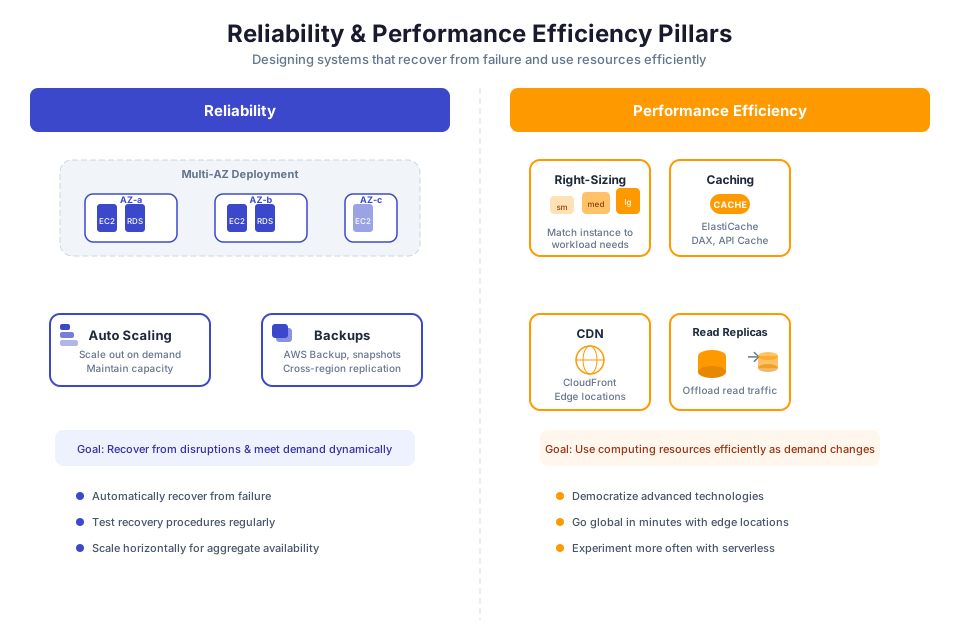
The Reliability Pillar asks: "Will this system keep working when things go wrong?" It covers fault tolerance, recovery automation, and capacity planning.
Design principles:
- Automatically recover from failure. Use health checks, Auto Scaling, and multi-AZ deployments to detect and recover from failures without manual intervention. You configured these in Modules 04, 06, and 07.
- Test recovery procedures. Use chaos engineering (AWS FIS) to validate that your recovery mechanisms work as expected. You learned this in Module 16.
- Scale horizontally. Distribute load across multiple small resources rather than relying on a single large resource. This reduces the impact of any single failure.
- Stop guessing capacity. Use Auto Scaling to match capacity to demand automatically. Monitor utilization and adjust scaling policies based on actual patterns.
- Manage change through automation. Deploy changes through CI/CD pipelines with automated testing and rollback. Avoid manual changes to production infrastructure.
Key AWS services for reliability: Auto Scaling, ALB, Route 53, RDS Multi-AZ, DynamoDB Global Tables, AWS Backup, FIS, Resilience Hub.
Pillar 4: Performance Efficiency
The Performance Efficiency Pillar asks: "Are you using the right resources for the job, and will they keep up as demand changes?" It covers resource selection, monitoring, and trade-off awareness.
Design principles:
- Use managed services to offload undifferentiated work. RDS, DynamoDB, Lambda, and ECS Fargate let AWS handle patching, scaling, and hardware management so you can focus on application logic.
- Deploy globally with minimal effort. CloudFront for content delivery, Route 53 for DNS-based routing, and DynamoDB Global Tables for multi-Region data let you reach users worldwide without managing infrastructure in every Region.
- Prefer serverless where it fits. Lambda, Fargate, API Gateway, and DynamoDB remove server management and scale automatically. You built serverless applications in Module 09.
- Experiment frequently. Test different instance types, storage configurations, and architectures. Use CloudWatch metrics to measure whether changes actually improve performance.
- Match the tool to the access pattern. Use DynamoDB for key-value lookups (not complex joins) and RDS for relational queries (not high-throughput key-value access). Understanding how a service works under the hood helps you use it effectively.
Key AWS services for performance efficiency: EC2 (Graviton instances), Lambda, Fargate, CloudFront, ElastiCache, DynamoDB, Auto Scaling.
Pillar 5: Cost Optimization
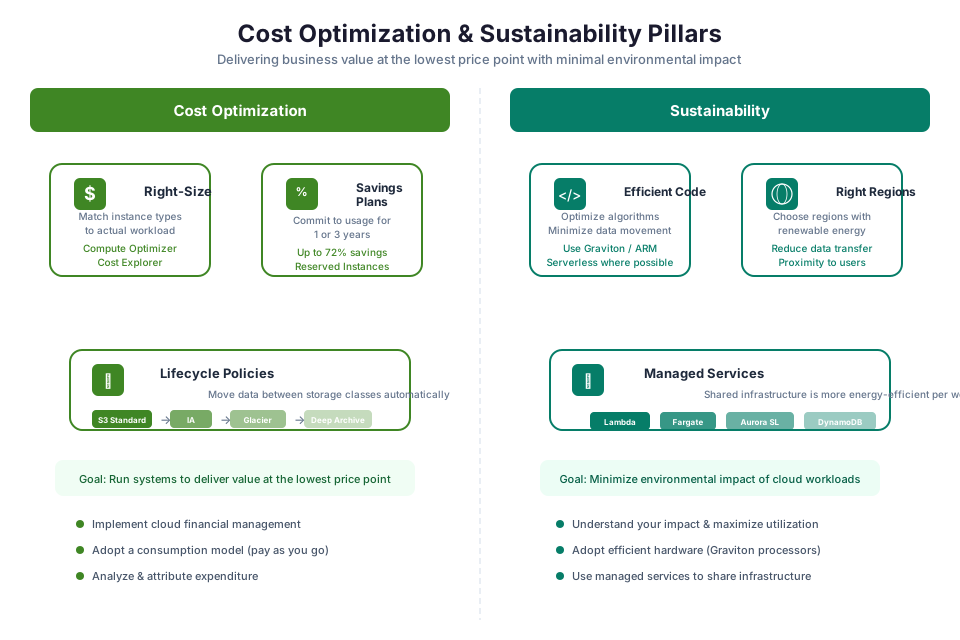
The Cost Optimization Pillar asks: "Are you spending money where it matters, and avoiding waste?" It covers financial governance, expenditure awareness, and resource right-sizing.
Design principles:
- Assign cost ownership. Use cost allocation tags to attribute spending to teams. Review spending regularly with Cost Explorer. Set budgets with alerts. You practiced these in Module 15.
- Pay only for what you consume. Use Auto Scaling to match capacity to demand. Use serverless services that charge per request rather than per hour.
- Track cost per business outcome. Measure cost per transaction or cost per user, not just total spend. A higher bill that serves more users may represent better efficiency.
- Avoid building what AWS already offers. The operational cost of managing your own servers, databases, and networking often exceeds the fees for managed services.
- Make spending visible. Tag all resources. Use Cost Explorer to spot trends. Use Compute Optimizer to identify over-provisioned resources.
Key AWS services for cost optimization: Cost Explorer, Budgets, Compute Optimizer, Savings Plans, S3 Lifecycle Policies, Trusted Advisor.
Pillar 6: Sustainability
The Sustainability Pillar asks: "How can you reduce the environmental footprint of running this workload?" It covers resource efficiency, hardware selection, and data management.
Design principles:
- Understand your impact. Measure the environmental impact of your workloads using the AWS Customer Carbon Footprint Tool.
- Establish sustainability goals. Set targets for reducing energy consumption, carbon emissions, and resource waste.
- Maximize utilization. Right-size resources to avoid idle capacity. Use Auto Scaling to match capacity to demand. Consolidate workloads onto fewer, more efficient resources.
- Adopt more efficient hardware and software. Use Graviton (ARM-based) instances, which provide better performance per watt than x86 instances. Use managed services that AWS optimizes for energy efficiency.
- Reduce the downstream impact. Minimize data transfer, compress data, and use efficient data formats to reduce network and storage energy consumption.
Key AWS services for sustainability: Graviton instances, Lambda (shared infrastructure), Auto Scaling, S3 Intelligent-Tiering, Customer Carbon Footprint Tool.
Tip: Sustainability and cost optimization often align. Right-sizing instances reduces both cost and energy consumption. Using serverless architectures eliminates idle capacity, which saves money and reduces environmental impact. When you optimize for cost, you frequently optimize for sustainability as well.
Trade-Offs Between Pillars
Every architectural decision involves trade-offs between pillars. The Well-Architected Framework helps you make these trade-offs explicitly rather than accidentally.
| Trade-Off | Example | How to Decide |
|---|---|---|
| Cost vs. Reliability | Multi-AZ deployment costs more but provides AZ-level fault tolerance | Define the business impact of downtime. If an hour of downtime costs more than the annual cost of Multi-AZ, the investment is justified. |
| Security vs. Agility | Strict IAM policies and approval workflows slow down deployments | Use automated security checks in CI/CD pipelines (Config rules, Security Hub) to maintain security without manual gates. |
| Performance vs. Cost | Provisioned IOPS EBS volumes provide consistent performance but cost more than gp3 | Measure actual I/O requirements. Use gp3 with baseline performance for most workloads; use io2 only for latency-sensitive databases. |
| Reliability vs. Cost | Multi-Region active-active provides the highest availability but doubles infrastructure cost | Match the DR strategy to the RTO/RPO requirements. Most workloads do not need multi-Region active-active. |
| Performance vs. Sustainability | Larger instances provide more headroom but waste energy when underutilized | Right-size instances based on actual utilization. Use Auto Scaling to add capacity only when needed. |
The AWS Well-Architected Tool
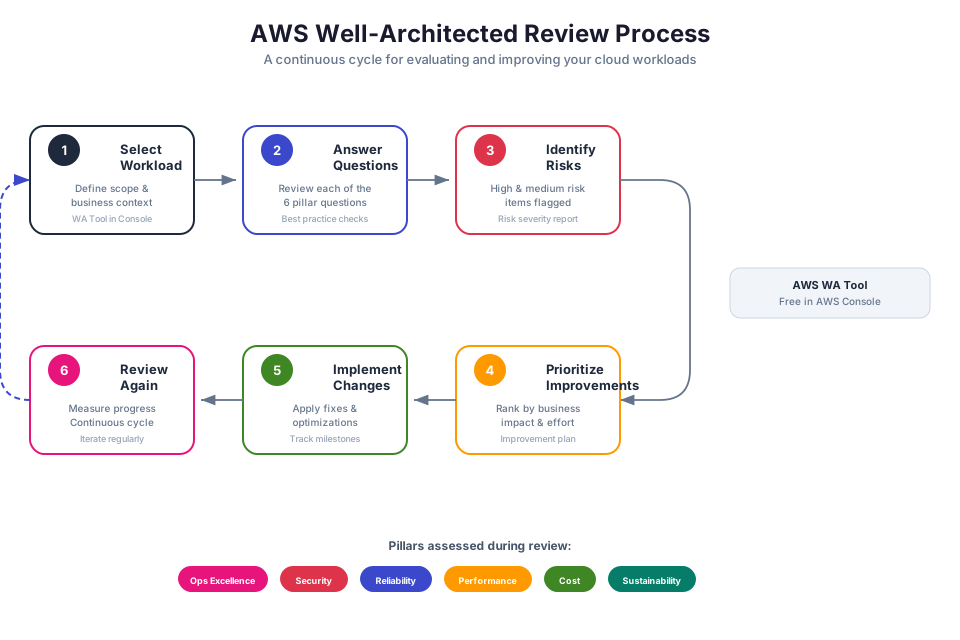
The AWS Well-Architected Tool is a free console-based service that walks you through a structured review of your workload. It asks pillar-specific questions, records your answers, flags high-risk issues (HRIs) and medium-risk issues (MRIs), and generates an improvement plan with links to relevant documentation.
How a Review Works
- Define the workload. Create a workload in the tool, specifying the name, description, environment (production, pre-production), and AWS Regions.
- Select lenses. Choose which lenses to apply. The default is the AWS Well-Architected Framework lens. You can also apply specialized lenses for serverless, SaaS, data analytics, or other workload types.
- Answer questions. For each pillar, the tool presents questions about your architecture. For each question, you select which best practices you have implemented.
- Review findings. The tool identifies HRIs (best practices not implemented that pose significant risk) and MRIs (best practices partially implemented).
- Create an improvement plan. Prioritize the identified risks and create a plan to address them. The tool provides links to relevant AWS documentation for each improvement.
- Track progress. Save milestones to track how your architecture improves over time. Re-run the review periodically to measure progress.
Well-Architected Lenses
Lenses extend the Framework with additional questions and best practices for specific workload types:
| Lens | Focus |
|---|---|
| Serverless Applications Lens | Lambda, API Gateway, Step Functions, DynamoDB workloads |
| SaaS Lens | Multi-tenant SaaS application architecture |
| Data Analytics Lens | Data lakes, ETL pipelines, analytics workloads |
| Machine Learning Lens | ML model training, inference, and MLOps |
| Container Build Lens | Container image building and CI/CD for containers |
Tip: Use the Well-Architected Tool as a living document, not a one-time assessment. Save a milestone after each review, then compare milestones over time to demonstrate continuous improvement to stakeholders.
Instructor Notes
Estimated lecture time: 90 to 105 minutes
Common student questions:
-
Q: Is the Well-Architected Framework a certification requirement? A: The Framework itself is not a certification, but its concepts are heavily tested on AWS certification exams (Solutions Architect Associate, Solutions Architect Professional, DevOps Engineer Professional). Understanding the six pillars and their design principles is essential for both certification and real-world architecture.
-
Q: How often should I run a Well-Architected review? A: At minimum, review before launching a new workload and after significant architectural changes. For production workloads, a quarterly or semi-annual review is recommended. The goal is continuous improvement, not a one-time assessment.
-
Q: What if two pillars conflict? For example, the Security Pillar says to encrypt everything, but encryption adds latency (Performance Efficiency). A: This is exactly the kind of trade-off the Framework helps you navigate. In most cases, the latency added by encryption (especially with KMS and S3 Bucket Keys) is negligible. When it is not negligible (for example, encrypting high-throughput data streams), you evaluate the business risk of not encrypting versus the performance impact, and make a documented decision. The Framework does not prescribe a single answer; it ensures you consider the trade-off consciously.
-
Q: Do I need to implement every best practice in every pillar? A: No. The Framework is aspirational, not prescriptive. Prioritize best practices based on your workload's requirements and risk tolerance. A development environment does not need the same level of reliability as a production financial trading system. Focus on high-risk issues first, then address medium-risk issues over time.
Teaching tips:
- Start the lecture by asking students to describe the architecture they built in previous modules. Write the components on the board (VPC, EC2, RDS, Lambda, ALB, S3, etc.). Then walk through each pillar and ask: "How does our architecture score on this pillar?" This grounds the abstract Framework in their concrete experience.
- When explaining trade-offs, use a real scenario: "Your startup has $5,000/month for AWS. You need to choose between Multi-AZ RDS ($200/month extra) and a larger EC2 instance for better performance ($150/month extra). You cannot afford both. Which do you choose, and why?" This forces students to practice trade-off reasoning.
- Pause after the six pillars overview for a group exercise. Assign each team a pillar and ask them to identify three improvements they would make to the bootcamp architecture for that pillar. Have each team present their findings.
- The Well-Architected Tool section is a good candidate for a live demo. Create a workload in the tool, answer a few questions, and show students the HRI/MRI output and improvement plan.
- Emphasize that the Framework is a conversation tool, not a compliance checklist. The value comes from the discussion it generates among architects, developers, and operations teams, not from achieving a perfect score.
Key Takeaways
- The AWS Well-Architected Framework provides six pillars (Operational Excellence, Security, Reliability, Performance Efficiency, Cost Optimization, Sustainability) for evaluating and improving cloud architectures.
- Every architecture involves trade-offs between pillars; the Framework helps you make these trade-offs consciously and document your reasoning.
- Use the AWS Well-Architected Tool to conduct structured reviews, identify high-risk issues, and create improvement plans that you track over time.
- The Framework is most valuable as a regular practice (quarterly or semi-annual reviews), not a one-time assessment at launch.
- Well-Architected lenses extend the Framework with specialized guidance for serverless, SaaS, data analytics, and other workload types.
AWS Bootcamp: From Novice to Architect Author: Samuel Ogunti License: CC BY-NC 4.0