Module 08: Messaging and Integration Services
Learning Objectives
By the end of this module, you will be able to:
- Demonstrate the benefits of loose coupling and asynchronous communication in distributed architectures
- Configure Amazon Simple Queue Service (Amazon SQS) queues, including Standard and First-In-First-Out (FIFO) queue types, with appropriate visibility timeout and retention settings
- Implement Amazon Simple Notification Service (Amazon SNS) topics with multiple subscription types and message filtering policies
- Use Amazon EventBridge to route events between AWS services using event buses, rules, and event patterns
- Set up a fan-out pattern by publishing from one SNS topic to multiple SQS queues
- Configure dead-letter queues (DLQs) to capture and monitor failed messages
- Demonstrate how AWS Step Functions orchestrates multi-step workflows using state machines
- Use a decision framework to choose the right integration service (SQS, SNS, or EventBridge) for a given requirement
Prerequisites
- Completion of Module 02: Identity and Access Management (IAM) and Security (IAM policies and roles for granting services permission to interact with SQS, SNS, and EventBridge)
- Completion of Module 04: Compute with Amazon EC2 (EC2 instances as message producers and consumers in decoupled architectures)
- Completion of Module 05: Storage with Amazon S3 (S3 event notifications that trigger messages to SQS, SNS, or EventBridge)
- An AWS account with console access (free tier is sufficient)
Concepts
Why Decouple? Tight Coupling vs. Loose Coupling
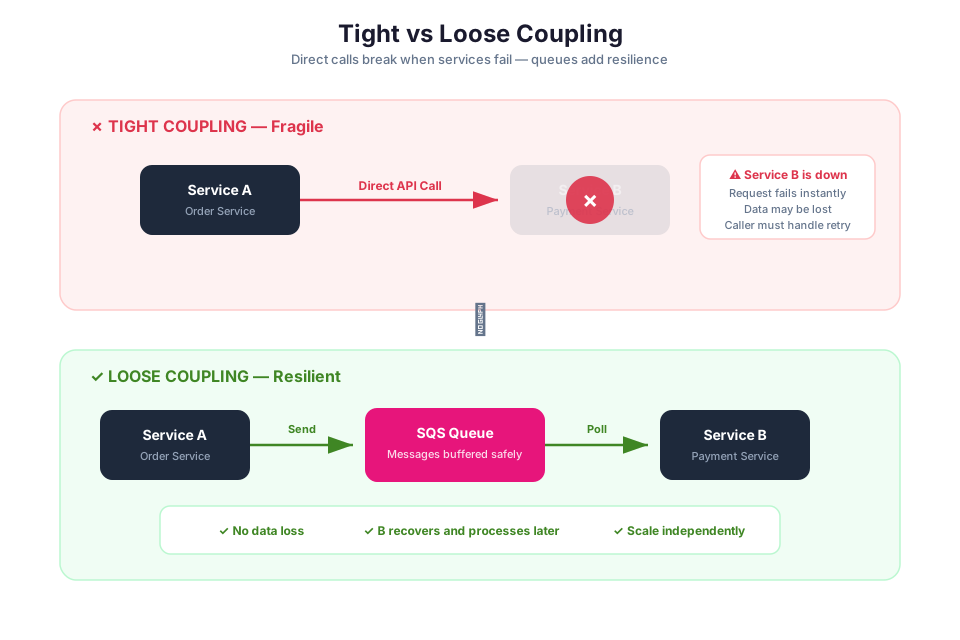
In a tightly coupled architecture, components communicate directly with each other through synchronous calls. If one component fails or slows down, the failure cascades to every component that depends on it. For example, if an EC2-based web server (Module 04) calls a backend processing service directly, and that service goes down, the web server cannot complete requests. The two components are bound together: changes to one require changes to the other, deployments must be coordinated, and scaling one component does not help if the other is the bottleneck.
Loose coupling solves these problems by placing a messaging layer between components. Instead of calling each other directly, components send messages to an intermediary (a queue, a topic, or an event bus). The sender does not need to know who receives the message, whether the receiver is available, or how long processing takes. This approach provides several benefits:
- Fault isolation. If a consumer fails, messages wait in the queue until the consumer recovers. The producer is unaffected.
- Independent scaling. You can scale producers and consumers independently. If message volume increases, add more consumers without changing the producer.
- Deployment independence. You can update, deploy, or replace a consumer without modifying the producer, as long as the message format stays compatible.
- Asynchronous processing. The producer sends a message and moves on immediately. It does not wait for the consumer to finish processing.
AWS provides several managed messaging and integration services for building loosely coupled architectures. The three primary services are Amazon SQS, Amazon SNS, and Amazon EventBridge. Each serves a different communication pattern, and choosing the right one depends on your use case.
Tip: Think of tight coupling as two people having a phone call (both must be available at the same time) and loose coupling as sending a letter through a mailbox (the sender drops it off and the recipient picks it up whenever they are ready).
Amazon SQS: Message Queues
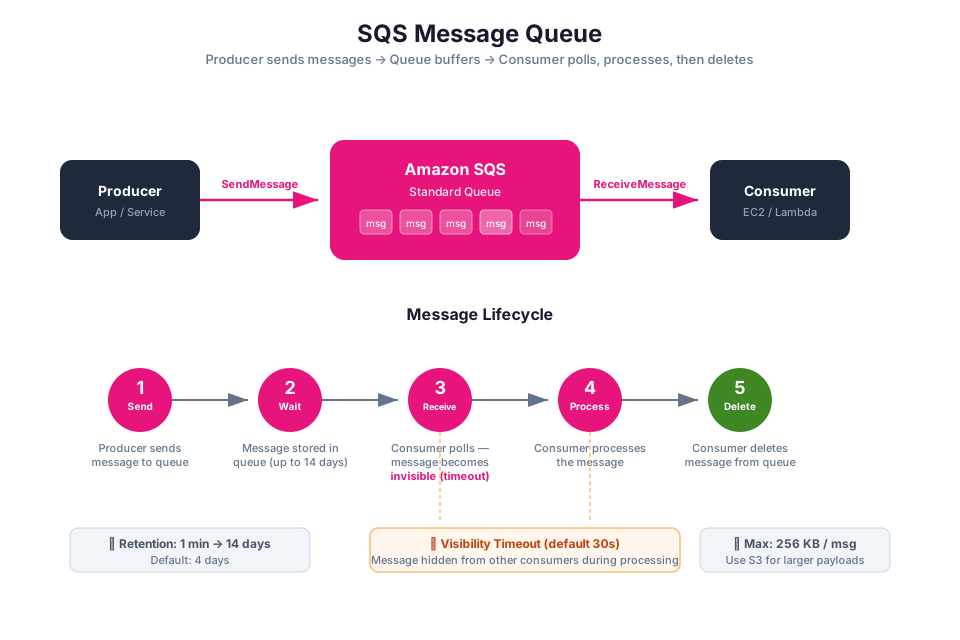
Amazon Simple Queue Service (Amazon SQS) acts as a buffer between the parts of your application that produce work and the parts that consume it. A producer drops a message into the queue and moves on; a consumer picks it up whenever it is ready. This decoupling means neither side needs to know about the other, and a failure on one side does not cascade to the other.
SQS is a pull-based service: consumers poll the queue to retrieve messages. This is different from push-based services like SNS, where messages are delivered to subscribers automatically.
How SQS Works
The basic SQS workflow has three steps:
- Send. A producer sends a message to the queue. The message body can be up to 256 KB of text (XML, JSON, or unformatted text).
- Receive. A consumer polls the queue and receives one or more messages. While a consumer is processing a message, the message remains in the queue but is hidden from other consumers (this is the visibility timeout).
- Delete. After the consumer finishes processing, it deletes the message from the queue. If the consumer fails to delete the message before the visibility timeout expires, the message becomes visible again for another consumer to process.
aws sqs create-queue --queue-name my-demo-queue --region us-east-1
Expected output:
{
    "QueueUrl": "https://sqs.us-east-1.amazonaws.com/123456789012/my-demo-queue"
}
aws sqs send-message \
    --queue-url https://sqs.us-east-1.amazonaws.com/123456789012/my-demo-queue \
    --message-body "Order 12345 placed"
Expected output:
{
    "MD5OfMessageBody": "a1b2c3d4e5f6...",
    "MessageId": "abcdef12-3456-7890-abcd-ef1234567890"
}
Standard Queues vs. FIFO Queues
SQS offers two queue types: Standard and FIFO. Each is designed for different use cases.
| Feature | Standard Queue | FIFO Queue |
|---|---|---|
| Message ordering | Best-effort ordering (messages may arrive out of order) | Strict first-in, first-out ordering guaranteed |
| Delivery guarantee | At-least-once (a message may be delivered more than once) | Exactly-once processing (duplicates are eliminated) |
| Throughput | Nearly unlimited transactions per second | Up to 3,000 messages per second with batching (higher with high-throughput mode) |
| Deduplication | No built-in deduplication | Built-in deduplication using message deduplication IDs |
| Queue name | Any valid name | Must end with .fifo suffix |
| Use cases | High-throughput workloads where occasional duplicates or out-of-order delivery is acceptable | Financial transactions, order processing, or any workflow where message order and exactly-once processing matter |
Tip: Start with a Standard queue unless your application requires strict ordering or exactly-once processing. Standard queues offer higher throughput and are simpler to configure.
Visibility Timeout
The visibility timeout is the period during which a message is hidden from other consumers after one consumer receives it. The default visibility timeout is 30 seconds, and you can set it to any value between 0 seconds and 12 hours.
If the consumer processes and deletes the message within the visibility timeout, the message is removed from the queue. If the consumer fails or takes too long, the visibility timeout expires, and the message becomes visible again for another consumer to pick up. This mechanism provides automatic retry behavior without any additional configuration.
Set the visibility timeout to at least as long as your expected processing time. If your consumer typically takes 60 seconds to process a message, set the visibility timeout to at least 60 seconds (with some buffer) to prevent the message from being processed by multiple consumers simultaneously.
Message Retention
SQS retains messages in the queue for a configurable retention period. The default retention period is 4 days, and you can set it to any value between 1 minute and 14 days. After the retention period expires, SQS automatically deletes the message, whether or not it has been processed.
Warning: If your consumers cannot keep up with the message volume, messages may expire and be lost before they are processed. Monitor the
ApproximateAgeOfOldestMessageCloudWatch metric to detect this situation.
Long Polling vs. Short Polling
When a consumer polls an SQS queue, it can use either short polling or long polling.
Short polling returns immediately, even if the queue is empty. It queries only a subset of SQS servers, which means it might return an empty response even when messages are available on other servers. Short polling can result in many empty responses, which increases costs (you pay per API request).
Long polling waits up to 20 seconds for a message to arrive before returning an empty response. It queries all SQS servers, which eliminates false empty responses. Long polling reduces the number of empty responses and lowers your SQS costs.
| Polling Type | Wait Time | Server Coverage | Empty Responses | Cost Impact |
|---|---|---|---|---|
| Short polling | 0 seconds (returns immediately) | Subset of servers | Frequent | Higher (more API calls) |
| Long polling | 1 to 20 seconds (configurable) | All servers | Rare | Lower (fewer API calls) |
To enable long polling, set the ReceiveMessageWaitTimeSeconds attribute on the queue to a value between 1 and 20:
aws sqs set-queue-attributes \
    --queue-url https://sqs.us-east-1.amazonaws.com/123456789012/my-demo-queue \
    --attributes ReceiveMessageWaitTimeSeconds=20
Tip: Always use long polling unless you have a specific reason to use short polling. Long polling reduces costs and provides more reliable message retrieval.
In Module 02, you learned about IAM policies. SQS queues use resource-based policies (similar to S3 bucket policies from Module 05) to control which AWS accounts, IAM users, or IAM roles can send messages to or receive messages from the queue. You also need IAM roles to allow AWS services (such as EC2 instances from Module 04 or Lambda functions) to interact with SQS.
Amazon SNS: Publish/Subscribe Notifications
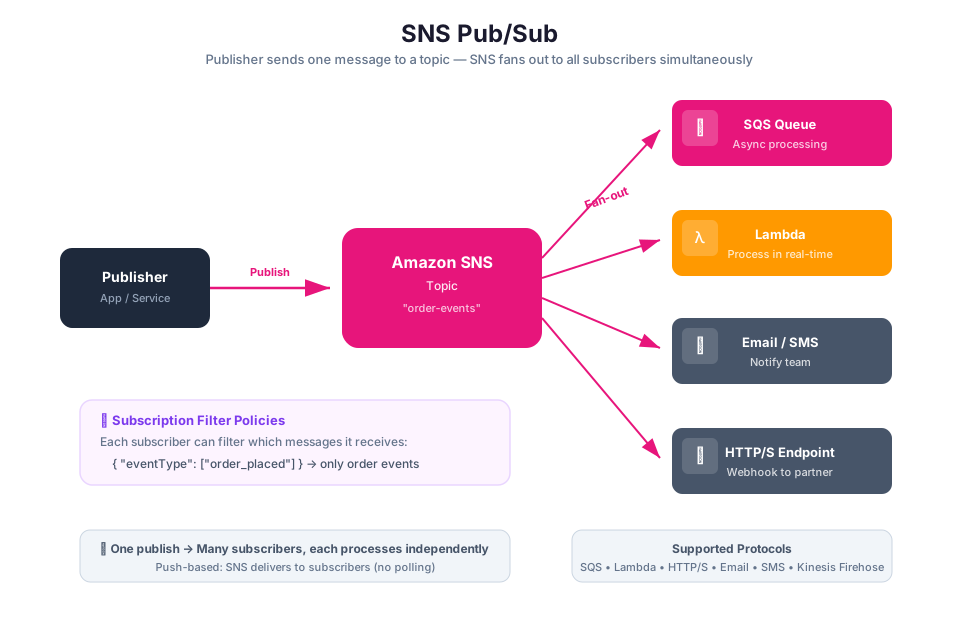
Amazon Simple Notification Service (Amazon SNS) flips the messaging model from pull to push. Instead of consumers polling for messages, SNS delivers messages directly to every subscriber the moment a publisher sends one. Think of it as a broadcast channel: one announcement reaches everyone who is listening.
The pub/sub model is useful when a single event needs to reach multiple consumers. For example, when a new order is placed, you might want to notify the fulfillment system, the analytics pipeline, and the customer notification service simultaneously. With SNS, you publish one message to a topic, and all three subscribers receive it.
Topics and Subscriptions
An SNS topic is a logical access point and communication channel. Publishers send messages to a topic, and subscribers receive messages from a topic. A topic can have multiple subscribers, and each subscriber receives a copy of every message published to the topic.
A subscription connects an endpoint to a topic. SNS supports several subscription protocols:
| Protocol | Endpoint Type | Use Case |
|---|---|---|
| Email address | Human notifications, alerts | |
| Email-JSON | Email address (JSON format) | Structured notifications for automated email processing |
| SQS | Amazon SQS queue ARN | Decoupled processing, fan-out to queues |
| Lambda | AWS Lambda function ARN | Serverless event processing |
| HTTP/HTTPS | Web endpoint URL | Webhook integrations, external systems |
| SMS | Phone number | Text message alerts |
| Platform application | Mobile push endpoint | Mobile push notifications (iOS, Android) |
aws sns create-topic --name my-demo-topic --region us-east-1
Expected output:
{
    "TopicArn": "arn:aws:sns:us-east-1:123456789012:my-demo-topic"
}
aws sns subscribe \
    --topic-arn arn:aws:sns:us-east-1:123456789012:my-demo-topic \
    --protocol email \
    --notification-endpoint student@example.com
Warning: Email and SMS subscriptions require confirmation from the subscriber before messages are delivered. Check the inbox (or phone) for a confirmation message and click the confirmation link.
Message Filtering
By default, every subscriber to an SNS topic receives every message published to that topic. Message filtering lets you attach a filter policy to a subscription so that the subscriber receives only messages that match specific criteria.
A filter policy is a JSON document that defines conditions based on message attributes. When a publisher includes attributes with a message, SNS evaluates each subscription's filter policy and delivers the message only to subscriptions whose filter policy matches the message attributes.
For example, you might have an "orders" topic with two subscribers: one for high-priority orders and one for standard orders. You attach a filter policy to each subscription that matches on an order_priority attribute:
{
    "order_priority": ["high"]
}
This subscriber receives only messages where the order_priority attribute is set to "high". Messages with other priority values are not delivered to this subscription.
Message filtering reduces the need for subscribers to receive and discard irrelevant messages, which simplifies your application logic and reduces processing costs.
SNS vs. SQS: Key Differences
| Feature | Amazon SQS | Amazon SNS |
|---|---|---|
| Model | Pull-based (consumers poll) | Push-based (messages delivered to subscribers) |
| Consumers | One consumer processes each message | Multiple subscribers receive each message |
| Message persistence | Messages stored until processed or expired | No message persistence (delivered immediately or lost) |
| Use case | Point-to-point communication, work queues | Fan-out, notifications, broadcasting |
| Retry behavior | Message becomes visible again after visibility timeout | Delivery retries based on delivery policy |
Tip: SQS and SNS are complementary, not competing. A common pattern is to use SNS to fan out messages to multiple SQS queues, where each queue feeds a different consumer. This is the fan-out pattern covered later in this module.
Amazon EventBridge: Event-Driven Routing
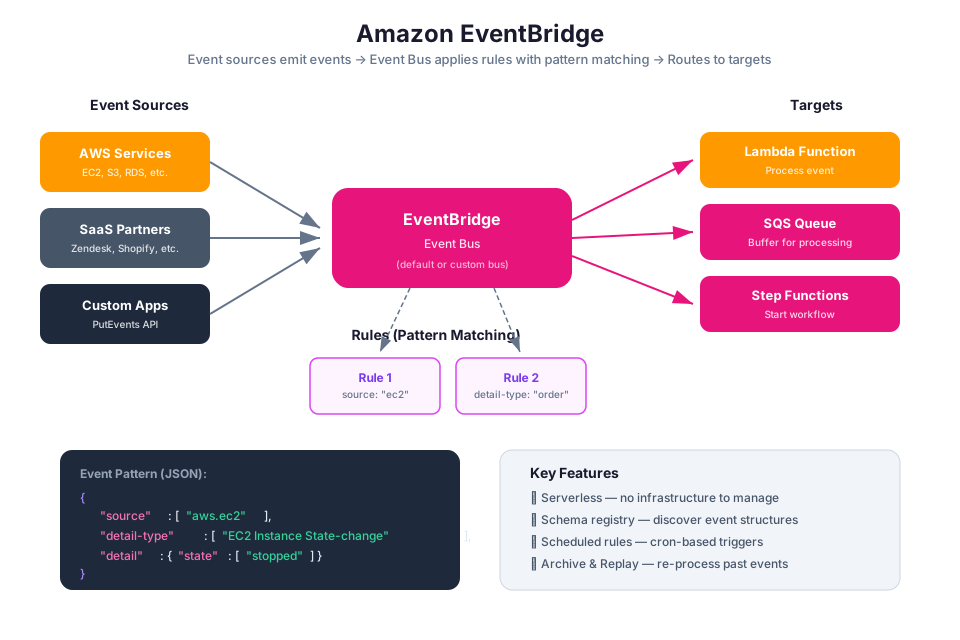
Amazon EventBridge is a serverless event router. While SQS and SNS focus on delivering messages you explicitly send, EventBridge listens for state changes across AWS services, SaaS applications, and your own code, then routes matching events to the right target based on rules you define.
EventBridge is particularly useful when different AWS services, SaaS applications, or your own code need to react to state changes. For example, when someone uploads an object to S3 (Module 05), when an EC2 instance changes state (Module 04), or when your application emits a custom business event, EventBridge can route that event to the appropriate handler without you writing any polling logic.
Event Buses
An event bus is a pipeline that receives events. EventBridge provides three types of event buses:
- Default event bus. Every AWS account has a default event bus that automatically receives events from AWS services (such as EC2 state changes, S3 events, and IAM policy changes).
- Custom event bus. You create custom event buses to receive events from your own applications or from third-party SaaS integrations.
- Partner event bus. Created automatically when you configure a SaaS partner integration (such as Datadog, Zendesk, or Shopify) to send events to EventBridge.
Rules and Event Patterns
A rule matches incoming events and routes them to targets. Each rule is associated with a single event bus and contains an event pattern that defines which events the rule matches.
An event pattern is a JSON structure that specifies the criteria for matching events. EventBridge compares the event pattern against incoming events and routes only the events that match. For example, the following event pattern matches all EC2 instance state-change events:
{
    "source": ["aws.ec2"],
    "detail-type": ["EC2 Instance State-change Notification"],
    "detail": {
        "state": ["stopped", "terminated"]
    }
}
This rule matches events where an EC2 instance transitions to the "stopped" or "terminated" state. You could use this to trigger an alert, update a database, or invoke a Lambda function.
Targets
A target is the resource that EventBridge invokes when a rule matches an event. A single rule can have up to five targets. Common targets include:
- AWS Lambda functions
- Amazon SQS queues
- Amazon SNS topics
- AWS Step Functions state machines
- Amazon Kinesis Data Streams
- Amazon CloudWatch Logs log groups
- Other event buses (for cross-account or cross-Region event routing)
EventBridge requires an IAM role with permissions to invoke the target. When you create a rule in the console, EventBridge can create this role automatically. When using the CLI or infrastructure as code, you must create the role and attach the appropriate policy.
Schema Registry
The EventBridge Schema Registry stores the structure (schema) of events in a registry. Schemas describe the fields and data types in an event, similar to how a database schema describes the columns in a table. The schema registry can automatically discover schemas from events flowing through your event bus, and you can use discovered schemas to generate code bindings for your applications.
The schema registry is useful for teams building event-driven architectures because it provides a shared contract for event formats. Producers and consumers can reference the schema to ensure they are sending and receiving events in the expected format.
EventBridge vs. SNS
| Feature | Amazon SNS | Amazon EventBridge |
|---|---|---|
| Primary model | Pub/sub (topic-based) | Event routing (rule-based) |
| Filtering | Filter policies on subscriptions | Event patterns on rules (more expressive) |
| Event sources | Your applications publish messages | AWS services, SaaS partners, and custom applications emit events |
| Schema support | No | Yes (schema registry and discovery) |
| Targets | Subscription endpoints (SQS, Lambda, HTTP, email) | 20+ AWS service targets |
| Content-based routing | Basic attribute filtering | Rich pattern matching (prefix, suffix, numeric ranges, arrays) |
| Use case | Simple fan-out, notifications | Complex event routing, cross-service integration, SaaS integration |
Tip: Use SNS when you need simple fan-out to multiple subscribers. Use EventBridge when you need content-based routing with complex event patterns, integration with AWS service events, or SaaS partner events.
SQS + SNS Fan-Out Pattern
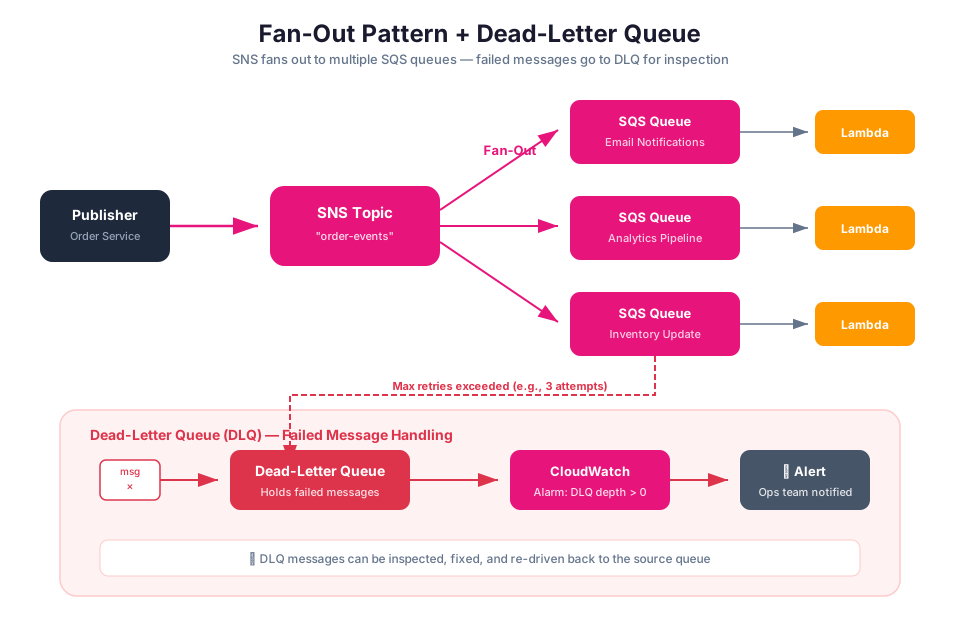
The fan-out pattern combines SNS and SQS to deliver a single message to multiple independent consumers. In this pattern, a publisher sends a message to an SNS topic, and the topic fans out the message to multiple SQS queues. Each queue feeds a separate consumer that processes the message independently.
How Fan-Out Works
Producer --> SNS Topic --> SQS Queue A --> Consumer A (order fulfillment)
                       --> SQS Queue B --> Consumer B (analytics pipeline)
                       --> SQS Queue C --> Consumer C (notification service)
- The producer publishes a message to an SNS topic.
- SNS delivers a copy of the message to every SQS queue subscribed to the topic.
- Each consumer polls its own queue and processes the message independently.
This pattern provides several advantages over direct SNS-to-Lambda or SNS-to-HTTP delivery:
- Buffering. SQS queues buffer messages, so consumers do not need to be available at the exact moment the message is published. If a consumer is temporarily down, messages accumulate in the queue and are processed when the consumer recovers.
- Independent processing rates. Each consumer processes messages at its own pace. A slow consumer does not block other consumers.
- Retry and error handling. Each queue can have its own visibility timeout, retry behavior, and dead-letter queue (covered in the next section).
Setting Up Fan-Out
To set up the fan-out pattern, you need to:
- Create an SNS topic.
- Create one or more SQS queues.
- Subscribe each SQS queue to the SNS topic.
- Configure the SQS queue's access policy to allow the SNS topic to send messages to it.
The SQS queue access policy must grant the SNS topic permission to send messages. Here is an example policy:
{
    "Version": "2012-10-17",
    "Statement": [
        {
            "Effect": "Allow",
            "Principal": {
                "Service": "sns.amazonaws.com"
            },
            "Action": "sqs:SendMessage",
            "Resource": "arn:aws:sqs:us-east-1:123456789012:my-queue",
            "Condition": {
                "ArnEquals": {
                    "aws:SourceArn": "arn:aws:sns:us-east-1:123456789012:my-topic"
                }
            }
        }
    ]
}
This policy uses the Condition element (which you learned about in Module 02) to restrict access so that only the specified SNS topic can send messages to the queue.
In Module 05, you learned about S3 event notifications. S3 can send event notifications to an SNS topic when objects are created or deleted. Combined with the fan-out pattern, a single S3 upload event can trigger multiple independent processing pipelines: one queue for thumbnail generation, another for metadata extraction, and a third for audit logging.
Tip: The fan-out pattern is one of the most common integration patterns on AWS. Whenever you need multiple systems to react to the same event, consider SNS + SQS fan-out.
Dead-Letter Queues (DLQs)
A dead-letter queue (DLQ) is a separate SQS queue that receives messages that could not be processed successfully after a specified number of attempts. DLQs are a critical component of any messaging architecture because they prevent problematic messages from blocking the processing of other messages and provide a way to investigate and reprocess failures.
How DLQs Work
When you configure a DLQ, you set a redrive policy on the source queue. The redrive policy specifies two things:
- The DLQ ARN. The Amazon Resource Name of the queue that receives failed messages.
- The maximum receive count (
maxReceiveCount). The number of times a message can be received from the source queue before it is moved to the DLQ.
For example, if you set maxReceiveCount to 3, a message that is received three times without being deleted (meaning the consumer failed to process it three times) is automatically moved to the DLQ on the fourth receive attempt.
aws sqs set-queue-attributes \
    --queue-url https://sqs.us-east-1.amazonaws.com/123456789012/my-demo-queue \
    --attributes '{
        "RedrivePolicy": "{\"deadLetterTargetArn\":\"arn:aws:sqs:us-east-1:123456789012:my-demo-dlq\",\"maxReceiveCount\":\"3\"}"
    }'
Why DLQs Matter
Without a DLQ, a "poison message" (a message that consistently fails processing) cycles through the queue indefinitely. Each time a consumer receives the message, it fails, the visibility timeout expires, and the message becomes visible again. This wastes compute resources and can delay the processing of other messages in the queue.
With a DLQ, the poison message is moved out of the main queue after the maximum receive count is reached. The main queue continues processing other messages normally, and you can inspect the DLQ to understand why the message failed.
Monitoring DLQs
You should monitor your DLQs to detect failures quickly. Use Amazon CloudWatch to set up alarms on the ApproximateNumberOfMessagesVisible metric for your DLQ. If this metric rises above zero, it means messages are failing and need investigation.
Common reasons messages end up in a DLQ:
- Malformed message body. The consumer cannot parse the message content.
- Missing dependencies. The consumer depends on an external service that is unavailable.
- Application bugs. A code error causes the consumer to throw an exception for certain message types.
- Timeout. The consumer takes longer than the visibility timeout to process the message.
DLQ Retention Period
Set the DLQ's message retention period to be longer than the source queue's retention period. This ensures that messages in the DLQ do not expire before you have a chance to investigate and reprocess them. A common practice is to set the DLQ retention period to the maximum of 14 days.
Redriving Messages
After you fix the issue that caused messages to fail, you can redrive messages from the DLQ back to the source queue for reprocessing. The SQS console provides a built-in redrive feature that moves messages from the DLQ back to the original queue.
Warning: Always configure a DLQ for every production SQS queue. Without a DLQ, failed messages can silently consume resources and delay processing of healthy messages.
Amazon SNS also supports dead-letter queues for subscription endpoints. If SNS cannot deliver a message to a subscriber (for example, a Lambda function that is throttled or an HTTP endpoint that is down), it can send the undelivered message to an SQS queue configured as the subscription's DLQ.
AWS Step Functions: Orchestrating Multi-Step Workflows
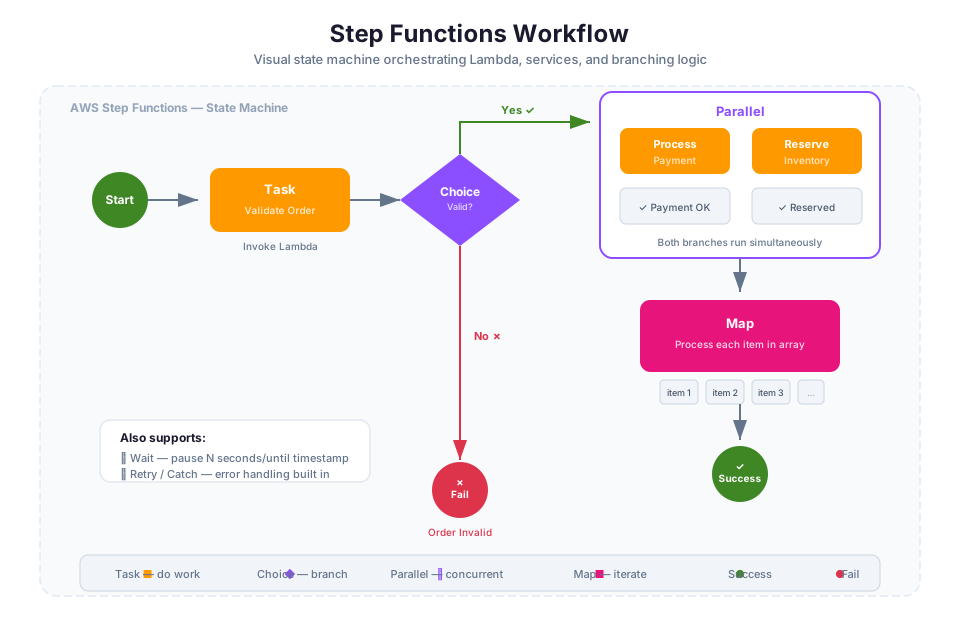
AWS Step Functions coordinates multi-step workflows across AWS services. While SQS, SNS, and EventBridge pass messages between components, Step Functions manages the sequencing, branching, error handling, and retry logic of processes that span multiple steps. If your workflow has conditional paths or needs to wait for human approval, Step Functions keeps track of where you are in the process.
A Step Functions workflow is defined as a state machine. A state machine is a collection of states, where each state performs a task, makes a decision, waits for input, or runs steps in parallel. The state machine definition specifies the order of states, the conditions for transitioning between them, and how to handle errors.
State Types
Step Functions provides several state types for building workflows:
| State Type | Purpose | Example |
|---|---|---|
| Task | Performs work by invoking an AWS service or activity | Invoke a Lambda function, run an ECS task, insert a DynamoDB item |
| Choice | Adds branching logic based on input values | Route to different processing paths based on order type |
| Parallel | Runs multiple branches simultaneously | Process payment and send notification at the same time |
| Wait | Pauses execution for a specified time | Wait 24 hours before sending a reminder |
| Pass | Passes input to output (useful for transforming data) | Add default values to the state input |
| Succeed | Marks the workflow as successfully completed | End the workflow after all steps complete |
| Fail | Marks the workflow as failed with an error message | Stop the workflow when a validation check fails |
Standard vs. Express Workflows
Step Functions offers two workflow types:
| Feature | Standard Workflow | Express Workflow |
|---|---|---|
| Maximum duration | Up to 1 year | Up to 5 minutes |
| Execution model | Exactly-once | At-least-once (asynchronous) or at-most-once (synchronous) |
| Execution history | Full history available in console | Logged to CloudWatch Logs |
| Pricing | Per state transition | Per execution, duration, and memory |
| Use case | Long-running workflows, human approval steps, order processing | High-volume, short-duration event processing, data transformation |
When to Use Step Functions
Step Functions is the right choice when you need to:
- Coordinate multiple services. For example, process an order by validating payment (Lambda), updating inventory (DynamoDB), sending confirmation (SNS), and generating an invoice (Lambda), all in a defined sequence with error handling.
- Add branching and conditional logic. Route processing based on data values without writing custom orchestration code.
- Handle errors and retries. Step Functions provides built-in retry and catch mechanisms for each state, so you do not need to implement retry logic in your application code.
- Include human approval steps. Pause a workflow and wait for a human to approve or reject before continuing (using callback patterns).
Step Functions integrates with over 200 AWS services through service integrations, including Lambda, SQS, SNS, DynamoDB, ECS, and more. You will explore Step Functions in greater depth in Module 09 when you build serverless applications.
Tip: Think of Step Functions as the conductor of an orchestra. Each musician (AWS service) plays their part, but the conductor ensures they play in the right order, handles mistakes, and keeps everything coordinated.
Choosing the Right Integration Pattern
AWS provides multiple messaging and integration services, and choosing the right one depends on your communication pattern, throughput requirements, and how many consumers need to receive each message. The following decision framework helps you select the appropriate service.
Decision Table
| Requirement | Recommended Service | Why |
|---|---|---|
| One producer, one consumer (point-to-point) | Amazon SQS | SQS provides reliable message buffering between a single producer and consumer with built-in retry via visibility timeout |
| One event, multiple consumers (fan-out) | Amazon SNS (+ SQS queues) | SNS pushes messages to all subscribers simultaneously; combine with SQS for buffered fan-out |
| Route events based on content or source | Amazon EventBridge | EventBridge provides rich event pattern matching for content-based routing |
| React to AWS service events | Amazon EventBridge | The default event bus receives events from AWS services automatically |
| Strict message ordering required | Amazon SQS FIFO | FIFO queues guarantee first-in, first-out delivery and exactly-once processing |
| Coordinate multi-step workflows | AWS Step Functions | Step Functions manages sequencing, branching, error handling, and retries across multiple services |
| Send notifications to humans | Amazon SNS | SNS supports email, SMS, and mobile push notification protocols |
| Integrate with SaaS partner events | Amazon EventBridge | EventBridge supports partner event sources from third-party SaaS providers |
Comprehensive Service Comparison
| Feature | Amazon SQS | Amazon SNS | Amazon EventBridge |
|---|---|---|---|
| Communication model | Point-to-point (queue) | Pub/sub (topic) | Event routing (bus + rules) |
| Message delivery | Pull (consumer polls) | Push (to subscribers) | Push (to targets) |
| Message persistence | Yes (up to 14 days) | No | No (but can archive events) |
| Ordering | FIFO queues only | FIFO topics only | No ordering guarantee |
| Filtering | No native filtering | Subscription filter policies | Event patterns (rich matching) |
| Max message size | 256 KB | 256 KB | 256 KB |
| Dead-letter queue support | Yes | Yes (per subscription) | Yes (per rule target) |
| AWS service event sources | No (must send explicitly) | No (must publish explicitly) | Yes (automatic from 100+ services) |
| Schema registry | No | No | Yes |
| Typical use case | Work queues, buffering | Notifications, fan-out | Event routing, service integration |
For more details on choosing between these services, see the AWS decision guide for SQS, SNS, or EventBridge.
Tip: Many production architectures use multiple integration services together. For example, EventBridge routes AWS service events to an SNS topic, which fans out to multiple SQS queues, each feeding a different consumer. Choose the combination that matches your requirements rather than trying to use a single service for everything.
Instructor Notes
Estimated lecture time: 75 minutes
Common student questions:
-
Q: When should I use SQS instead of SNS? A: Use SQS when you have a single consumer that needs to process messages at its own pace, with built-in retry and buffering. Use SNS when you need to deliver the same message to multiple consumers simultaneously. In many architectures, you use both together: SNS for fan-out and SQS for buffering at each consumer. See the SQS overview and SNS overview for details.
-
Q: What happens if a message in SQS is never processed? A: The message remains in the queue until the retention period expires (default 4 days, maximum 14 days), at which point SQS deletes it automatically. If you configure a dead-letter queue, messages that fail processing after the maximum receive count are moved to the DLQ instead of cycling indefinitely. Monitor the
ApproximateAgeOfOldestMessagemetric to detect messages that are not being processed. See the DLQ documentation for configuration details. -
Q: How is EventBridge different from SNS? They both deliver events to targets. A: The key differences are event sources and filtering. EventBridge automatically receives events from over 100 AWS services and SaaS partners without any code. SNS requires you to explicitly publish messages. EventBridge also provides richer event pattern matching (prefix, suffix, numeric ranges, arrays) compared to SNS filter policies. Use SNS for simple fan-out and human notifications. Use EventBridge for routing AWS service events and complex content-based routing. See the EventBridge overview for details.
-
Q: Do I need to worry about message ordering with SQS Standard queues? A: Standard queues provide best-effort ordering, which means messages are generally delivered in the order they are sent, but this is not guaranteed. If your application requires strict ordering (for example, processing financial transactions in sequence), use a FIFO queue. If occasional out-of-order delivery is acceptable and you need higher throughput, Standard queues are the better choice. See the Standard queues and FIFO queues documentation for a detailed comparison.
Teaching tips:
- Start by connecting to Module 04 (EC2) and Module 05 (S3). Draw a simple architecture on the whiteboard with an EC2 web server calling a backend processing service directly. Then show what happens when the backend goes down (the web server fails too). Introduce a queue between them and show how the web server can continue accepting requests while the backend recovers. This makes the value of decoupling immediately concrete.
- Use a restaurant analogy for the three services: SQS is a ticket queue at a deli counter (one customer per ticket, processed in order). SNS is a public address system (one announcement, everyone hears it). EventBridge is a smart receptionist who reads each message and routes it to the right department based on its content.
- When explaining the fan-out pattern, draw the SNS topic in the center with arrows pointing to multiple SQS queues. Walk through a concrete example: an e-commerce order event that needs to reach fulfillment, analytics, and notification systems simultaneously.
- Remind students about IAM roles from Module 02. Every integration between services requires the right permissions. Show a quick example of an SQS queue policy that allows SNS to send messages, and connect it to the bucket policy concept from Module 05.
Pause points:
- After the SQS section: ask students to explain the difference between visibility timeout and message retention period. Then ask what happens if the visibility timeout is shorter than the processing time (answer: the message becomes visible again and may be processed by another consumer, leading to duplicate processing).
- After the SNS section: ask students to describe a scenario where they would use SNS instead of SQS (answer: when multiple systems need to receive the same event, such as sending a notification to both an email address and a processing queue).
- After the fan-out pattern: ask students why you would use SQS queues behind SNS instead of subscribing Lambda functions directly to the SNS topic (answer: SQS provides buffering, independent processing rates, and DLQ support for each consumer).
- After the decision table: present a scenario and ask students which service they would choose. For example: "You need to process uploaded images in S3 with exactly one consumer. Which service?" (answer: S3 event notification to SQS, then a consumer polls the queue).
Key Takeaways
- Loose coupling through messaging services (SQS, SNS, EventBridge) improves fault isolation, independent scaling, and deployment flexibility compared to direct synchronous communication between components.
- Use SQS for point-to-point message buffering between a producer and consumer; choose Standard queues for high throughput or FIFO queues when strict ordering and exactly-once processing are required.
- Use SNS for fan-out scenarios where a single event needs to reach multiple subscribers, and combine SNS with SQS queues to add buffering and independent error handling for each consumer.
- Use EventBridge for content-based event routing, reacting to AWS service events, and integrating with SaaS partner applications; its event pattern matching is more expressive than SNS filter policies.
- Always configure dead-letter queues for production messaging workloads to capture failed messages, prevent poison messages from blocking processing, and provide visibility into failures through CloudWatch monitoring.
AWS Bootcamp: From Novice to Architect Author: Samuel Ogunti License: CC BY-NC 4.0