Module 13: Security in Depth
Learning Objectives
By the end of this module, you will be able to:
- Analyze a defense-in-depth strategy by identifying the security controls applied at each layer (edge, network, compute, application, data) and evaluating whether gaps exist
- Evaluate encryption strategies using AWS Key Management Service (AWS KMS) by comparing customer managed keys, AWS managed keys, and AWS owned keys for different compliance and control requirements
- Assess when to use AWS Secrets Manager versus AWS Systems Manager Parameter Store for storing sensitive configuration data, and justify the choice based on rotation, cost, and integration requirements
- Recommend AWS WAF rule configurations to protect web applications against common threats such as SQL injection, cross-site scripting, and volumetric attacks
- Evaluate the security posture of an AWS environment by analyzing findings from Amazon GuardDuty, AWS Security Hub, and AWS CloudTrail
- Analyze AWS CloudTrail logs to identify unauthorized API calls, policy violations, and suspicious activity patterns across an AWS account
- Assess resource compliance using AWS Config rules and recommend remediation actions for non-compliant resources
- Justify the selection of AWS Shield Standard versus AWS Shield Advanced based on an organization's DDoS protection requirements and budget constraints
Prerequisites
- Completion of Module 02: Identity and Access Management (IAM) and Security (IAM users, groups, roles, policies, and the shared responsibility model that this module builds upon)
- Completion of Module 03: Networking Basics (VPC) (VPCs, subnets, security groups, and NACLs that form the network security layer)
- Completion of Module 05: Storage with Amazon S3 (S3 bucket policies, encryption settings, and Block Public Access that you will secure further in this module)
- Completion of Module 07: Load Balancing and DNS (ALB and Route 53 configurations that WAF and Shield protect)
- Completion of Module 11: Infrastructure as Code (CloudFormation templates for defining security configurations as code)
- Familiarity with all prior modules, as this module applies security controls to infrastructure built throughout the bootcamp
Concepts
Defense in Depth: Layered Security on AWS
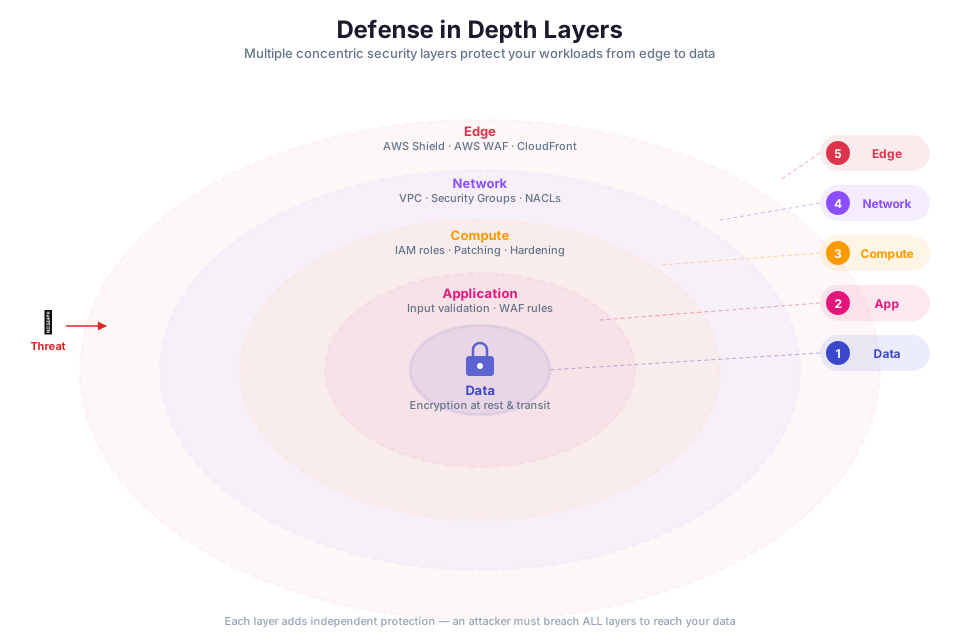
Defense in depth is a security strategy that applies multiple layers of controls throughout an IT system. Instead of relying on a single security mechanism, you place controls at every layer so that if one layer is compromised, the remaining layers continue to protect your resources. This approach is a core principle of the AWS Well-Architected Framework Security Pillar.
On AWS, defense in depth maps to distinct layers:
| Layer | AWS Controls | Purpose |
|---|---|---|
| Edge | AWS Shield, AWS WAF, Amazon CloudFront | Protect against DDoS attacks and filter malicious web traffic before it reaches your infrastructure |
| Network | VPC, security groups, NACLs, VPC Flow Logs, AWS Network Firewall | Isolate resources, control traffic flow, and log network activity |
| Compute | IAM roles, Amazon Inspector, Systems Manager Patch Manager | Control what instances and containers can do, scan for vulnerabilities, and keep software patched |
| Application | AWS WAF rules, input validation, API Gateway throttling | Protect application logic from injection attacks, abuse, and unauthorized access |
| Data | AWS KMS encryption, S3 Block Public Access, Macie, database encryption | Protect data at rest and in transit, detect sensitive data exposure |
| Identity | IAM policies, MFA, IAM Identity Center, STS temporary credentials | Control who can access what, enforce strong authentication |
| Monitoring | CloudTrail, GuardDuty, Security Hub, Config | Detect threats, audit activity, and assess compliance continuously |
In Module 02, you learned about IAM policies and the shared responsibility model. In Module 03, you configured security groups and NACLs. This module adds the remaining layers: encryption, secrets management, web application protection, threat detection, audit logging, and compliance monitoring.
Tip: No single security service protects against all threats. The strength of defense in depth comes from combining multiple services so that each compensates for the limitations of the others. A security group blocks unauthorized network access, but it cannot detect a compromised credential. GuardDuty detects compromised credentials, but it cannot block network traffic. Together, they provide comprehensive protection.
AWS KMS: Managing Encryption Keys
AWS Key Management Service (AWS KMS) gives you centralized control over the cryptographic keys that protect your data. Nearly every AWS service that supports encryption (S3, EBS, RDS, DynamoDB, Lambda, and many others) can delegate key management to KMS, so you configure encryption once and the service handles the rest.
Key Types
KMS provides three categories of keys, each with different levels of control and management responsibility:
| Key Type | Who Creates It | Who Manages It | Who Can Use It | Rotation | Cost |
|---|---|---|---|---|---|
| Customer managed keys | You | You | Controlled by your key policy | Configurable (automatic or on-demand) | Monthly fee + per-request charge |
| AWS managed keys | AWS (on your behalf) | AWS | The AWS service that created it | Automatic (every year) | No monthly fee; per-request charge |
| AWS owned keys | AWS | AWS | AWS (internal) | Varies | No charge |
Customer managed keys give you full control over the key policy, rotation schedule, and lifecycle. You can enable or disable the key, define who can use it through key policies and IAM policies, and audit its usage through CloudTrail. Use customer managed keys when compliance requirements mandate that you control the encryption keys.
AWS managed keys are created automatically when an AWS service encrypts data on your behalf (for example, when you enable default encryption on an S3 bucket without specifying a key). They are convenient but offer less control: you cannot change the key policy, and you cannot share them across accounts.
Envelope Encryption
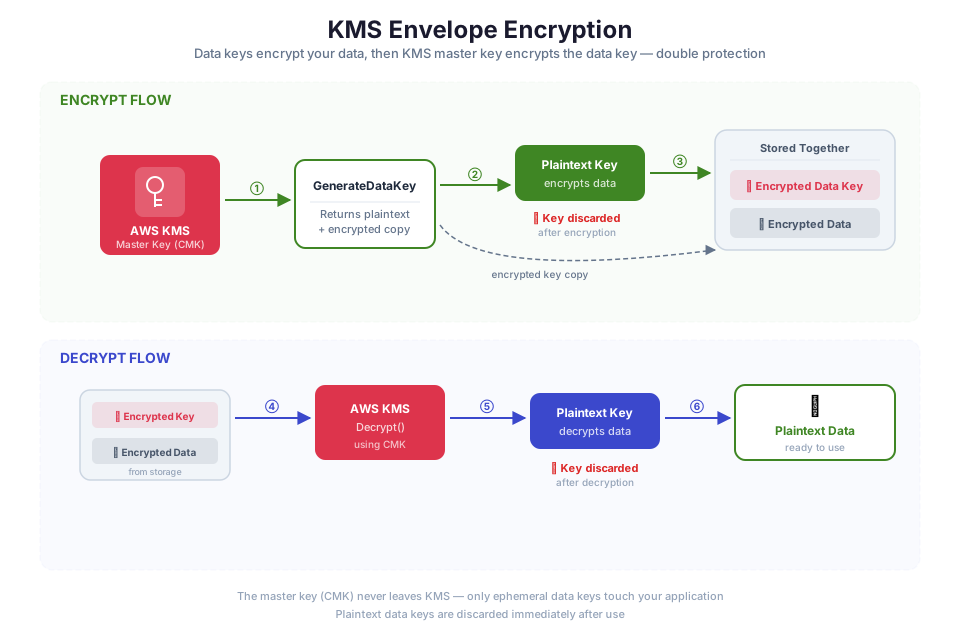
KMS uses a technique called envelope encryption to encrypt data efficiently. Instead of sending your data to KMS for encryption (which would be slow for large datasets), KMS generates a data key. The data key encrypts your data locally, and then KMS encrypts the data key itself with your KMS key. The encrypted data key is stored alongside the encrypted data.
1. You request a data key from KMS
2. KMS returns a plaintext data key + an encrypted copy of the data key
3. You encrypt your data with the plaintext data key
4. You store the encrypted data + the encrypted data key together
5. You discard the plaintext data key from memory

To decrypt:
1. You send the encrypted data key to KMS
2. KMS decrypts it and returns the plaintext data key
3. You decrypt your data with the plaintext data key
This approach means your data never leaves your application unencrypted, and KMS never sees your data. Only the small data key travels to and from KMS.
Key Rotation
Key rotation replaces the cryptographic material of a KMS key on a schedule. When you enable automatic rotation for a customer managed key, KMS generates new cryptographic material every year (or on a custom schedule). Previously encrypted data remains accessible because KMS retains all previous versions of the key material. New encryption operations use the latest key material.
Warning: Deleting a KMS key is irreversible. Once a key is deleted, all data encrypted with that key becomes permanently unrecoverable. KMS enforces a waiting period (7 to 30 days) before deletion to prevent accidental data loss. During the waiting period, you can cancel the deletion.
AWS Secrets Manager and Systems Manager Parameter Store
Applications need credentials, API keys, database passwords, and other sensitive values to function. Hardcoding these values in source code or configuration files is a security risk: anyone with access to the code repository can see the secrets. AWS provides two services for storing and retrieving secrets securely.
AWS Secrets Manager
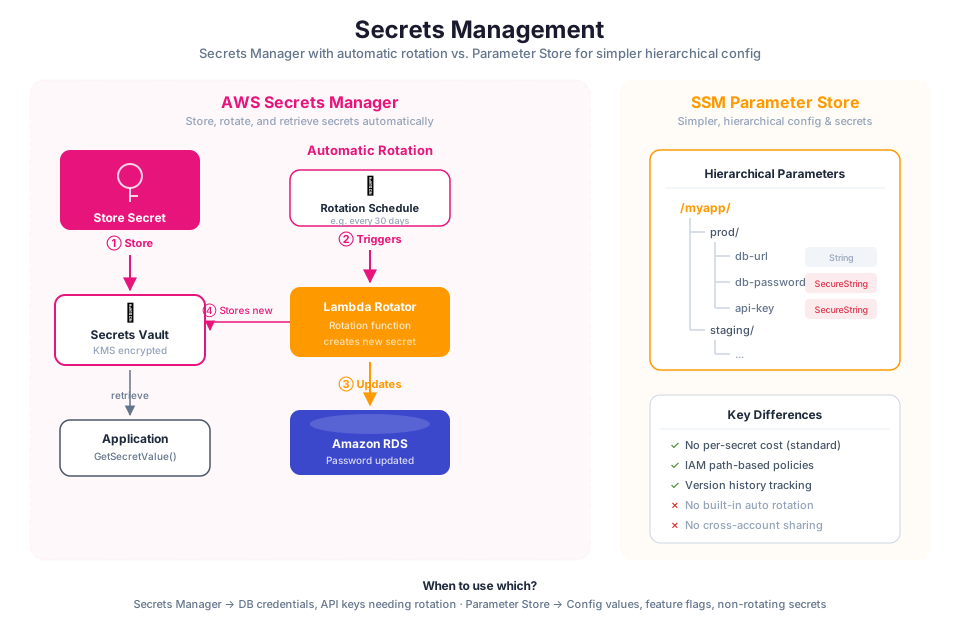
AWS Secrets Manager solves the "where do I put my passwords" problem. It stores credentials, API keys, and other sensitive values in an encrypted vault, controls access through IAM, and (critically) can rotate database passwords on a schedule without any application downtime.
Key capabilities:
- Automatic rotation. Secrets Manager can rotate secrets automatically on a schedule you define. For supported databases (RDS, Redshift, DocumentDB), Secrets Manager provides built-in rotation functions that update both the secret value and the database credential without application downtime.
- Cross-account access. You can share secrets across AWS accounts using resource-based policies, which is useful in multi-account architectures.
- Versioning. Secrets Manager maintains version stages (AWSCURRENT, AWSPREVIOUS, AWSPENDING) so that rotation can update the secret without breaking applications that are still using the previous value.
- Integration. AWS services such as RDS, ECS, and Lambda can retrieve secrets directly from Secrets Manager at runtime, eliminating the need to pass credentials through environment variables.
Systems Manager Parameter Store
AWS Systems Manager Parameter Store provides hierarchical storage for configuration data and secrets. It supports three parameter types: String, StringList, and SecureString (encrypted with KMS).
Parameter Store is simpler and less expensive than Secrets Manager, but it does not provide built-in automatic rotation. You must implement rotation logic yourself (for example, using a Lambda function on a schedule).
Choosing Between Secrets Manager and Parameter Store
| Feature | Secrets Manager | Parameter Store |
|---|---|---|
| Automatic rotation | Built-in for supported databases; custom Lambda for others | Not built-in; requires custom implementation |
| Cost | Per-secret monthly fee + per-API-call charge | Free for standard parameters; charge for advanced parameters |
| Cross-account sharing | Supported via resource-based policies | Not natively supported |
| Maximum size | 64 KB per secret | 4 KB (standard) or 8 KB (advanced) |
| Parameter hierarchy | Flat (secret name) | Hierarchical paths (e.g., /myapp/prod/db-password) |
| Best for | Database credentials, API keys, OAuth tokens that need rotation | Application configuration, feature flags, non-rotating secrets |
Tip: Use Secrets Manager for credentials that must be rotated automatically (database passwords, API keys with expiration). Use Parameter Store for configuration values that change infrequently and do not require rotation (feature flags, endpoint URLs, environment-specific settings).
AWS WAF: Protecting Web Applications
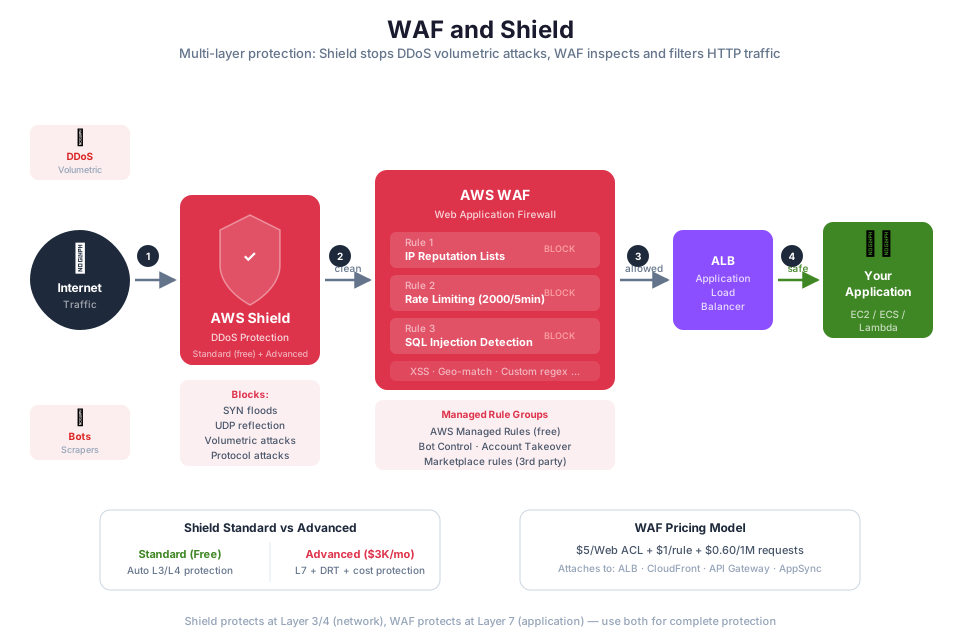
AWS WAF inspects HTTP and HTTPS traffic heading to your CloudFront distributions, Application Load Balancers, API Gateway REST APIs, or AppSync GraphQL APIs. Think of it as a bouncer that reads every incoming request and decides whether to let it through based on rules you define.
WAF evaluates incoming requests against a set of rules you define. Each rule inspects a specific aspect of the request (IP address, headers, body, URI, query string) and takes an action: allow, block, count, or CAPTCHA.
Web ACLs and Rules
A web access control list (web ACL) is the top-level WAF resource. It contains an ordered list of rules and a default action (allow or block) that applies to requests that do not match any rule.
Rules can be:
- Custom rules. Rules you write to match specific patterns in requests (for example, block requests from a specific IP range or block requests with SQL injection patterns in the query string).
- Managed rule groups. Pre-built rule sets maintained by AWS or AWS Marketplace sellers. AWS provides managed rule groups for common threats:
| Managed Rule Group | Protects Against |
|---|---|
| AWSManagedRulesCommonRuleSet | Common web exploits (OWASP Top 10) |
| AWSManagedRulesSQLiRuleSet | SQL injection attacks |
| AWSManagedRulesKnownBadInputsRuleSet | Known malicious input patterns |
| AWSManagedRulesAmazonIpReputationList | IP addresses with poor reputation |
| AWSManagedRulesBotControlRuleSet | Bot traffic (scrapers, crawlers) |
Rate-Based Rules
Rate-based rules automatically block IP addresses that exceed a request threshold within a five-minute window. This protects against brute-force login attempts, credential stuffing, and application-layer DDoS attacks. For example, you can create a rule that blocks any IP address that sends more than 2,000 requests in five minutes.
Tip: Start with the AWS managed rule groups (especially the Common Rule Set and SQL injection rules) and add custom rules as you identify application-specific threats. Managed rules are updated by AWS as new threats emerge, reducing the maintenance burden on your team.
AWS Shield: DDoS Protection
AWS Shield defends your applications against Distributed Denial of Service (DDoS) attacks, which attempt to knock your service offline by flooding it with traffic from many sources simultaneously.
Shield Standard vs. Shield Advanced
| Feature | Shield Standard | Shield Advanced |
|---|---|---|
| Cost | Free (included with all AWS accounts) | $3,000/month + data transfer fees |
| Protection scope | Network and transport layer (Layer 3/4) | Network, transport, and application layer (Layer 3/4/7) |
| Automatic mitigation | Yes, for common network-layer attacks | Yes, with enhanced detection and faster mitigation |
| DDoS Response Team | Not included | 24/7 access to the AWS Shield Response Team (SRT) |
| Cost protection | Not included | DDoS cost protection: AWS credits you for scaling charges caused by a DDoS attack |
| Visibility | Basic CloudWatch metrics | Advanced real-time metrics, attack diagnostics, and post-attack reports |
| WAF integration | Not included | AWS WAF included at no additional cost for protected resources |
Shield Standard is enabled automatically for all AWS accounts at no extra cost. It protects against the most common network-layer DDoS attacks (SYN floods, UDP reflection attacks, DNS amplification).
Shield Advanced adds application-layer (Layer 7) protection, which detects and mitigates sophisticated attacks that target your application logic (HTTP floods, slow-read attacks). It also provides the DDoS Response Team, who can help you respond to attacks in real time.
Tip: Shield Standard is sufficient for most workloads. Consider Shield Advanced if your application is a high-value target (financial services, e-commerce, government), if you need 24/7 DDoS response support, or if you want cost protection against DDoS-related scaling charges.
AWS CloudTrail: Auditing API Activity
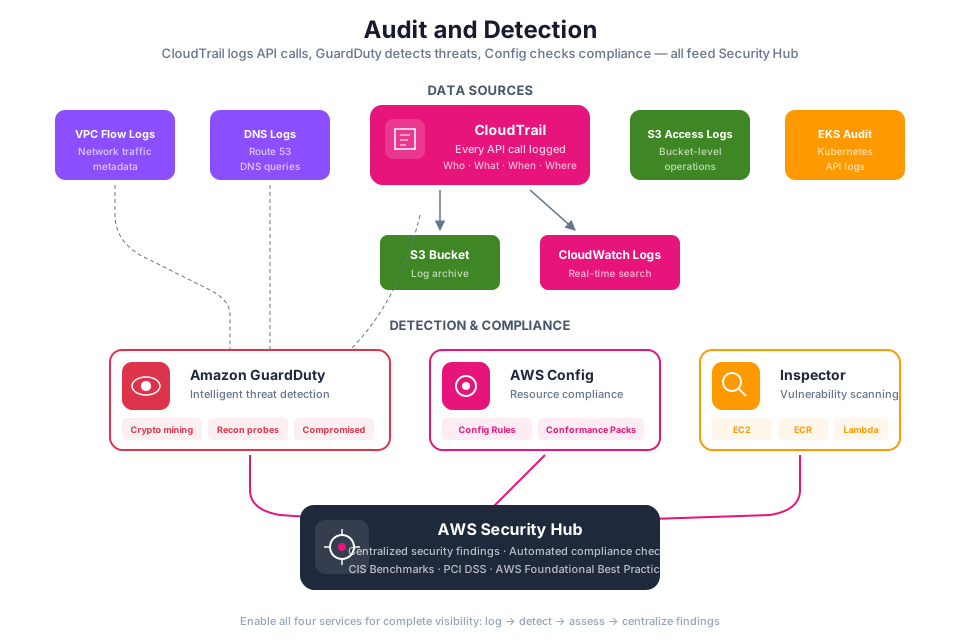
AWS CloudTrail keeps a detailed log of every API call in your account. Whenever a user, role, or service interacts with AWS (creating a bucket, launching an instance, changing a policy), CloudTrail captures who did it, what they did, which resources were affected, when it happened, and from which IP address.
Event Types
CloudTrail captures three types of events:
| Event Type | What It Records | Examples |
|---|---|---|
| Management events | Control plane operations that create, modify, or delete AWS resources | CreateBucket, RunInstances, AttachRolePolicy, DeleteStack |
| Data events | Data plane operations on resources | GetObject and PutObject on S3, Invoke on Lambda |
| Insights events | Unusual API activity patterns | Sudden spike in RunInstances calls, unusual DeleteBucket activity |
Management events are logged by default in the CloudTrail Event History (90-day retention, no cost). To retain events longer or to capture data events, you must create a trail that delivers events to an S3 bucket, CloudWatch Logs, or CloudTrail Lake.
CloudTrail Lake
CloudTrail Lake is a managed data lake that lets you run SQL queries on your CloudTrail events. Instead of downloading log files from S3 and parsing JSON, you can query events directly:
SELECT eventName, userIdentity.arn, sourceIPAddress, eventTime
FROM my_event_data_store
WHERE eventName = 'DeleteBucket'
  AND eventTime > '2026-01-01'
ORDER BY eventTime DESC
Warning: Data events (S3 object-level operations, Lambda invocations) can generate a very high volume of log entries and incur significant costs. Enable data events selectively for buckets or functions that contain sensitive data, not for all resources in the account.
Amazon GuardDuty: Intelligent Threat Detection
Amazon GuardDuty acts as an always-on security analyst for your AWS accounts. It ingests data from CloudTrail management events, VPC Flow Logs, DNS logs, and optionally S3 data events, EKS audit logs, and RDS login activity, then applies machine learning and threat intelligence to surface suspicious behavior without requiring you to write detection rules.
When GuardDuty detects suspicious activity, it generates a finding. Each finding includes:
- Finding type. A categorized description of the threat (for example,
UnauthorizedAccess:IAMUser/InstanceCredentialExfiltration.OutsideAWS). - Severity. Low, Medium, or High, indicating the potential impact.
- Affected resource. The AWS resource involved (EC2 instance, IAM user, S3 bucket).
- Action details. The specific API calls, network connections, or DNS queries that triggered the finding.
Common finding categories:
| Category | Example Findings |
|---|---|
| Unauthorized access | Compromised credentials used from an unusual location, API calls from a known malicious IP |
| Cryptocurrency mining | EC2 instance communicating with known cryptocurrency mining pools |
| Data exfiltration | Unusual volume of data transferred from an S3 bucket to an external IP |
| Malware | EC2 instance communicating with a known command-and-control server |
GuardDuty requires no infrastructure to deploy. You enable it with a single click (or API call), and it begins analyzing data immediately. There are no agents to install, no rules to write, and no log sources to configure manually.
Tip: Enable GuardDuty in every AWS Region, even Regions where you do not run workloads. An attacker who gains access to your account could launch resources in any Region. GuardDuty in unused Regions detects this activity.
AWS Config: Resource Compliance and Configuration History
AWS Config tracks the configuration state of your resources over time and evaluates them against compliance rules. While CloudTrail tells you who did what, Config tells you what the resource looked like before and after, and whether its current state meets your organization's standards.
Config Rules
A Config rule represents a desired configuration state for a resource. AWS provides over 300 managed rules that cover common compliance requirements:
| Managed Rule | What It Checks |
|---|---|
s3-bucket-server-side-encryption-enabled | S3 buckets have default encryption enabled |
ec2-instance-no-public-ip | EC2 instances do not have public IP addresses |
iam-root-access-key-check | The root account does not have active access keys |
rds-instance-public-access-check | RDS instances are not publicly accessible |
cloudtrail-enabled | CloudTrail is enabled in the account |
encrypted-volumes | EBS volumes are encrypted |
When a resource configuration changes, Config evaluates the resource against all applicable rules and updates the compliance status. You can view compliance results in the Config console, export them to S3, or send non-compliance notifications through Amazon SNS.
Configuration History and Timeline
Config records every configuration change for tracked resources. You can view the configuration timeline for any resource to see exactly what changed, when it changed, and which IAM principal made the change. This is invaluable for troubleshooting ("who changed this security group rule?") and for compliance audits ("prove that this bucket has been encrypted for the past 12 months").
Remediation
Config supports automatic remediation through Systems Manager Automation documents. When a resource becomes non-compliant, Config can automatically execute a remediation action (for example, enabling encryption on an unencrypted S3 bucket or removing a public IP from an EC2 instance).
Tip: Start with a small set of high-impact Config rules (encryption enabled, no public access, CloudTrail enabled) and expand as your compliance requirements grow. Running hundreds of rules across all resources can generate significant evaluation costs.
AWS Security Hub: Centralized Security View
AWS Security Hub pulls security findings from GuardDuty, Inspector, Macie, Config, Firewall Manager, IAM Access Analyzer, and third-party tools into one dashboard. It normalizes everything into the AWS Security Finding Format (ASFF), so you can prioritize issues across your entire environment without switching between consoles.
Security Hub also runs automated compliance checks against industry standards:
| Standard | What It Checks |
|---|---|
| AWS Foundational Security Best Practices | AWS-specific security controls across 30+ services |
| CIS AWS Foundations Benchmark | Center for Internet Security benchmark for AWS account hardening |
| PCI DSS | Payment Card Industry Data Security Standard controls |
| NIST 800-53 | National Institute of Standards and Technology security controls |
Each check produces a finding with a severity rating and a remediation recommendation. You can view your overall security score (percentage of passing checks) and drill into specific failures.
Tip: Enable Security Hub with the AWS Foundational Security Best Practices standard as a starting point. This standard covers the most common security misconfigurations and provides actionable remediation steps for each finding.
Instructor Notes
Estimated lecture time: 90 to 105 minutes
Common student questions:
-
Q: If I enable default encryption on an S3 bucket, do I need to do anything else to encrypt my data? A: No. When you enable default encryption with a KMS key, S3 automatically encrypts every object uploaded to the bucket. You do not need to specify encryption in each PutObject request. However, you should also ensure that your bucket policy enforces encryption by denying PutObject requests that do not include the encryption header. This prevents clients from accidentally uploading unencrypted objects if they override the default.
-
Q: What is the difference between GuardDuty and Security Hub? A: GuardDuty is a threat detection service that analyzes data sources (CloudTrail, VPC Flow Logs, DNS logs) to identify active threats such as compromised credentials, cryptocurrency mining, and data exfiltration. Security Hub is an aggregation and compliance service that collects findings from GuardDuty and other services, normalizes them into a standard format, and runs automated compliance checks against industry standards. Think of GuardDuty as the detective that finds threats, and Security Hub as the dashboard that shows you the overall security picture.
-
Q: Do I need both CloudTrail and Config? They seem to overlap. A: They serve different purposes. CloudTrail records who did what (API calls): "User X called DeleteBucket at 3:15 PM." Config records the state of resources over time: "This S3 bucket had encryption enabled from January through March, then encryption was disabled on March 15." CloudTrail tells you the action; Config tells you the resulting configuration state. Together, they provide a complete audit trail: what changed, who changed it, and what the resource looked like before and after.
-
Q: Is AWS WAF the same as a security group? A: No. Security groups operate at the network layer (Layer 3/4) and filter traffic based on IP addresses, ports, and protocols. WAF operates at the application layer (Layer 7) and inspects HTTP/HTTPS request content (headers, body, URI, query strings). Security groups cannot detect SQL injection or cross-site scripting attacks because they do not inspect request content. WAF cannot block non-HTTP traffic. You need both for defense in depth.
Teaching tips:
- Start the lecture by asking students to list all the security controls they have configured in previous modules (IAM policies, security groups, NACLs, S3 Block Public Access, encryption). Write them on the board, then map them to the defense-in-depth layers. This shows students they already know several layers and motivates the need for the remaining ones.
- When explaining KMS, draw the envelope encryption flow on the whiteboard. The concept of "encrypting the key that encrypts the data" is initially confusing. A visual walkthrough helps.
- Pause after the WAF section for a discussion: "Your web application is receiving 10,000 login attempts per minute from different IP addresses. Which WAF rules would you configure?" This connects WAF concepts to a real scenario.
- The GuardDuty section is a good opportunity for a live demo. Enable GuardDuty in the console and show the sample findings that AWS provides. Walk through a finding to show students what information is available and how to investigate.
- Emphasize that security is not a one-time setup. CloudTrail, Config, GuardDuty, and Security Hub provide continuous monitoring. The value comes from reviewing findings regularly and acting on them.
Key Takeaways
- Defense in depth applies security controls at every layer (edge, network, compute, application, data, identity, monitoring) so that no single point of failure compromises your entire environment.
- AWS KMS manages encryption keys centrally; use customer managed keys when you need full control over key policies and rotation, and AWS managed keys when convenience is more important than control.
- Store secrets in AWS Secrets Manager (with automatic rotation) or Parameter Store (for simpler, non-rotating configuration), and never hardcode credentials in source code or environment variables.
- AWS WAF, Shield, CloudTrail, GuardDuty, Config, and Security Hub work together to protect, detect, audit, and assess your security posture continuously.
- Enable CloudTrail in all Regions, turn on GuardDuty in all Regions, and use Config rules to enforce compliance baselines across your account.
AWS Bootcamp: From Novice to Architect Author: Samuel Ogunti License: CC BY-NC 4.0